Vista Forums
Vista Forums Home Join Vista Forums Donate Vista Tutorials Tags

Welcome to Vista Forums we are your forum to discuss Windows Vista x64 and x86 systems. Whether you need help or just want to post an idea you have on Vista, this is the forum for you.
Register at Vista forums...the world biggest Windows Vista resource Join Vista Forums Now

Go Back   Vista Forums > Vista Forums > Tutorials

Vista Tutorial Categories Network & Internet Tutorials File & Folder Settings Tutorials Taskbar & Start Menu Tutorials Performance & Maintenance Tutorials General Tips Tutorials Programs & Features Tutorials Context Menu Tutorials Shortcut Tutorials Security & System Tools Tutorials Parental Controls Tutorials User Account Tutorials Hardware & Drivers Tutorials Appearance & Personalization Tutorials Backup & Restore Tutorials Music, Photo, Video and Media Tutorials Power Management Tutorials

Desktop Icons - View and Sort By

Update your Vista Drivers Update Your Drivers Now!!
Poll: Did this Tutorial help and work for you?
Poll Options
Did this Tutorial help and work for you?

Comment
 
Tutorial Tools Display Modes
<!-- google_ad_section_start -->Desktop Icons - View and Sort By<!-- google_ad_section_end -->
Desktop Icons - View and Sort By
Published by Brink
02-03-2008

How to Change the Desktop Icons View Alignment and Sort By Order in Vista

Information
  This will show you how to hide or show all icons on the desktop, or change how all of the icons are aligned (View) and sorted (Sort By) on the desktop to how you want them displayed.
RELATED LINKS:
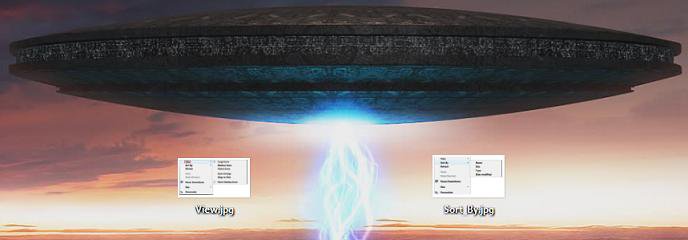
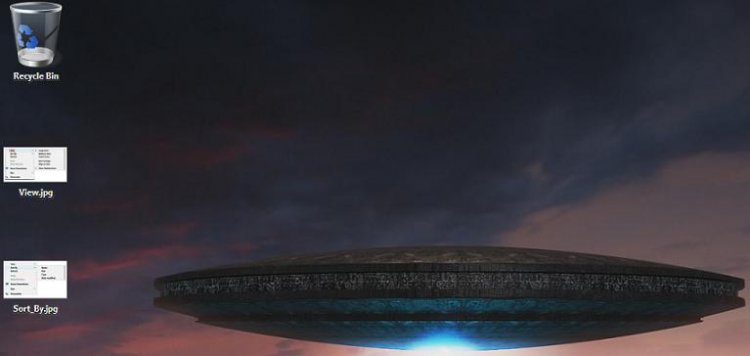
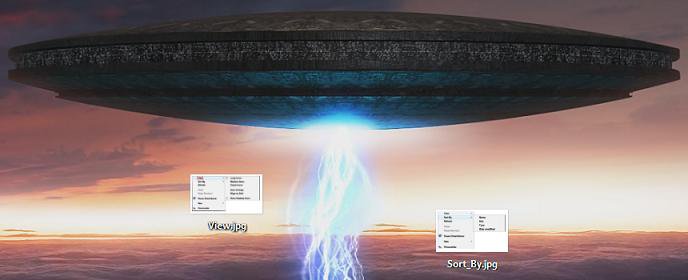
EXAMPLE: View Before (Everything Unchecked), Align to Grid, and Auto Arrange
Click the image to open in full size.

Click the image to open in full size.

Click the image to open in full size.


OPTION ONE:
Hide or Show All Desktop Icons
1. Right click on the desktop and click on View. (See screenshot below step 3)

2. To Hide All Desktop Icons -
A) Click on Show All Icons to uncheck it. (See screenshot below step 3)
3. To Show All Dekstop Icons -
A) Click on Show All Icons to check it.
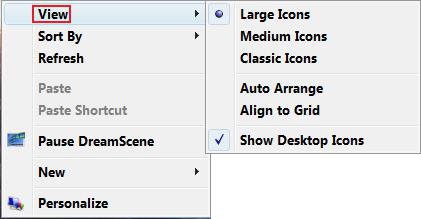
Name:  View.jpg
Views: 1374
Size:  15.4 KB


OPTION TWO:
Change the Desktop View Alignment Settings
Tip
  For desktop icon sizes, see: How to Change the Size of Desktop Icons in Vista
1. Right click on the desktop and click on View. (See screenshot below step 4)

2. To Have the Icons Stay Where Placed on the Desktop -
A) Click on Align to Grid and Auto Arrange to uncheck them. (See screenshot below step 4)
3. To Have the Icons Align to a Grid -
NOTE: The icons will still basically be left where placed on the Desktop, but they will be moved slightly to keep them aligned to a grid on the desktop. It keeps the icons from overlapping each other. (See the middle Example above)
A) Click on Align to Grid to check it. (See screenshot below step 4)
4. To Have the Icons Automatically Align -
NOTE: The icons will be automatically aligned starting at the upper left corner of the desktop to a grid. (See the bottom Example above)
A) Click on Auto Arrange to check it. (See sceenshot below)
Name:  View.jpg
Views: 1374
Size:  15.4 KB


OPTION THREE:
Change the Desktop Icons Sort By Order
NOTE
 
  • This will automatically align all of the icons starting at the upper left corner of the desktop according to what you select to sort them by below. (See bottom example at the top)
  • This will not set any View alignment settings in OPTION ONE above.
1. Right click on the desktop and click on Sort By. (See screenshot below )
2. Click on a option to change the icons to be sorted by that order option.
NOTE: These are the sort by Name, Size, Type, and Date modified options.
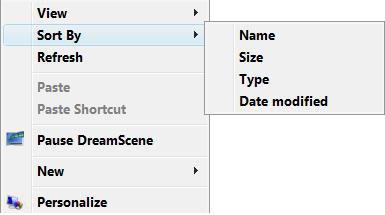
Name:  Sort_By.jpg
Views: 1371
Size:  10.5 KB
That's it,
Shawn

Published by
Brink's Avatar
Administrator
Join Date: Apr 2007
Location: Texas, USA
Posts: 16,477
Rep Power: 150
Brink has a reputation beyond reputeBrink has a reputation beyond reputeBrink has a reputation beyond reputeBrink has a reputation beyond reputeBrink has a reputation beyond reputeBrink has a reputation beyond reputeBrink has a reputation beyond reputeBrink has a reputation beyond reputeBrink has a reputation beyond reputeBrink has a reputation beyond reputeBrink has a reputation beyond repute

Tutorial Tools
Show Printable Version Show Printable Version
Email this Page Email this Page

Applies to
All Vista Versions
64 Bit & 32 Bit

Old 06-19-2008  
Karl Snooks
Junior Member


Join Date: May 2008
Vista Ultimate
 
Rep Power: 7
Karl Snooks has a spectacular aura aboutKarl Snooks has a spectacular aura aboutKarl Snooks has a spectacular aura about
  Karl Snooks is offline

Re: Desktop Icons - View and Sort By

Shawn,
What have I done? Somehow I've shot myself in the foot and, despite being logged in, no .jpgs from the tutorial are visible. Just get that placeholder giving name, views, and size. Yes, I clicked and dbl-clkd on the placeholer to no avail.
karl

My System SpecsSystem Spec
Old 06-19-2008  
Brink's Avatar
Brink
Administrator


Join Date: Apr 2007
Vista x64 Ultimate SP1
Texas, USA
 
Rep Power: 150
Brink has a reputation beyond reputeBrink has a reputation beyond reputeBrink has a reputation beyond reputeBrink has a reputation beyond reputeBrink has a reputation beyond reputeBrink has a reputation beyond reputeBrink has a reputation beyond reputeBrink has a reputation beyond reputeBrink has a reputation beyond reputeBrink has a reputation beyond reputeBrink has a reputation beyond repute
  Brink is offline

Re: Desktop Icons - View and Sort By

LOL, it's ok Karl.

You might not have checked the Rember me box at log in, or you do not have cookies enabled or enabled for this website (Sites button in Privacy).

Hope this helps,
Shawn
My System SpecsSystem Spec
Old 06-19-2008  
Karl Snooks
Junior Member


Join Date: May 2008
Vista Ultimate
 
Rep Power: 7
Karl Snooks has a spectacular aura aboutKarl Snooks has a spectacular aura aboutKarl Snooks has a spectacular aura about
  Karl Snooks is offline

Re: Desktop Icons - View and Sort By

Shawn,
Right again. I'd blocked all cookies. Didn't realize that the vistax64 sites required cookies to be enabled. I'm sure that when I joined that was emblazed in reb and big letters. Must be old timer's disease.
Thanks and sorry for inconvenience.
karl
My System SpecsSystem Spec
Old 06-19-2008  
Brink's Avatar
Brink
Administrator


Join Date: Apr 2007
Vista x64 Ultimate SP1
Texas, USA
 
Rep Power: 150
Brink has a reputation beyond reputeBrink has a reputation beyond reputeBrink has a reputation beyond reputeBrink has a reputation beyond reputeBrink has a reputation beyond reputeBrink has a reputation beyond reputeBrink has a reputation beyond reputeBrink has a reputation beyond reputeBrink has a reputation beyond reputeBrink has a reputation beyond reputeBrink has a reputation beyond repute
  Brink is offline

Re: Desktop Icons - View and Sort By

No problem Karl. I'm happy to hear that you got it sorted out.

Shawn
My System SpecsSystem Spec
Old 2 Days Ago  
voltsb333
Newbie


Join Date: Jun 2008
Vista Ultimate x64
Baguio City
 
Rep Power: 3
voltsb333 is on a distinguished road
  voltsb333 is offline

Re: Desktop Icons - View and Sort By

hi Brink, i had problems with my folder settings and tried method 2 in this thread http://www.vistax64.com/tutorials/70819-windows-explorer-folder-view-settings.html

after doing so, my folders are now ok but it somehow messed my icons in my desktop, it keeps on aligning them automatically to the left whenever i refresh my desktop, even if i unchecked auto arrange and auto align

any suggestions?

thanks.
My System SpecsSystem Spec
Old 2 Days Ago  
Brink's Avatar
Brink
Administrator


Join Date: Apr 2007
Vista x64 Ultimate SP1
Texas, USA
 
Rep Power: 150
Brink has a reputation beyond reputeBrink has a reputation beyond reputeBrink has a reputation beyond reputeBrink has a reputation beyond reputeBrink has a reputation beyond reputeBrink has a reputation beyond reputeBrink has a reputation beyond reputeBrink has a reputation beyond reputeBrink has a reputation beyond reputeBrink has a reputation beyond reputeBrink has a reputation beyond repute
  Brink is offline

Re: Desktop Icons - View and Sort By

Hi Voltsb333,

This is strange. I have not seen that happen as a result of that tutorial before.

Have you tried restarting the computer again to see if that may reset it?
My System SpecsSystem Spec
Old 2 Days Ago  
voltsb333
Newbie


Join Date: Jun 2008
Vista Ultimate x64
Baguio City
 
Rep Power: 3
voltsb333 is on a distinguished road
  voltsb333 is offline

Re: Desktop Icons - View and Sort By

yep, i thought it was strange too...

anyway i used system restore to get back the icons but now the "remember folder settings" does'nt work anymore, my windows explorer window goes to it's default size everytime.

i'll try the other manual method in your folder's tutorial and will update soon.

thanks.

***UPDATE: everythings ok now, i used the manual method

Last edited by voltsb333; 2 Days Ago at 01:46 AM.
My System SpecsSystem Spec
Old 2 Days Ago  
Brink's Avatar
Brink
Administrator


Join Date: Apr 2007
Vista x64 Ultimate SP1
Texas, USA
 
Rep Power: 150
Brink has a reputation beyond reputeBrink has a reputation beyond reputeBrink has a reputation beyond reputeBrink has a reputation beyond reputeBrink has a reputation beyond reputeBrink has a reputation beyond reputeBrink has a reputation beyond reputeBrink has a reputation beyond reputeBrink has a reputation beyond reputeBrink has a reputation beyond reputeBrink has a reputation beyond repute
  Brink is offline

Re: Desktop Icons - View and Sort By

Voltsb333, I'm happy to hear that it is working for you now.

Now that is strange. The REG download does exactly the same as the manual method, but automatically. Did you do anything different or skip any parts while doing the manual method?

Thank you for posting your results.

Shawn
My System SpecsSystem Spec
Comment

Tags
appearance & personalize, desktop, icon

Tutorial Tools
Display Modes


Update your Vista Drivers Update Your Drivers Now!!

Similar Threads
Tutorial Tutorial Starter Category Comments Last Post
Desktop icons sort Tony Vella Vista General 5 02-07-2008 02:18 AM
Folder view: making sort criteria appear in the menu permanently Sathyaish Vista General 0 01-14-2008 10:05 PM
Re: Can I sort within a sort, in folder view (eg., Name, Date) Baffin Live Mail 0 12-09-2007 02:44 PM
desktop icons covered by unknown program icons maskintoojay Vista General 4 10-24-2007 01:19 AM
Remove desktop sort? Ben R. Vista General 2 12-16-2006 08:50 AM


Vistax64.com is an independent web site and has not been authorized,
sponsored, or otherwise approved by Microsoft Corporation.
"Windows Vista", the Start Orb, and related materials are trademarks of Microsoft Corp.
© Designer Media 2005-2008
Tutorial powered by GARS 2.1.8m ©2005-2006
Page generated in 0.36749 seconds with 15 queries