
How to Fix the Error "The User Profile Service failed the logon. User profile cannot be loaded."
 Information
When you log on to Vista or Windows 7 using a temporary profile (user account), you receive this error message:
The User Profile Service failed the logon. User profile cannot be loaded.
For more information, see:
Error message when you log on to a Windows Vista-based or Windows 7-based computer by using a temporary profile: "The User Profile Service failed the logon. User profile cannot be loaded"
The User Profile Service failed the logon. User profile cannot be loaded.
For more information, see:
Error message when you log on to a Windows Vista-based or Windows 7-based computer by using a temporary profile: "The User Profile Service failed the logon. User profile cannot be loaded"
 Note
Note CAUSE:
The jury is still out on the exact cause, but so far :
The jury is still out on the exact cause, but so far :
- This issue may occur if the user profile was manually deleted by using the command prompt or Windows Explorer by a user or by some program. A profile that is manually deleted does not remove the security identifier (SID) from the user profile list in the registry. Since the SID is still present, Vista will still try to load the profile by using the ProfileImagePath that points to a nonexistent path. Therefore, the profile cannot be loaded.
- This can also be a issue with the user profile entering into a backup state.
- Manually renaming the C:\Users\(User Name) user profile folder.
 Warning
If you have this error message below instead, then see: How to Fix the Error "Your user profile was not loaded correctly! You have been logged on with a temporary profile." in Vista
Your user profile was not loaded correctly! You have been logged on with a temporary profile.
Changes you make to this profile will be lost when you log off. Please see the event log for details or contact your administrator.
Your user profile was not loaded correctly! You have been logged on with a temporary profile.
Changes you make to this profile will be lost when you log off. Please see the event log for details or contact your administrator.
 Tip
TipIf the steps in the tutorial below do not help or you wish to try this first, then:
- You could also try doing a System Restore at boot using a restore point dated before the this error to see if it may be able to fix this.
- If you do not want to repair the user profile, you can delete it and create a new user account in OPTION TWO. If this still does not work for you, then you will be left with doing a clean install for your Upgrade or Full version of Vista or Windows 7.
- Try the option at this link: Rob Brooks-Bilson's Blog: Fix for Vista's: The User Profile Service service failed the logon. User profile cannot be loaded
 STEP ONE
  Warning
You must be logged on to an administrator account using either step 1 or 2 below before you can move on to do either the OPTION ONE or OPTION TWO sections.
1. To Log on to another Administrator account.
NOTE: If you do not have another Administrator account, then proceed to step 2.
A) Go to OPTION ONE or OPTION TWO.
OR
2. To Boot into Safe Mode and Use the built-in Administrator account
NOTE: You may not need to enable the built-in Administrator account. If this was the only normal administrator account you had, then Safe Mode should automatically boot into the built-in Administrator account.
TipIf you cannot boot into Windows and do not have a Windows installation DVD, then you can create and use the boot disc below to boot into Safe Mode with instead.
Tip
Windows 7: (Option Two at link)
Vista: (Option One at link)
B) If Safe Mode did not boot into the built-in Administrator account, then enable the built-in Administrator account. If it did, then go to step 2D.
C) Log off in Safe Mode, and then log on to the built-in Administrator account to logon with that account in Safe Mode.
D) Go to OPTION ONE or OPTION TWO.
OPTION ONE 1. Open the Start menu.
2. In the white line (Start Search) area, type regedit and press Enter.
3. If prompted by UAC, either click on Continue (Vista) or Yes (Windows 7).
4. In regedit, go to: (See screenshot below step 5)
Code:
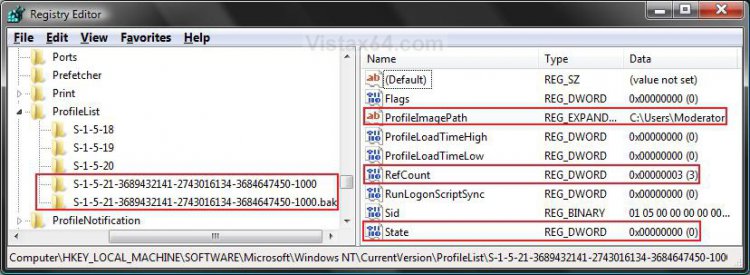
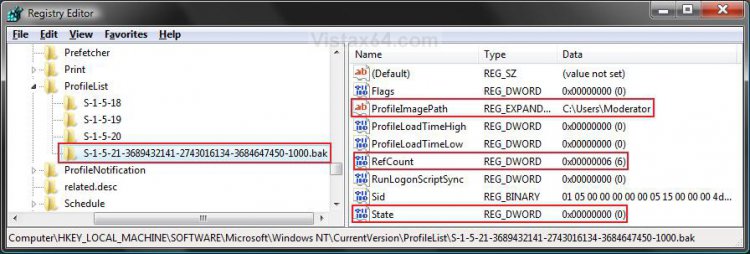
HKEY_LOCAL_MACHINE\SOFTWARE\Microsoft\Windows NT\CurrentVersion\ProfileList5. In the left pane, look for the S-1-5..... folder (SID key) with the long number that has .bak at the end of the numbers.
(See screenshots below steps 6A and 7B)
NOTE:
A) In the right pane, look at the ProfileImagePath to verify that this is the user account profile that has the error.
B) You may have another S-1-5..... folder (SID key) above it with the exact same number without the .bak at the end of it.
6. If you have Two S-1-5..... folders (SID key) with the same Number
NOTE: This is if you have two S-1-5..... folders (SID key) with the exact same numbers, but the second (below) one has the .bak at the end of the numbers.
A) In the left pane, right click on the first (top) S-1-5..... folder (SID key) that does not have .bak at the end of the numbers and click Rename. (See screenshot below)
B) Add .bk to the end of the numbers. (See screenshot below)
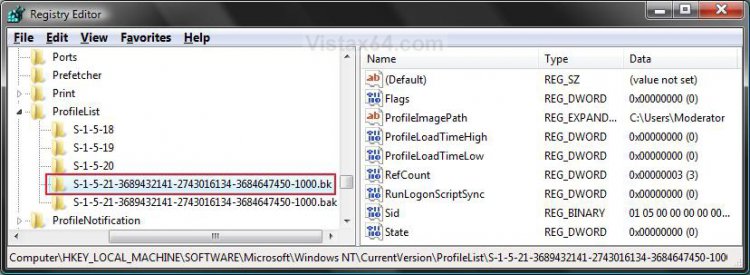
C) In the left pane, right click on the second S-1-5..... folder (SID key) with .bak at the end of the numbers and click Rename. (See screenshot above)
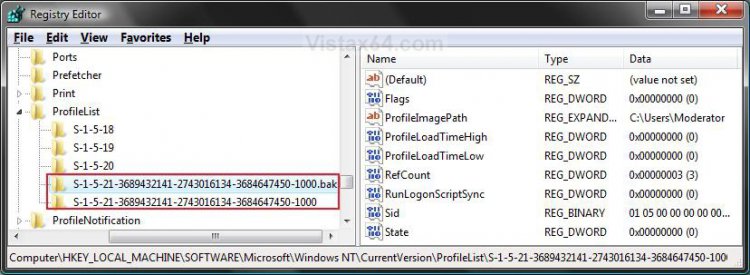
D) Remove only .bak from the end of the numbers and press Enter. (See screenshot below)
E) Now go back and Rename the first one with .bk to .bak now at the end of the numbers and press Enter.
F) Go to step 8.
7. If you have Only One S-1-5..... Folder (SID key) with .bak
NOTE: This is if you only have one S-1-5..... folder (SID key) for your user account with .bak at the end of the numbers.
A) In the left pane, right click on the S-1-5..... folder (SID key) with .bak at the end of the numbers and click Rename. (See screenshot below)
B) Remove only .bak at the end of the numbers and press Enter. (See screenshot below and below step 10)
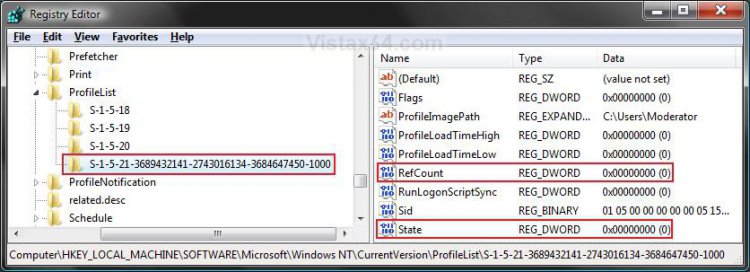
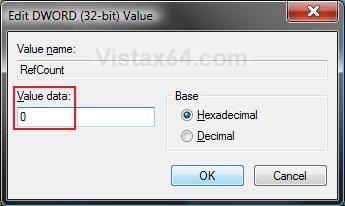
8. In the right pane of the one without .bak now, right click on RefCount and click on Modify. (See screenshot below step 10)
NOTE: If you do not have RefCount, then right click on a empty space in the right pane and click New and DWORD (32 bit) Value, then type RefCount and press Enter. This value for this entry will reset and return back to the original value after you have restarted the computer and logged on to the account.
A) Type 0 (number) and click on OK. (See screenshot below)
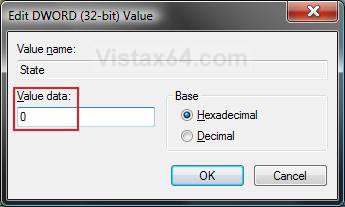
9. In the right pane of the one without .bak now, right click on State and click on Modify. (See screenshot below step 10)
NOTE: This value for this entry will reset and return back to the original value after you have restarted the computer and logged on to the account.
A) Type 0 (number) and click on OK. (See screenshot below)
10. The registry will now look like this for the one without .bak now. (See screenshot below)
11. Close regedit.
12. Restart the computer.
13. See if you can logon now.
NOTE: If this still does not help, then either try OPTION TWO below or see the yellow TIP box at the top of the tutorial.
OPTION TWO WarningYou can do this option if you do not care about losing the user account and the contents in the user folders. Your programs will still be installed, but you will need to create new shortcuts for them afterwards.
1. Delete the User account profile that this error is for.
2. Open the Start menu.
3. In the white line (Start Search) area, type regedit and press Enter.
4. If prompted by UAC, click on Continue (Vista) or Yes (Windows 7).
5. In regedit, go to: (See screenshot below step 7)
Code:
HKEY_LOCAL_MACHINE\SOFTWARE\Microsoft\Windows NT\CurrentVersion\ProfileList6. In the left pane, click on one of the S-1-5..... folders (SID key) with the long number in it.
NOTE: It may have .bak at the end of it.
A) In the right pane, look at the ProfileImagePath to see if this is the same user account that you deleted in step 1 above.
B) Repeat step 6 until you find the one that you deleted in step 1 above.
NOTE: If the user account is not here, then it has already been removed when deleted in step 1. Go to step 9.
7. To Backup the Registry SID Key
WARNING: You should backup this SID key to be safe in case you delete the wrong one in step 8 below.
A) Right click on the SID key, and click on Export.
B) Type in a name and save the REG file to a safe location.
NOTE: This is your backup. To Restore the Backup, right click on the REG backup file and click on Merge.
C) Continue on to step 8.
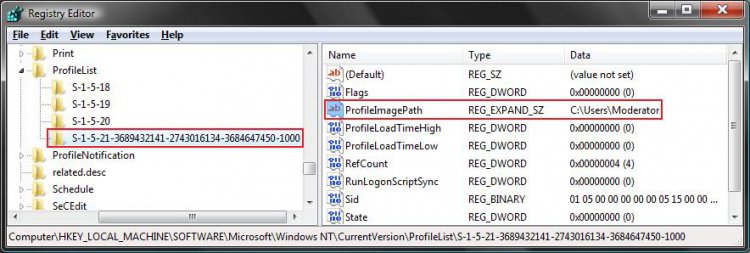
8. To Delete the Registry SID Key
A) Right click on the SID key, and click on Delete. (See screenshot above)
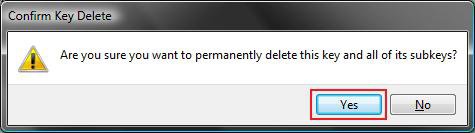
B) Click on Yes to confirm deletion. (See screenshot below)
9. Close regedit.
10. Now, just create a new normal Administrator account.
NOTE: See: How to Create a New User Account in Vista
11. Restart the computer, and log on to your new account.
NOTE: If this still does not help, then either try OPTION ONE above or see the yellow TIP box at the top of the tutorial.
That's it,Shawn
Related Tutorials
- How To Perform a Repair Installation For Vista
- How to Do a System Restore in Vista
- How to Do a Startup Repair in Vista
- How to Do a Clean Install of Vista with a Upgrade Version
- How to Do a Clean Install with a Full Version of Vista
- How to Fix the Error "Your user profile was not loaded correctly! You have been logged on with a temporary profile."
- How to Change the User Folder Name of a User Profile in Windows 7
- How to Fix Windows 7 Logon Screen Showing Only "Other User" and Last Logged On User Icon
Attachments

Last edited by a moderator:


