
How to Log Off a Local User in Vista and Windows 7
 Information
This will show you how to select and log off a user connected locally to your computer from within your adminsitrator account using Task Manager.
 Note
NoteFor example, this would be another user account on your computer logged on by switch user.
 Warning
You must be an administrator, or apply the administrator password to do this.
Here's How:
1. Open Task Manager.
NOTE: Press CTRL+SHIFT+ESC, or right click on the taskbar and click on Task Manager.
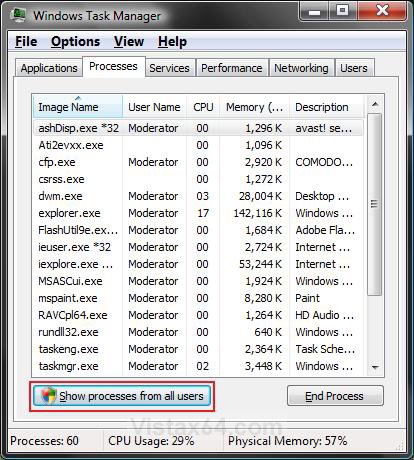
2. Click on the Process tab. (see screenshot below step 5)
3. Click on Show processes from all users. (see screenshot below)
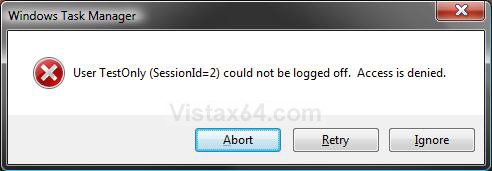
Note This elevates the Task Manager. If you do not this, then you will receive this error when you try to log off the user: User username (SessionId=2) could not be logged off. Access is denied. (see screenshot below)
Note
4. If prompted by UAC, then click on Continue (Vista) or Yes (Windows 7).
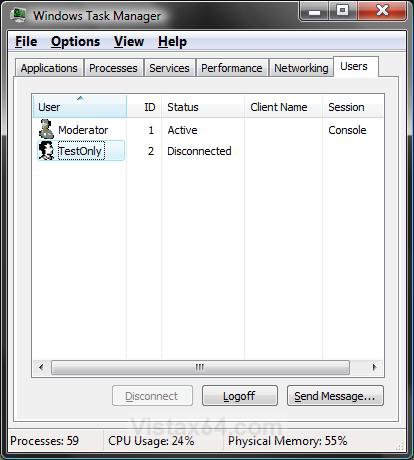
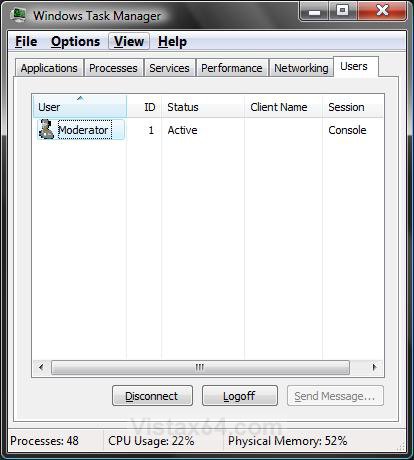
5. Click on the Users tab. (see screenshot below step 3)
NOTE: The Users tab is unavailable on computers that are members of a network domain.
6. Click on a user that you want to log off to select it. (see screenshot below)
7. Click on the Logoff button.
NOTE: This button will be grayed out if the listed user is connected by a network instead of only being connected locally (EX: Switch User).
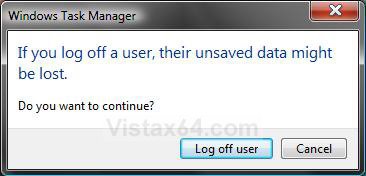
8. Click on Log off user to confirm. (see screenshot below)
WARNING: If the user is working on something when you log them off, they may lose it.
9. Task Manager will now no longer have the user listed since they have been logged off. (see screenshot below)
That's it,
Shawn
Related Tutorials
- How to Enable or Disable Task Manager in Vista
- How to Open and Close a Application and Process in Vista Task Manager
- How to Switch Between Regular and Small Footprint Mode in Vista Task Manager
- How to Use the Resource Monitor in Vista
- How to Disconnect a Network User Connection in Vista
- How to Add or Remove Log Off from the Start Menu in Vista
- How to Create a Log Off Shortcut in Vista
- How to Add or Remove Log Off from the Ctrl+Alt+Delete Screen in Vista
- How to Shutdown, Restart, Switch User, Log Off, Sleep, or Lock Vista from the Keyboard
- How to Create a Switch User Desktop Shortcut in Vista
- How to Turn On or Off Vista Task Manager Always On Top
- How to Create a Elevated Vista Task Manager Shortcut
- How to Send a Message to Another User in Vista and Windows 7
Attachments

Last edited by a moderator: