Vista Forums
Vista Forums Home Join Vista Forums Donate Vista Tutorials Tags

Welcome to Vista Forums we are your forum to discuss Windows Vista x64 and x86 systems. Whether you need help or just want to post an idea you have on Vista, this is the forum for you.
Register at Vista forums...the world biggest Windows Vista resource Join Vista Forums

Go Back   Vista Forums > Vista Forums > Tutorials

Search Context Menu Item - Restore After Vista SP1

Poll: Did this Tutorial help and work for you?
Poll Options
Did this Tutorial help and work for you?

Comment
 
Tutorial Tools Display Modes
<!-- google_ad_section_start -->Search Context Menu Item - Restore After Vista SP1<!-- google_ad_section_end -->
Search Context Menu Item - Restore After Vista SP1
How to Restore the Search Context Menu Item after Installing the Vista SP1
Published by Brink
02-25-2008

How to Restore the Search Context Menu Item after Installing the Vista SP1

INFO: When you install the Vista SP1, it removes Search from the Context (right click) menu of the Start menu button and Folders. This will show you how to restore the Search context menu item with the Vista SP1 still installed. For more information on what the SP1 changes, see: Microsoft Help and Support: KB941946 and Windows Vista Blog: Experiencing Windows Vista Service Pack 1 Beta

NOTE: The Search button on the right dark side in the Start menu has also been removed by the Vista SP1. This will show you how to restore it: How to Restore the Start Menu Button after Installing the Vista SP1

RELATED LINKS:
1. How to Open and Change Search Options in Vista

2. How to Use Advanced Search Options in Vista

3. How to Enable or Disable Search Index in Vista

4. How to Use the Indexing Options in Vista

5. How to Use the Find Window to Find Text on a Page

6. How to Change the Internet Explorer 7 Search Box Settings in Vista

7. How to Create a Search Desktop Shortcut on Vista

8. How to Expand the Context (Shortcuts) Menu in Vista

9. How to Customize the Context Menu for the Start Menu in Vista

10. How to Customize the Send To Context Menu in Vista

11. How to Customize the Recycle Bin Context Menu in Vista

12. How to Add Encrypt and Decrypt to the Context Menu in Vista

13. How to Add and Remove a New Menu Item in Vista

14. How to Add Take Ownership to the Context Menu in Vista

15. How to Add Flip 3D to the Context Menu in Vista

16. How to Restore or Remove New from the Context Menu in Vista

17. How to Enable or Disable the Context Menu in Vista

18. How to Remove or Show Drive Letters in the Vista Send To Context Menu

19. How to Restore the Start Menu Search Button after Installing the Vista SP1


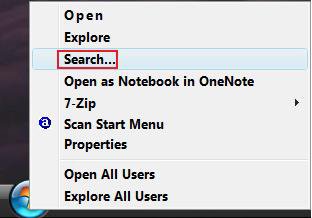
EXAMPLE: Start Button Context Menu with SP1 and Restored
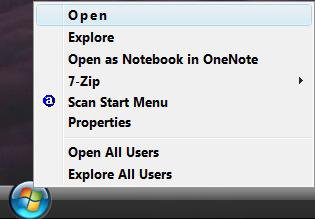
Start_menu_SP1_installed.jpgStart_menu_Restored.jpg

EXAMPLE: Folder Context Menu with SP1 and Restored
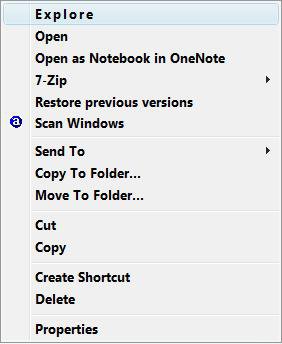
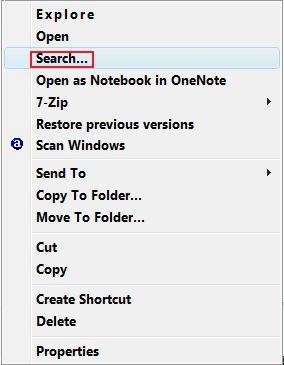
Folder_SP1_installed.jpgFolder_Restored.jpg

EXAMPLE: Drive Context Menu with SP1 and Restored
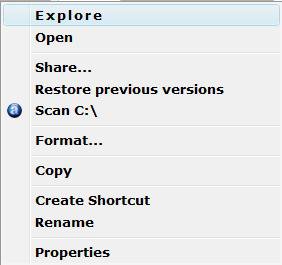
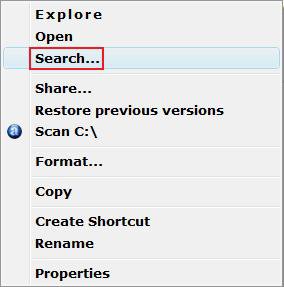
Drive_SP1_Installed.jpgDrive_Restored.jpg


OPTION ONE:
Through a Download:

1. To Remove the Search Context Menu Item -
A) Remove_ContextMenu_Search.reg < Click To Download

2. To Restore the Search Context Menu Item -
A) Restore_ContextMenu_Search.reg < Click To Download

3. Click on Save, and save the .reg file to the Desktop.
4. Right click the .reg (On Desktop) file and click Merge.
5. Click on the Run button for Security Warning pop-up.
6. Click on Continue (UAC), Yes, and then OK when prompted.
7. You may need to Logoff and logon, or restart the computer to apply the changes.
8. When done, you can delete the .reg file (On Desktop).


OPTION TWO:
The Manual Way:
1. Open the Start Menu.
2. In the white line (Start Search) area, type regedit and press Enter.
3. Click the Continue button for the UAC prompt.

FOR FILES AND FOLDERS -
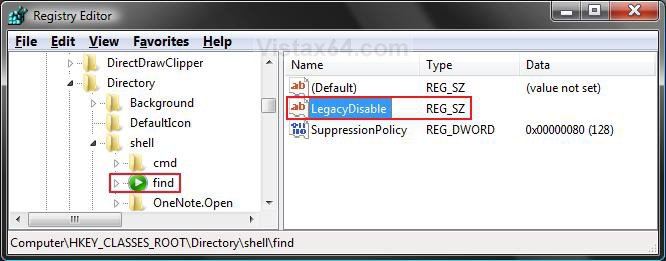
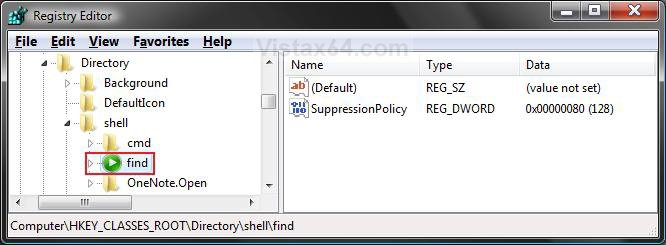
4. In regedit, go to: (See screenshot below)
HKEY_CLASSES_ROOT\Directory\shell\find

REG.jpg

5. To Restore the Search Context Menu Item -
A) In the right pane, right click on LegacyDisable and click Delete. (See screenshot above)
B) Click Yes to confirm deletion. (See screenshot below)

Yes_Confirm.jpg

C) The registry will now look like this. (See screenshot below)
D) Go to step 7.

REG_After.jpg

6. To Remove the Search Context Menu Item -
A) In the right pane, right click on a empty area and click New and String Value. (See screenshot above)
B) Type LegacyDisable and press Enter. (See screenshot below step 4)

FOR DRIVES -
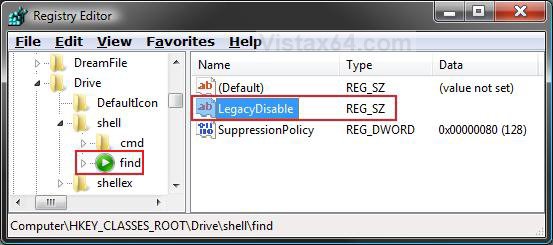
7. In regedit, go to: (See screenshot below)
HKEY_CLASSES_ROOT\Drive\shell\find

Reg2.jpg

8. To Restore the Search Context Menu Item -
A) In the right pane, right click on LegacyDisable and click Delete. (See screenshot above)
B) Click Yes to confirm deletion. (See screenshot below)

Yes_Confirm.jpg

C) The registry will now look like this. (See screenshot below)
D) Go to step 10.

Reg2_After.jpg

9. To Remove the Search Context Menu Item -
A) In the right pane, right click on a empty area and click New and String Value. (See screenshot above)
B) Type LegacyDisable and press Enter. (See screenshot below step 4)

10. Close regedit.
11. You may need to Logoff and logon, or restart the computer to apply the changes.


That's it,
Shawn
Published by
Brink's Avatar
Administrator
Join Date: Apr 2007
Location: Texas, USA
Posts: 12,904
Rep Power: 200
Brink has a reputation beyond reputeBrink has a reputation beyond reputeBrink has a reputation beyond reputeBrink has a reputation beyond reputeBrink has a reputation beyond reputeBrink has a reputation beyond reputeBrink has a reputation beyond reputeBrink has a reputation beyond reputeBrink has a reputation beyond reputeBrink has a reputation beyond reputeBrink has a reputation beyond repute

Tutorial Tools

Applies to
All Vista Versions
64 Bit & 32 Bit

Rating
Skill Level
20%20%20%
1

Page copy protected against web site content infringement by Copyscape

Old 05-22-2008  
Bob-C
Newbie
Bob-C is on a distinguished road
 
Join Date: May 2008
Vista Home Premium 32bit
Posts: 3

Re: Search Context Menu Item - Restore After Vista SP1

Shawn,

If I right click on a drive, I still don't see the Search item. Only on subfolders. For example, I want to do a Search on everything on an SD card E: by it is not there on a right click. I have to go down to a subfolder. Know of any way to do this as well?
Bob-C is offline   Reply With Quote
Old 05-22-2008  
Brink
Administrator
Brink has a reputation beyond reputeBrink has a reputation beyond reputeBrink has a reputation beyond reputeBrink has a reputation beyond reputeBrink has a reputation beyond reputeBrink has a reputation beyond reputeBrink has a reputation beyond reputeBrink has a reputation beyond reputeBrink has a reputation beyond reputeBrink has a reputation beyond reputeBrink has a reputation beyond repute
 
Brink's Avatar
 
Join Date: Apr 2007
Vista x64 Ultimate SP1
Posts: 12,904

Location: Texas, USA
Re: Search Context Menu Item - Restore After Vista SP1

Hi Bob-C,

This will not add Search to the context menu for a drive, only the Start menu button and folders.

You can use Advanced Search to do what you want. Just select the E:\ drive in the Location drop down menu to search from. This tutorial will show you how to if needed.

Advanced Search

Update:
Search is now included for the Drive context menu in this tutorial.

Hope this helps,
Shawn

There are no dumb questions, just the people that do not ask them.
Please post feedback to help others.
Brink is offline   Reply With Quote
Old 2 Weeks Ago  
Karl Snooks
Junior Member
Karl Snooks has a spectacular aura aboutKarl Snooks has a spectacular aura aboutKarl Snooks has a spectacular aura about
 
Join Date: May 2008
Vista Ultimate
Posts: 10

Re: Search Context Menu Item - Restore After Vista SP1

Shawn,
Many thanks. I find the context menu search item to be a real time saver and didn't know that this aid could be restored.
karl
Karl Snooks is offline   Reply With Quote
Old 2 Weeks Ago  
Brink
Administrator
Brink has a reputation beyond reputeBrink has a reputation beyond reputeBrink has a reputation beyond reputeBrink has a reputation beyond reputeBrink has a reputation beyond reputeBrink has a reputation beyond reputeBrink has a reputation beyond reputeBrink has a reputation beyond reputeBrink has a reputation beyond reputeBrink has a reputation beyond reputeBrink has a reputation beyond repute
 
Brink's Avatar
 
Join Date: Apr 2007
Vista x64 Ultimate SP1
Posts: 12,904

Location: Texas, USA
Re: Search Context Menu Item - Restore After Vista SP1

Your welcome Karl.

Shawn

There are no dumb questions, just the people that do not ask them.
Please post feedback to help others.
Brink is offline   Reply With Quote
 
Comment

Tags
menu, context, search

Tutorial Tools
Display Modes


Vistax64.com is an independent web site and has not been authorized,
sponsored, or otherwise approved by Microsoft Corporation.
"Windows Vista", the Start Orb, and related materials are trademarks of Microsoft Corp.
© Vistax64.com 2005-2008
Tutorial powered by GARS 2.1.8m ©2005-2006

1 2 3 4 5 6 7 8 9 10 11 12 13 14 15 16 17 18 19 20 21 22 23 24 25 26 27 28 29 30 31 32 33 34 35 36 37 38 39 40 41 42 43 44 45 46 47 48