Windows Vista Forums
Vista Forums Home Join Vista Forums Windows 7 Forum Vista Tutorials Tags
Welcome to Windows Vista Forums. Our forum is dedicated to helping you find solutions with any problems, errors or issues you are experiencing with Windows Vista. The Vista forum also covers news and updates and has an extensive Windows Vista tutorial section that covers a wide range of tips and tricks.

Go Back   Vista Forums > Vista Forums > Tutorials

Vista - Command Prompt Window Here

Comment
 

Command Prompt Window Here

Published by Brink
03-13-2008

How to Use Open Command Prompt Window Here in Vista

Information
  This will show you how to have a command prompt window open at any drive, file, or folder location of your choice in Vista from their context menu. This will make it easier to perform a command task there instead of having to open a command prompt normally and manually type the folder location in it using the CD\ command.
NOTE
 
  • This is not a elevated command prompt.
  • This option is not available for the folder tree in the left Navigation Pane Folders section.
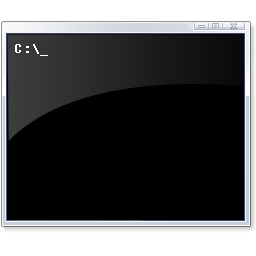
RELATED LINKS:EXAMPLE: Open Command Prompt Window Here at C:\Program Files

command_prompt.jpg

OPTION ONE:
Using Shift + Right Click
NOTE
  This is the default method in Vista.
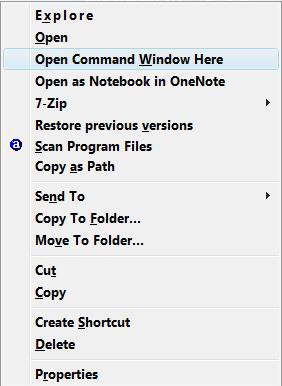
1. Navigate to a folder of your choice in a Windows Explorer window.

2. Hold down the Shift key and right click on the folder.

3. Click on Open Command Window Here. (See screenshot below)
Name:  Shift+Right_Click.jpg
Views: 4149
Size:  18.8 KB

OPTION TWO:
Using a Single Right Click Only
NOTE
  This will show you how to have Open Command Window Here as soon as you right click on a drive, file, or folder without having to press the Shift key first. You will need to enable this option below first though.
1. To Remove Having to Press Shift -
A) Click on the download button below to download the
Remove_Shift_Command_Window_Here.reg file.

B) Go to step 3.


2. To Restore Having to Press Shift -
A) Click on the download button below to download the
Restore_Shift_Command_Window_Here.reg file.


3. Click on Save, and save the .reg file to the Desktop.

4. Right click on the .reg file(on Desktop) and click on Merge.

5. Click on the Run button in the Security Warning pop-up.

6. Click on Continue (UAC), Yes, and then OK when prompted.

7. When done, you can delete the .reg file (on Desktop).
That's it,
Shawn

Published by
Brink's Avatar
Administrator

Join Date: Apr 2007
Location: Texas, USA
Posts: 25,919
Rep Power: 150
Brink has a reputation beyond reputeBrink has a reputation beyond reputeBrink has a reputation beyond reputeBrink has a reputation beyond reputeBrink has a reputation beyond reputeBrink has a reputation beyond reputeBrink has a reputation beyond reputeBrink has a reputation beyond reputeBrink has a reputation beyond reputeBrink has a reputation beyond reputeBrink has a reputation beyond repute

Tutorial Tools

Applies to
All Vista Versions
64 Bit & 32 Bit

Old 03-13-2008  
ggbib


Vista Ultimate x64 SP1


Re: Command Prompt Window Here

I only get the option when the folder is in the right pane of explorer, but, nice one.

J

My System SpecsSystem Spec
Old 03-31-2008  
Brink


Vista x64 Ultimate SP2, Windows 7 Ultimate x64


Re: Command Prompt Window Here

Updated 3-31-08 to include Option Two to remove having to press Shift first.

Shawn
My System SpecsSystem Spec
Old 07-29-2008  
ckm1956


Ultimate x32


Re: Command Prompt Window Here

I'm running Vista Ultimate 23 SP1 and I haven't had any luck with this. I import the first file, but I still don't get the "Open ...Here" entry.

Any ideas?
My System SpecsSystem Spec
Old 07-29-2008  
Brink


Vista x64 Ultimate SP2, Windows 7 Ultimate x64


Re: Command Prompt Window Here

Hello Ckm1956, and welcome to Vista Forums.

Do you get it when you press and hold Shift, then right click on the file, drive, or folder?

I tested the download # 1 again and it seems to work fine for me.

Shawn
My System SpecsSystem Spec
Old 07-30-2008  
ckm1956


Ultimate x32


Re: Command Prompt Window Here

No I don't. Whatever is causing that is probably keeping the .reg solution form working.
My System SpecsSystem Spec
Old 07-30-2008  
Brink


Vista x64 Ultimate SP2, Windows 7 Ultimate x64


Re: Command Prompt Window Here

Try running a sfc /scannow command to see if it can find and fix any bad system files that may be the cause. This tutorial will show you how to if needed.

System Files - SFC Command


If it does not help, then merge this reg file below from my system to see if it can help. It is the default settings in the registry for the command file.

** REMOVED ** < Click to download

It is now included in the tutorial download.

Hope this helps,
Shawn
My System SpecsSystem Spec
Old 07-31-2008  
ckm1956


Ultimate x32


Re: Command Prompt Window Here

SFC didn't find any problems.

Restoring the Registry defaults enabled the Shift-Open Command Here option.

I was then able to use the .reg file to remove the Shift requirement.

Thanks Shawn!
My System SpecsSystem Spec
Old 07-31-2008  
Brink


Vista x64 Ultimate SP2, Windows 7 Ultimate x64


Re: Command Prompt Window Here

Your welcome ckm1956. I'm happy to hear that it working for you now. Thank you for posting back with your results.

Shawn
My System SpecsSystem Spec
Comment

Tutorial Tools


Similar Threads
Tutorial Category
Solved Make a command prompt run a command as soon as it opens? General Discussion
No command prompt Vista General
Help please regarding Command Prompt Vista General
Command prompt "COPY" command not working in brand new Windows Vis Vista file management
Re: Cannot drag and drop file onto command prompt window Vista General


Vista Forums is an independent web site and has not been authorized,
sponsored, or otherwise approved by Microsoft Corporation.
"Windows Vista", the Start Orb, and related materials are trademarks of Microsoft Corp.
© Designer Media Ltd
Tutorial powered by GARS 2.1.8m ©2005-2006

1 2 3 4 5 6 7 8 9 10 11 12 13 14 15 16 17 18 19 20 21 22 23 24 25 26 27 28 29 30 31 32 33 34 35 36 37 38 39 40 41 42 43 44 45 46