
How to Restore or Remove New from the Context Menu in Vista and Windows 7
 Information
This will show you how to restore or remove New from the context menu when you right click on the Desktop or in Windows Explorer. By default, New is in the context menu.
You will need to be logged in as an administrator to be able to do this tutorial.
For more information, see: Microsoft Help and Support: KB180257
You will need to be logged in as an administrator to be able to do this tutorial.
For more information, see: Microsoft Help and Support: KB180257
 Tip
TipIf you are missing any of the default menu items in the New context menu, then see:
How to Restore Missing Default New Context Menu Items in Vista
or
How to Remove and Restore the Default Windows 7 New Context Menu Items
How to Restore Missing Default New Context Menu Items in Vista
or
How to Remove and Restore the Default Windows 7 New Context Menu Items
EXAMPLE: Desktop Context Menu with "New" Restored and Removed
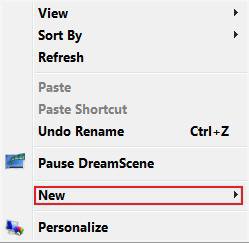
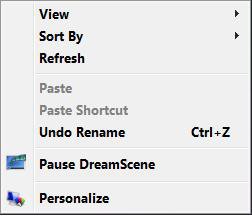
EXAMPLE: Windows Explorer Context Menu "with" New Restored and Removed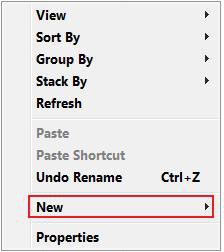
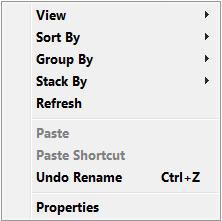
 OPTION ONE
1. To Remove New from the Context Menu
A) Click on the download button below to download the file below.
Remove_New.reg

B) Go to step 3.
2. To Restore New to the Context Menu
A) Click on the download button below to download the file below.
Restore_New.reg
3. Click on Save, and save the .reg file to the Desktop.
4. Right click on the downloaded .reg file and click on Merge.
5. Click on Run, Continue (UAC-Vista) or Yes (UAC-Windows 7), Yes, and then OK when prompted.
6. When done, you can delete the downloaded .reg file if you like.
OPTION TWO 1. Open the Start Menu.
2. In the white line (Start Search) area, type regedit and press Enter.
3. If prompted by UAC, then click on Continue (Vista) or Yes (Windows 7).
4. In regedit, go to: (See screenshot below and below step 5D)
NOTE: If New is not in the left pane, then right click on ContextMenuHandlers and click New and key. Type in New and press Enter.
Code:
HKEY_CLASSES_ROOT\Directory\Background\shellex\ContextMenuHandlers\New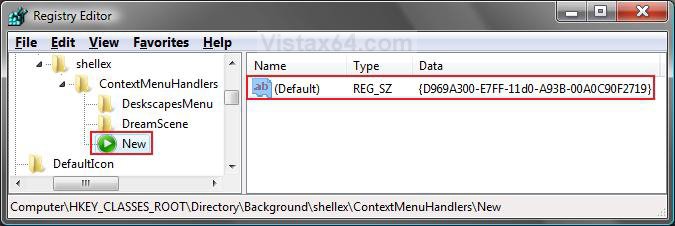
5. To Remove New from the Context Menu
A) In the right pane, right click on (Default) and click on Modify. (See screenshot above)
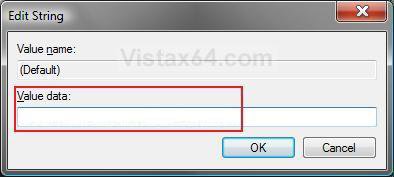
B) Clear the line and click on OK. (See screenshot below)
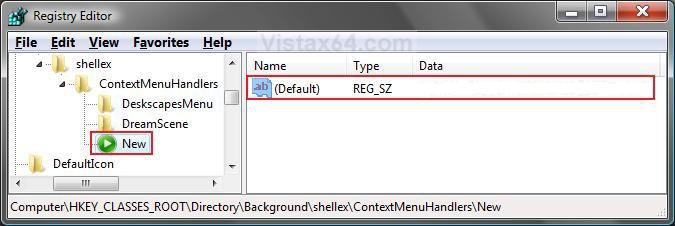
C) The registry will now look like this. (See screenshot below)
D) Go to step 7.
6. To Restore New to the Context Menu
A) In the right pane, right click on (Default) and click on Modify. (See screenshot above)
B) Type {D969A300-E7FF-11d0-A93B-00A0C90F2719} and press click on OK. (See screenshot below)
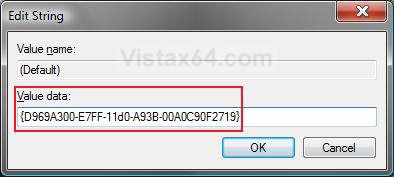
C) The registry will now look like this. (See screenshot below)
7. Close regedit.
That's it,Shawn
Related Tutorials
- How to Expand the Context (Shortcuts) Menu in Vista
- How to Customize the Send To Context Menu in Vista
- How to Add and Remove a New Menu Item in Vista
- How to Fix New Folder in Vista
- How to Enable or Disable the Context Menu in Vista
- How to Restore Missing Default New Context Menu Items in Vista
- How to Fix the New Shortcut Context Menu Item in Vista
- How to Add "New VBScript File" to the Context Menu in Windows
- How to Add "New Batch File" to the Context Menu in Windows
- How to Add "New Registry File" to the Context Menu in Windows
Attachments
Last edited:


