Windows Vista Forums

Audio Device - Enable Hidden Devices
  1. #31
    Brink's Avatar

    Administrator


    Join Date : Apr 2007
    Texas, USA
    Posts : 30,529
    64-bit Vista Ultimate SP2, Windows 7 Ultimate SP1, Windows 8 Enterprise
    Local Time: 05:11 AM
    usa us texas

      Thread Starter

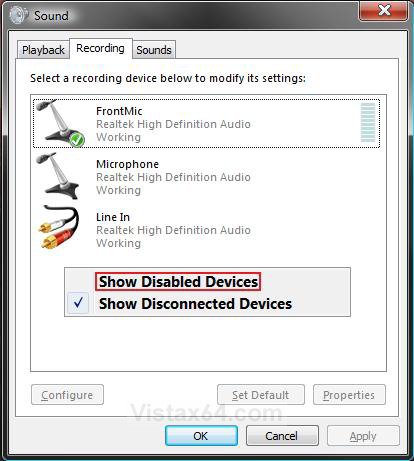
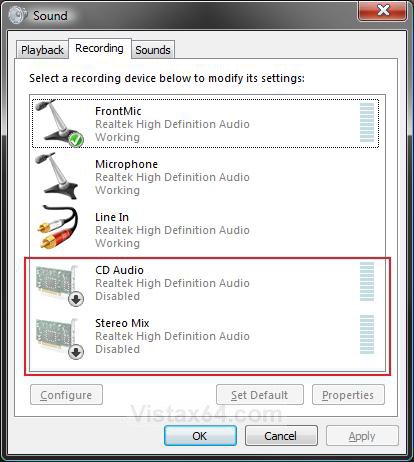
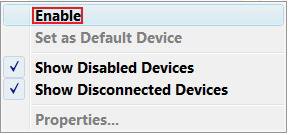
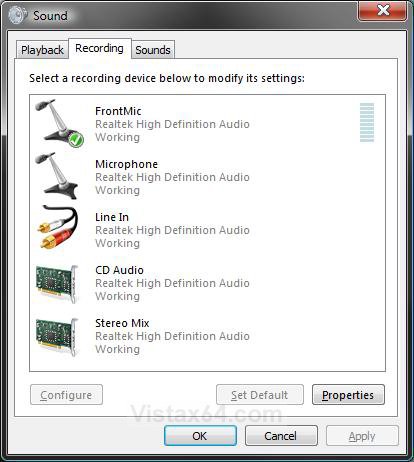
    Audio Device - Enable Hidden Devices

    How to Enable Hidden Audio Devices in Vista and Windows 7

    ...


    Last edited by dmex; 03 Jul 2008 at 04:18 PM.
      My System SpecsSystem Spec

  2. #30


    Newbie
    Join Date : Dec 2011
    Posts : 5
    windows7 x64
    Local Time: 01:11 PM


    Re: Audio Device - Enable Hidden Devices

    Thanks a lot. I have uninstalled and installed the graphics card again. Its working fine now.

      My System SpecsSystem Spec

  3. #31
    Brink's Avatar

    Administrator


    Join Date : Apr 2007
    Texas, USA
    Posts : 30,529
    64-bit Vista Ultimate SP2, Windows 7 Ultimate SP1, Windows 8 Enterprise
    Local Time: 05:11 AM
    usa us texas

      Thread Starter

    Re: Audio Device - Enable Hidden Devices

    You're most welcome Karthik. I'm happy to hear that you got it sorted.


      My System SpecsSystem Spec

  4. #32


    Newbie
    Join Date : Jun 2012
    Posts : 3
    windows 7
    Local Time: 05:11 AM


    Re: Audio Device - Enable Hidden Devices

    Hi Brink,
    I am hoping you can help me, too!
    First I want to apologize that my system is Windows 7, but my google search for this kind of help landed me here. You had such wonderful and helpful advice I was hoping you would have some for me, too

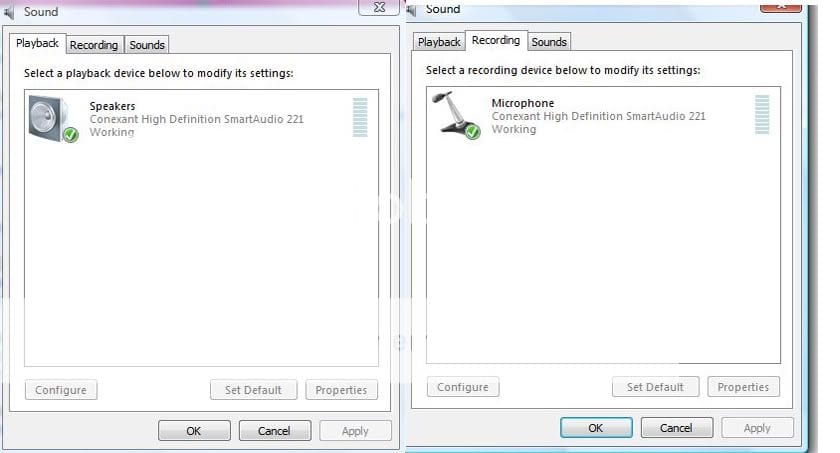
    I tried all the things you've suggested and found a hidden Stereo Mix Sound Card but thats not what I accidentally deleted and it doesn't help. Under the Playback tab it only shows "SPEAKERS Realtek High Definition Audio default device". I can't remember what the other speakers choice, that I deleted, said exactly. But before I deleted it I had to set it as default to make the sound come out of my TV and then when I wanted to use my computer and have sound out of my computer speakers I had to go back into control panel>sound and click it back to the Realtek speakers...quite a pain. Any ideas? Or could it be that my HDMI cable is malfunctioning? Picture quality hasn't changed.

    Thank you, Kelly

      My System SpecsSystem Spec

  5. #33
    Brink's Avatar

    Administrator


    Join Date : Apr 2007
    Texas, USA
    Posts : 30,529
    64-bit Vista Ultimate SP2, Windows 7 Ultimate SP1, Windows 8 Enterprise
    Local Time: 05:11 AM
    usa us texas

      Thread Starter

    Re: Audio Device - Enable Hidden Devices

    Hello Kelly, and welcome to Vista Forums.

    What method did you use to delete it? Did you mean uninstalled in Device Manager?

      My System SpecsSystem Spec

  6. #34


    Newbie
    Join Date : Jun 2012
    Posts : 3
    windows 7
    Local Time: 05:11 AM


    Re: Audio Device - Enable Hidden Devices

    The speakers were highlighted and I hit the delete button

      My System SpecsSystem Spec

  7. #35
    Brink's Avatar

    Administrator


    Join Date : Apr 2007
    Texas, USA
    Posts : 30,529
    64-bit Vista Ultimate SP2, Windows 7 Ultimate SP1, Windows 8 Enterprise
    Local Time: 05:11 AM
    usa us texas

      Thread Starter

    Re: Audio Device - Enable Hidden Devices

    Kelly,

    Could you post some screenshots showing where you deleted these at? I'm not aware of any "Delete" option in the "Playback" sound settings.

    playback.jpg

      My System SpecsSystem Spec

  8. #36


    Newbie
    Join Date : Jun 2012
    Posts : 3
    windows 7
    Local Time: 05:11 AM


    Re: Audio Device - Enable Hidden Devices

    Well, I don't believe it but, somehow through all my messing around with it last night while reading all the past posts it has fixed itself! It wasn't working last night before I shut down my computer but I just went in to get that screen shot that you asked for and it was there! AND it works perfect...I don't need to go in and change the speakers back and forth to default depending on if I want the sound to come out of my computer or out of my TV! Amazing! Thank you for your help...something I learned from you did the trick!
    Kelly

      My System SpecsSystem Spec

  9. #37
    Brink's Avatar

    Administrator


    Join Date : Apr 2007
    Texas, USA
    Posts : 30,529
    64-bit Vista Ultimate SP2, Windows 7 Ultimate SP1, Windows 8 Enterprise
    Local Time: 05:11 AM
    usa us texas

      Thread Starter

    Re: Audio Device - Enable Hidden Devices

    That's great news Kelly. Vista may have detected and installed the drivers for them automatically for you.

      My System SpecsSystem Spec

Page 4 of 4 FirstFirst ... 234
Audio Device - Enable Hidden Devices problems?

Similar Threads
Tutorial Tutorial Starter Category Comments Last Post
Disable and Enable Devices Aerofan PowerShell 2 14 Dec 2008
Device Manager - Hidden Devices Brink Tutorials 12 06 Nov 2008
multiple bluetooth devices in device manager, but only one device installed????? scousa4lyf Drivers 6 01 Oct 2008
Audio device stopped working - Reproduction devices list is empty Martinj Vista hardware & devices 0 23 Jul 2008
Permanently Set Dev. Mgr. to Show Hidden Devices Boris Vista General 3 11 Oct 2007