
How to Enable Hidden Audio Devices in Vista and Windows 7
 Information
This will show you how to enable hidden disabled audio devices in the Sound Control Panel window so they will be available to use now.
 Note
NoteThese now enabled audio devices will also now be available to all programs that allow you to select audio devices.
 Tip
TipEnabled the Stereo Mix device, if you have this option, will allow you to record all sounds played on your computer using Sound Recorder without a microphone.
Here's How:
1. Open the Control Panel. (Classic View)
NOTE: Open the Start menu and click on the Control Panel menu button.
2. Click on the Sound icon.
3. Click on the Recording tab. (See screenshot below step 4)
NOTE: This will also work in the Playback tab, but there is usually not any hidden audio devices there.
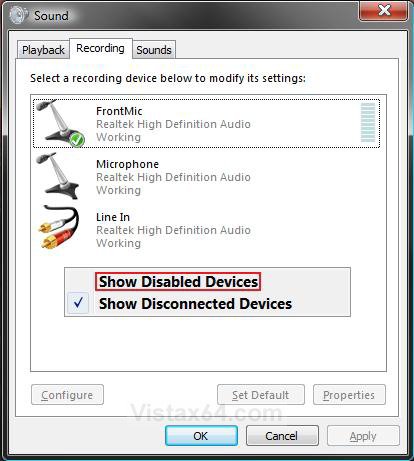
4. Right click on a empty area and click on Show Disabled Devices.
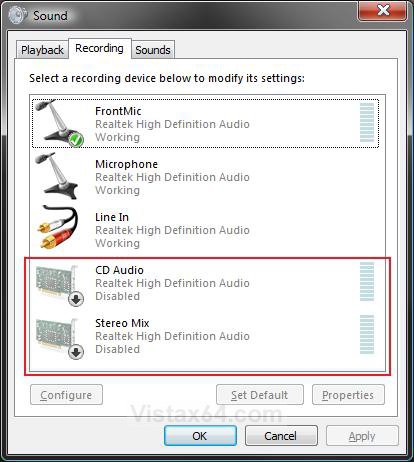
5. You will now see the disabled audio devices with the arrow pointing down on them. (See screenshot below)
NOTE: These audio devices will vary depending on the installed audio card or chip you have.
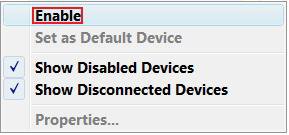
6. Right click on each listed disabled audio device that you want to enable and click on Enable. (See screenshot below)
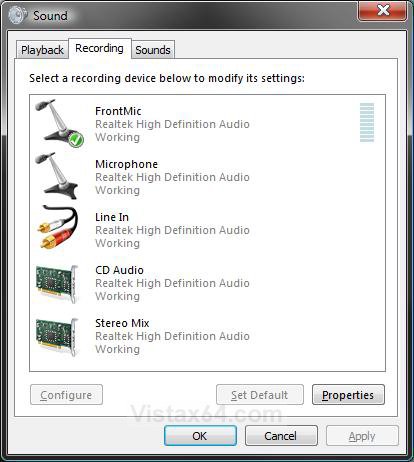
7. You will now see this when the audio devices are enabled. (See screenshot below)
NOTE: You can now change the properties settings on these audio devices to how you want them.
8. Click OK to close the Sound window.
That's it,
Shawn
Attachments

Last edited by a moderator:

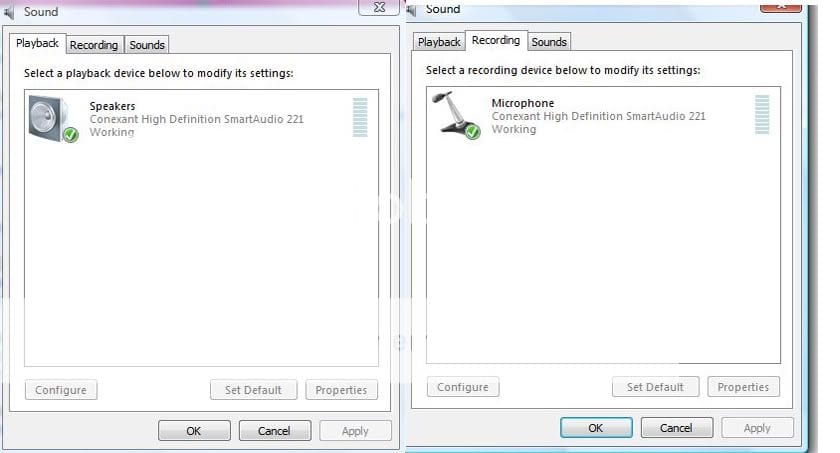
 , but what i ment was like when i play a music, it records what happends on the desktop not via the mic, if i put my mic on the speakers it won't record the sound perfectly, if you know what i mean