Windows Vista Forums
Vista Forums Home Join Vista Forums Windows 7 Forum Vista Tutorials Tags
Welcome to Windows Vista Forums. Our forum is dedicated to helping you find solutions with any problems, errors or issues you are experiencing with Windows Vista. The Vista forum also covers news and updates and has an extensive Windows Vista tutorial section that covers a wide range of tips and tricks.

Go Back   Vista Forums > Vista Forums > Tutorials

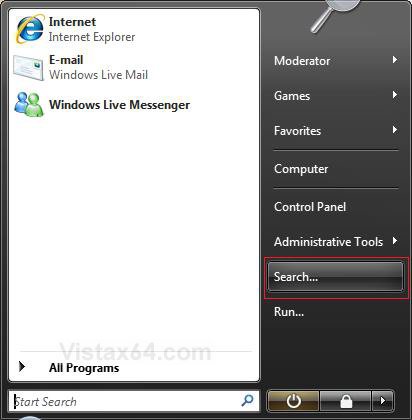
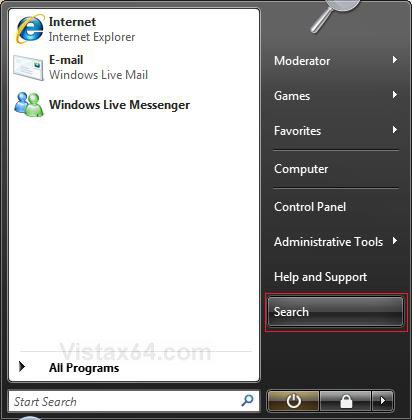
Vista Tutorial - Search Start Menu Button - Restore after SP1

Comment
 
Old 04-09-2008  
Brink
Administrator


Join Date: Apr 2007
Vista x64 Ultimate SP2, Windows 7 Ultimate x64


Search Start Menu Button - Restore after SP1

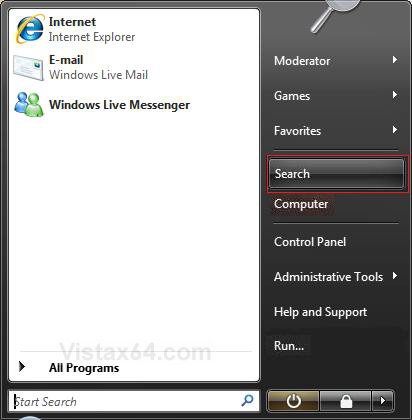
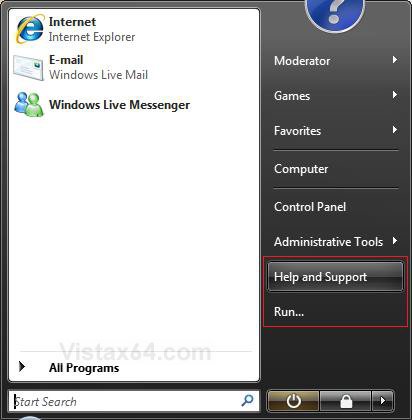
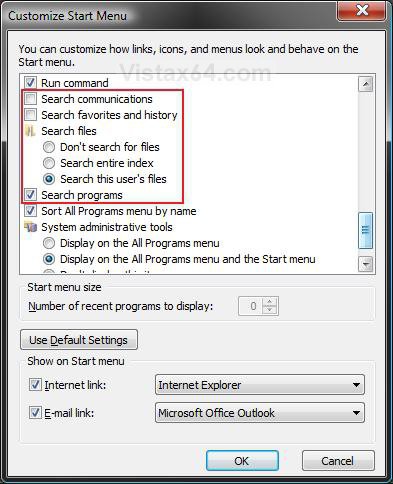
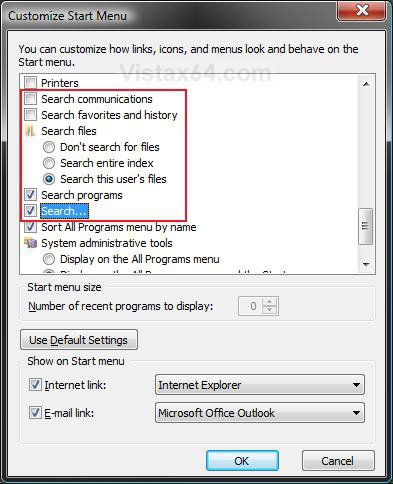
How to Restore the Start Menu Search Button after Installing the Vista SP1

...

My System SpecsSystem Spec
Old 06-01-2008  
SPRINGSTEEL
Member


Join Date: Jun 2008
Vista Ultimate 32


Re: Search Start Menu Button - Restore after SP1

From an unbiosed perspective and not to elaborate on the pros and cons of the Right Hand Search Button I could tell anyone who uses it freaquently that my method to restore it is unsurpassed although technically there is a chance that explorer.exe v.6001 may be improved even though it lacks the seach button.

DAVE


Last edited by SPRINGSTEEL; 10-16-2008 at 05:00 PM..
My System SpecsSystem Spec
Old 06-01-2008  
Dwarf
The Contemplator


Join Date: Mar 2008
Vista Home Premium 32-bit & Vista Ultimate 64-bit both Service Pack 2 W7 Pro RTM 7600 32 & 64


Re: Search Start Menu Button - Restore after SP1

Hi Dave,

I'm sorry, but I cannot recommend your method for restoring the button. Your method involves replacing the version of the file installed with SP1 with its predecessor. This is not recommended, as other files which were updated at the same time rely on this file being the correct version as they might not work correctly otherwise. In addition, future updates may require that ALL system files such as these are the SP1 versions (and will probably offer the SP1 update if they aren't), but if some are and some aren't - as will be the case with your method - you might throw up a validation check issue or even a genuine windows issue. It just isn't worth the risk.
Dwarf
My System SpecsSystem Spec
Old 06-01-2008  
Brink
Administrator


Join Date: Apr 2007
Vista x64 Ultimate SP2, Windows 7 Ultimate x64


Re: Search Start Menu Button - Restore after SP1

Quote  Quote: Originally Posted by SPRINGSTEEL View Post
Brink, if you are concerned about the loss of updates to the explore.exe,I could assure you that the explorer file is a basic file that was modified due to Googles anti-trust legal push to incorperate their search engine into the Micrsoft UI thus making their search a more obvious choice. Shame on Microsoft for backing down to Google in this manner by allowing third party companies to trespass on thier interface. This does a diservice to the end user who should expect more from an operating system. It is my opinion that the user should not be punished for installing a service pack by losing the most important service components to a complete O.S. I have bean able to preform many advanced seaches quickly and conveniantly while retaing the help and support as well as the run box both of wich I cherish. It would be a shame if the custumer had to sacrifice one option for another in what would result in a rollback or even a downgrade. One more thing to add, the procedure I outlined requiers no modifications to the registry. This a definate advantage in order to maintane stability without a needless registry hack that would only reduce explorer's performance.

DAVE
I agree Dave. Shame on Microsoft for backing down on something so trivial.

It is a better option to do what you suggested as long as Microsoft doesn't do any more updates to the explore.exe file, and if the user has not used the SP1 Disk Cleanup Tool already.

Other options are always welcomed to help give folks a choice.

Shawn
My System SpecsSystem Spec
Old 06-01-2008  
SPRINGSTEEL
Member


Join Date: Jun 2008
Vista Ultimate 32


Re: Search Start Menu Button - Restore after SP1

Dwaf, both files are genuine versions of explorer.exe. As for the legality of using one instead of another: I payed for both. The downloading and installation of updates and activation will not be affeccted by replacing one payed-for genuine file with another.

Last edited by SPRINGSTEEL; 10-16-2008 at 05:09 PM..
My System SpecsSystem Spec
Old 06-02-2008  
a.translator
Junior Member


Join Date: Apr 2008
Vista Home Premium SP1 32bit (non-English version)


Re: Search Start Menu Button - Restore after SP1

Quote  Quote: Originally Posted by SPRINGSTEEL View Post
To restore the search button wthout losing the run or help and support button you simply open the start menu and type "explorer.exe" without the quotes in the search box. If the seach says no results [...]
DAVE
Thanks, Dave. I typed in explorer.exe in the search box and it did find it and opened up the Search window, but no button has appeared on the right hand side of the start menu.
My System SpecsSystem Spec
Old 06-02-2008  
Brink
Administrator


Join Date: Apr 2007
Vista x64 Ultimate SP2, Windows 7 Ultimate x64


Re: Search Start Menu Button - Restore after SP1

Hi Adriana,

Did you also check the Search box in the Start menu's Customize window?
See the second example in this tutorial above for where to do this at.

Hope this helps,
Shawn
My System SpecsSystem Spec
Old 06-02-2008  
a.translator
Junior Member


Join Date: Apr 2008
Vista Home Premium SP1 32bit (non-English version)


Re: Search Start Menu Button - Restore after SP1

Quote  Quote: Originally Posted by Brink View Post
Hi Adriana,

Did you also check the Search box in the Start menu's Customize window?
See the second example in this tutorial above for where to do this at.

Hope this helps,
Shawn
Thanks for your very quick reply, Shawn. I don't see a Search box in the Customize window.
My System SpecsSystem Spec
Old 06-02-2008  
Brink
Administrator


Join Date: Apr 2007
Vista x64 Ultimate SP2, Windows 7 Ultimate x64


Re: Search Start Menu Button - Restore after SP1

Well Adriana, the explorer.exe option was worth a try. You can still use one of the options in the tutorial to replace either the Help and Support or Run button with Search instead in the Start menu.

Shawn
My System SpecsSystem Spec
Old 06-02-2008  
a.translator
Junior Member


Join Date: Apr 2008
Vista Home Premium SP1 32bit (non-English version)


Re: Search Start Menu Button - Restore after SP1

Quote  Quote: Originally Posted by Brink View Post
Well Adriana, the explorer.exe option was worth a try. You can still use one of the options in the tutorial to replace either the Help and Support or Run button with Search instead in the Start menu.
Shawn
I have done that. See the very first reply in this thread ;-)
My System SpecsSystem Spec
Old 06-02-2008  
Brink
Administrator


Join Date: Apr 2007
Vista x64 Ultimate SP2, Windows 7 Ultimate x64


Re: Search Start Menu Button - Restore after SP1

Doh! LOL
My System SpecsSystem Spec
Comment

Tutorial Tools


Similar Threads
Tutorial Category
No "Search" button on Start menu Vista file management
Lock Button on Start Menu will not show Menu Vista General
Restore Start Menu Search option in Windows Vista SP1 Vista General
SP1 Removed The Search Button From The Start Menu - How Can I Rest Vista performance & maintenance
search button in start menu Vista General


Vista Forums is an independent web site and has not been authorized,
sponsored, or otherwise approved by Microsoft Corporation.
"Windows Vista", the Start Orb, and related materials are trademarks of Microsoft Corp.
© Designer Media Ltd
Tutorial powered by GARS 2.1.8m ©2005-2006

1 2 3 4 5 6 7 8 9 10 11 12 13 14 15 16 17 18 19 20 21 22 23 24 25 26 27 28 29 30 31 32 33 34 35 36 37 38 39 40 41 42 43 44 45 46