![]() |
![]() | ![]() | ![]() | ![]() | ![]() | ![]() | ![]() |
|
Welcome to Vista Forums we are your forum to discuss Windows Vista x64 and x86 systems. Whether you need help or just want to post an idea you have on Vista, this is the forum for you.
br> br> |
| |||||||
![]() |
| | Tutorial Tools | Display Modes |
| | |
| Newbie ![]() Join Date: May 2008 Vista Ultimate 64
Posts: 5
Location: The OC, California | Re: Removing the Sleep function in the Shutdown menu Hi, I'm new here. Something has disabled the Sleep function in my Vista Ultimate 64 and I want to get it back. Sleep was working fine until yesterday. Now it goes into full Hibernate mode when I hit the Sleep button on the keyboard. In the Start menu, the Sleep function is grayed out now. I searched but only found this tutorial on how to Disable Sleep Function. So how do I enable it? Do I follow the same instructions as above, except for the final hex value use "1" instead of "0"? Thanks for the help! >>>> Clay >>>> |
| | |
| | ||||||||||||||||
| Newbie ![]() ![]() ![]() Join Date: Apr 2008 Vista HP32 SP1
Posts: 5
Location: Leeuwarden, The Netherlands | Re: Removing the Sleep function in the Shutdown menu
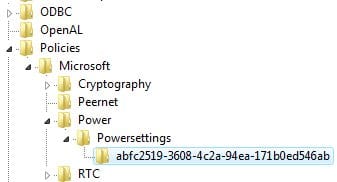
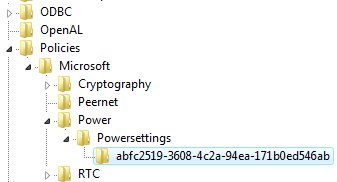
I.m.o., the best thing to do to enable the sleepfunction is the following; Go to HKEY_LOCAL_MACHINE\SOFTWARE\Policies\Microsoft\ and remove the whole 'Power' key in the left pane by rightclicking the word 'Power' and choose remove. This should work. Good luck Last edited by Cyberstorm77; 05-13-2008 at 12:16 PM. Reason: removed some garbage text | |||||||||||||||
| | | |||||||||||||||
| | ||||||||||||||||
| Newbie ![]() Join Date: May 2008 Vista Ultimate 64
Posts: 5
Location: The OC, California | Re: Removing the Sleep function in the Shutdown menu
Any other thoughts on how to re-enable the Sleep function? | |||||||||||||||
| | | |||||||||||||||
| | |
| Administrator ![]() ![]() ![]() ![]() ![]() ![]() ![]() ![]() ![]() ![]() ![]() ![]() Join Date: Apr 2007 Vista x64 Ultimate SP1
Posts: 14,743
Location: Texas, USA | Re: Removing the Sleep function in the Shutdown menu Hi Clay, You might go through this tutorial also to see if something in there is the cause of your sleep problem. I would check to see if you accidentally cleaned (disabled) the hibernation file in Disk Cleanup, check your sleep settings in the Power Plan options, and the other steps. Power Options and Sleep Mode Problems Have you installed or changed anything before this happened? Shawn |
| There are no dumb questions, just the people that do not ask them. Please post feedback to help others. | |
| | |
| | ||||||||||||||||
| Newbie ![]() Join Date: May 2008 Vista Ultimate 64
Posts: 5
Location: The OC, California | Re: Removing the Sleep function in the Shutdown menu
I did install a couple of driver updates the day before Sleep stopped working. So I rolled the system back to the Recover point that was saved the day before the driver update. That still didn't fix it. In the Power Plan options, I have everything set to Sleep. I think there is even a setting where I tell it to "Never Hibernate". I will step through the other tutorial to see what I can find. Thanks for the pointer. >>>> Clay >>>> | |||||||||||||||
| | | |||||||||||||||
| | |
| Newbie ![]() Join Date: May 2008 Vista Ultimate 64
Posts: 5
Location: The OC, California | Re: Removing the Sleep function in the Shutdown menu I did find a "Power" key there, so I deleted it and restarted the system. Didn't make any difference though. I have no Sleep options. Only full Hibernate and Shut Down. I'll have to step through the other tutorial mentioned above this weekend and see if I can find anything. Thanks, >>>> Clay >>>> |
| | |
| | |
| Newbie ![]() Join Date: May 2008 Vista Ultimate 64
Posts: 5
Location: The OC, California | Re: Removing the Sleep function in the Shutdown menu Last weekend I updated a couple of drivers on my system: the NVIDIA and the audio card. The next day, all the Sleep functions were gone. I eventually reverted to the recovery point prior to the driver updates, but that didn't fix the Sleep functions. Today I decided that I might as well go ahead and re-install the video and audio driver updates. And the Sleep function magically came back. All is working fine now. Go figure! >>>> Clay >>>> |
| | |
| | |
| Technophile Wannabe ![]() ![]() ![]() ![]() ![]() ![]() ![]() ![]() ![]() ![]() ![]() ![]() ![]() Join Date: Feb 2008 Home Premium SP1
Posts: 942
Location: The Lowcountry | Re: Removing the Sleep function in the Shutdown menu Hey Cyberstorm77, This worked like a charm, thanks! (or just like I knew what I was doing ) Later Ted |
| Please post back with the outcome. - So others (and I) can learn from the experience! ![]() Jesus loves you just the way you are! You're welcome to visit my site: HERE | |
| | |
![]() |
| Tags |
| menu, power management, sleep, start |
| Tutorial Tools | |
| Display Modes | |
| |
Similar Threads | ||||
| Tutorial | Tutorial Starter | Category | Comments | Last Post |
| Sleep Function | Warren Davies | Vista General | 5 | 02-25-2008 05:02 PM |
| Disable sleep option in shutdown menu | New ACT user | Vista General | 2 | 01-24-2008 11:09 PM |
| Taskbar icons do not function after a Unexpected Shutdown. | Solver | Vista performance & maintenance | 1 | 08-17-2007 08:26 PM |
| Sleep function | Francisco | Vista security | 3 | 01-19-2007 02:34 PM |
| Sleep Function | Mark W Scheidell | Vista General | 1 | 07-26-2006 08:48 AM |