
How to Restore a Missing or Default Location of User Folders in Vista
 Information
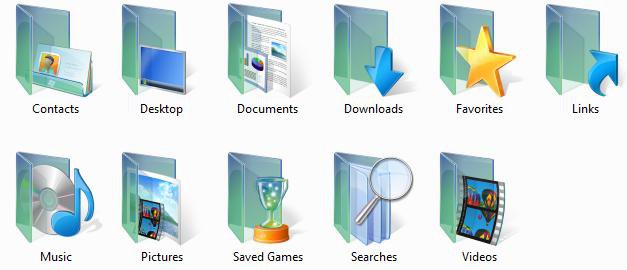
This tutorial will show you how to restore a personal user folder if it has been deleted, in the wrong location, or is missing from your C:\Users\(user name) or Start menu location.
 Tip
TipIf you have duplicate user folders instead, then you will need to backup the contents of the duplicate user folders, do OPTION TWO below, delete the duplicate folders, then you may need to restart the computer a couple of times first before the default location is restored.
EXAMPLE: Personal User Profile Folders
EXAMPLE: Personal User Profile Folders Start menu Location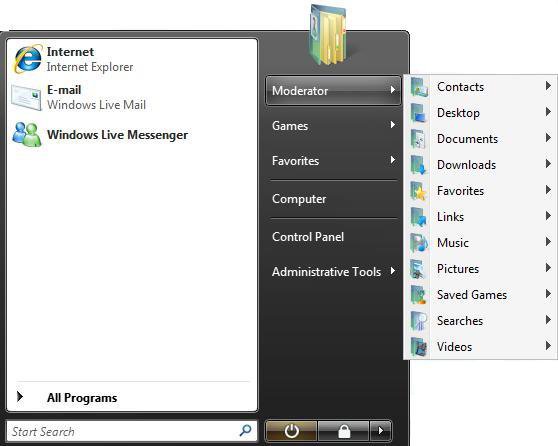
 OPTION ONE
NOTE: This can help restore the default location of a user folder. If it does not help, then use OPTION TWO below.
1. Right click on the user folder that you want to restore the default location for and click on Properties.
NOTE: Do this from the C:\Users\(user name) location for the best results and not from the Start menu user folders.
2. Click on the Location tab. (See screenshot below step 3)
NOTE: If you do not have a Location tab, then this is not the correct user folder and is only a normal folder that has the same name as the user folder. You will most likely need to use OPTION TWO below in this case instead.
3. Click on the Restore Default button and click on OK. (See screenshot below)
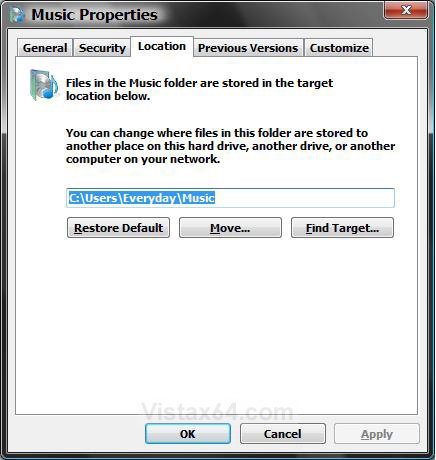
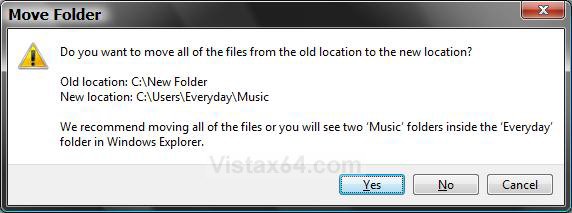
4. If you get this, then click on Yes. (See screenshot below)
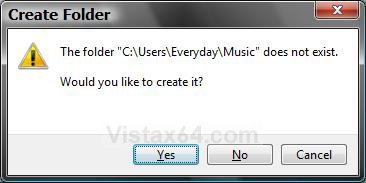
5. Click on Yes. (See screenshot below)
WARNING: If you do not click on Yes, you will have two copies of the personal user folder in the main (user name) folder with one being as described in the NOTE under step 2.
OPTION TWO  Note
NoteThis is a more thorough method of restoring a user folder's default location, or restore missing user folders.
The reg files in the downloads below will restore the default values at this registry location below.
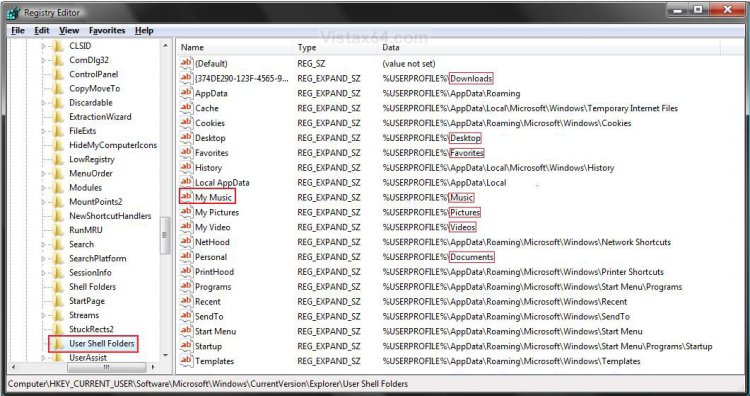
The reg files in the downloads below will restore the default values at this registry location below.
Code:
HKEY_CURRENT_USER\Software\Microsoft\Windows\CurrentVersion\Explorer\User Shell Folders Warning
If you have any duplicate user folders, or user folders that do not have a Location properties tab (Option One), then you will need to:
- Backup only the folder's contents to another location to be safe.
- Now proceed with the steps below
1. Open your C:\Users\(user-name) folder. If the user folder is missing, then create a New Folder and rename it with the name below for that user folder.
[TABLE=class:-grid,-width:-300][TR][TD]User Folder
[/TD]
[TD]
Rename with
[/TD][/TR]
[TR][TD]
Contacts
[/TD]
[TD]
Contacts
[/TD][/TR]
[TR][TD]
Desktop
[/TD]
[TD]
Desktop
[/TD][/TR]
[TR][TD]
Documents
[/TD]
[TD]
Documents
[/TD][/TR]
[TR][TD]
Downloads
[/TD]
[TD]
Downloads
[/TD][/TR]
[TR][TD]
Favorites
[/TD]
[TD]
Favorites
[/TD][/TR]
[TR][TD]
Links
[/TD]
[TD]
Links
[/TD][/TR]
[TR][TD]
Music
[/TD]
[TD]
Music
[/TD][/TR]
[TR][TD]
Pictures
[/TD]
[TD]
Pictures
[/TD][/TR]
[TR][TD]
Saved Games
[/TD]
[TD]
Saved Games
[/TD][/TR]
[TR][TD]
Searches
[/TD]
[TD]
Searches
[/TD][/TR]
[TR][TD]
Videos
[/TD]
[TD]
Videos
[/TD][/TR][/TABLE]
2. To Restore Default Contacts Folder Location
A) Click on the download button below to download the file below.
Restore_Default_Contacts_Location.reg

3. To Restore Default Desktop Folder Location
A) Click on the download button below to download the file below.
Restore_Desktop_Default_Location.reg
4. To Restore Default Documents Folder Location
A) Click on the download button below to download the file below.
Restore_Documents_Default_Location.reg
5. To Restore Default Downloads Folder Location
A) Click on the download button below to download the file below.
Restore_Downloads_Default_Location.reg
6. To Restore Default Favorites Folder Location
A) Click on the download button below to download the file below.
Restore_Favorites_Default_Location.reg
7. To Restore Default Links Folder Location
A) Click on the download button below to download the file below.
Restore_Default_Links_Location.reg
8. To Restore Default Music Folder Location
A) Click on the download button below to download the file below.
Restore_Music_Default_Location.reg
9. To Restore Default Pictures Folder Location
A) Click on the download button below to download the file below.
Restore_Pictures_Default_Location.reg
10. To Restore Default Saved Games Folder Location
A) Click on the download button below to download the file below.
Restore_Default_Saved_Games_Location.reg
11. To Restore Default Searches Folder Location
A) Click on the download button below to download the file below.
Restore_Default_Searches_Location.reg
12. To Restore Default Videos Folder Location
A) Click on the download button below to download the file below.
Restore_Videos_Default_Location.reg
13. Save the .reg file to your Desktop.
14. Right click on the downloaded .reg file, and click on Merge.
15. Click on Run, Yes, Yes, and OK when prompted.
16. Open the Start Menu, then type regedit in the search box and press enter.
17. If prompted by UAC, then click on Continue (administrator) or enter administrator's password (if standard user).
18. In regedit, navigate to the location below. (see screenshot below)
Code:
HKEY_CURRENT_USER\Software\Microsoft\Windows\CurrentVersion\Explorer\Shell Folders
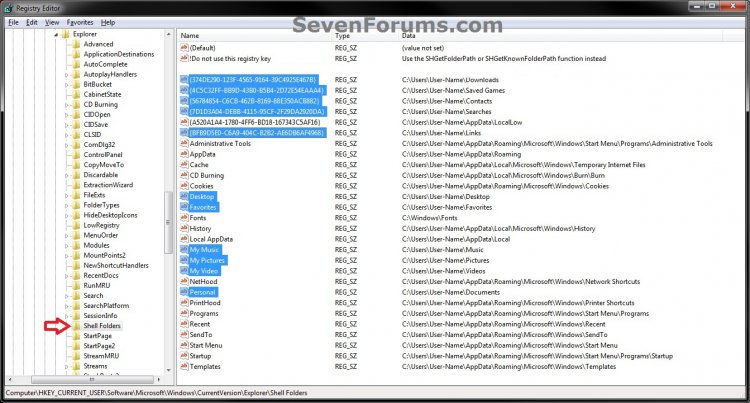
19. In the right pane of Shell Folders, right click on the user folder in the Name column in the registry (see table below) that you want to restore, then click on Modify. (see screenshot above)
NOTE: If the Name entry in the table below is not there, then right click on a empty space in the right pane, click on New and String Value, and give it the name in bold below for that user folder.
[TABLE=class:-grid,-width:-600][TR][TD]User Folder
[/TD]
[TD]
Name in Registry
[/TD][/TR]
[TR][TD]
Contacts
[/TD]
[TD]
{56784854-C6CB-462B-8169-88E350ACB882}
[/TD][/TR]
[TR][TD]
Desktop
[/TD]
[TD]
Desktop
[/TD][/TR]
[TR][TD]
Documents
[/TD]
[TD]
Personal
[/TD][/TR]
[TR][TD]
Downloads
[/TD]
[TD]
{374DE290-123F-4565-9164-39C4925E467B}
[/TD][/TR]
[TR][TD]
Favorites
[/TD]
[TD]
Favorites
[/TD][/TR]
[TR][TD]
Links
[/TD]
[TD]
{BFB9D5E0-C6A9-404C-B2B2-AE6DB6AF4968}
[/TD][/TR]
[TR][TD]
Music
[/TD]
[TD]
My Music
[/TD][/TR]
[TR][TD]
Pictures
[/TD]
[TD]
My Pictures
[/TD][/TR]
[TR][TD]
Saved Games
[/TD]
[TD]
{4C5C32FF-BB9D-43B0-B5B4-2D72E54EAAA4}
[/TD][/TR]
[TR][TD]
Searches
[/TD]
[TD]
{7D1D3A04-DEBB-4115-95CF-2F29DA2920DA}
[/TD][/TR]
[TR][TD]
Videos
[/TD]
[TD]
My Videos
[/TD][/TR][/TABLE]
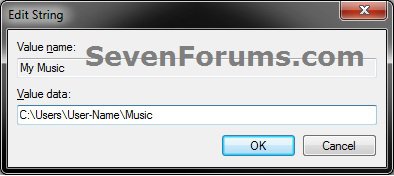
20. Type in the full default path (see table below) of the user folder, and click on OK. (see screenshot below)
NOTE: Substitute User-Name in the full path with your user account name instead.
[TABLE=class:-grid,-width:-600][TR][TD]User Folder
[/TD]
[TD]
Default Path
[/TD][/TR]
[TR][TD]
Contacts
[/TD]
[TD]
C:\Users\User-Name\Contacts
[/TD][/TR]
[TR][TD]
Desktop
[/TD]
[TD]
C:\Users\User-Name\Desktop
[/TD][/TR]
[TR][TD]
Documents
[/TD]
[TD]
C:\Users\User-Name\Documents
[/TD][/TR]
[TR][TD]
Downloads
[/TD]
[TD]
C:\Users\User-Name\Downloads
[/TD][/TR]
[TR][TD]
Favorites
[/TD]
[TD]
C:\Users\User-Name\Favorites
[/TD][/TR]
[TR][TD]
Links
[/TD]
[TD]
C:\Users\User-Name\Links
[/TD][/TR]
[TR][TD]
Music
[/TD]
[TD]
C:\Users\User-Name\Music
[/TD][/TR]
[TR][TD]
Pictures
[/TD]
[TD]
C:\Users\User-Name\Pictures
[/TD][/TR]
[TR][TD]
Saved Games
[/TD]
[TD]
C:\Users\User-Name\Saved Games
[/TD][/TR]
[TR][TD]
Searches
[/TD]
[TD]
C:\Users\User-Name\Searches
[/TD][/TR]
[TR][TD]
Videos
[/TD]
[TD]
C:\Users\User-Name\Videos
[/TD][/TR][/TABLE]
21. Close Regedit.
22. Open an elevated command prompt.
23. In the elevated command prompt, Copy and Paste the command below for the user folder icon that you want to restore to default. (see table below)
NOTE: This will set the user folder attributes back to default. You can Copy and Paste these to make it easier for you.
[TABLE=class:-grid,-width:-600][TR][TD]User Folder
[/TD]
[TD]
Command
[/TD][/TR]
[TR][TD]
Contacts
[/TD]
[TD]
attrib +r -s -h %USERPROFILE%\Contacts /S /D
[/TD][/TR]
[TR][TD]
Desktop
[/TD]
[TD]
attrib +r -s -h %USERPROFILE%\Desktop /S /D
[/TD][/TR]
[TR][TD]
Documents
[/TD]
[TD]
attrib +r -s -h %USERPROFILE%\Documents /S /D
[/TD][/TR]
[TR][TD]
Downloads
[/TD]
[TD]
attrib +r -s -h %USERPROFILE%\Downloads /S /D
[/TD][/TR]
[TR][TD]
Favorites
[/TD]
[TD]
attrib +r -s -h %USERPROFILE%\Favorites /S /D
[/TD][/TR]
[TR][TD]
Links
[/TD]
[TD]
attrib +r -s -h %USERPROFILE%\Links /S /D
[/TD][/TR]
[TR][TD]
Music
[/TD]
[TD]
attrib +r -s -h %USERPROFILE%\Music /S /D
[/TD][/TR]
[TR][TD]
Pictures
[/TD]
[TD]
attrib +r -s -h %USERPROFILE%\Pictures /S /D
[/TD][/TR]
[TR][TD]
Saved Games
[/TD]
[TD]
attrib +r -s -h %USERPROFILE%\"Saved Games" /S /D
[/TD][/TR]
[TR][TD]
Searches
[/TD]
[TD]
attrib +r -s -h %USERPROFILE%\Searches /S /D
[/TD][/TR]
[TR][TD]
Videos
[/TD]
[TD]
attrib +r -s -h %USERPROFILE%\Videos /S /D
[/TD][/TR][/TABLE]
24. Close the elevated command prompt.
25. Open the Start Menu, then Copy and Paste the Shell command (see table below) in the search box for the User folder that you want to restore, and press Enter.
NOTE: If this opens the missing personal user folder(s), then you are done and can skip step 26 and go to step 27 instead.
[TABLE=class:-grid,-width:-400][TR][TD]User Folder
[/TD]
[TD]
Shell Command
[/TD][/TR]
[TR][TD]
Contacts
[/TD]
[TD]
shell:Contacts
[/TD][/TR]
[TR][TD]
Desktop
[/TD]
[TD]
shell:desktop
[/TD][/TR]
[TR][TD]
Documents
[/TD]
[TD]
shell
 ersonal
[/TD][/TR]
[TR][TD]
Downloads
[/TD]
[TD]
shell:downloads
[/TD][/TR]
[TR][TD]
Favorites
[/TD]
[TD]
shell:Favorites
[/TD][/TR]
[TR][TD]
Links
[/TD]
[TD]
shell:Links
[/TD][/TR]
[TR][TD]
Music
[/TD]
[TD]
shell:My Music
[/TD][/TR]
[TR][TD]
Pictures
[/TD]
[TD]
shell:My Pictures
[/TD][/TR]
[TR][TD]
Saved Games
[/TD]
[TD]
shell:SavedGames
[/TD][/TR]
[TR][TD]
Searches
[/TD]
[TD]
shell:Searches
[/TD][/TR]
[TR][TD]
Videos
[/TD]
[TD]
shell:My Video
[/TD][/TR][/TABLE]
26. Log off and log on, or restart the computer to finish restoring the user folder location.
NOTE: Sometimes you may need to restart more than once for the changes to be applied.
27. When done, you can delete the downloaded .reg file(s) if you like.
28. If you have any duplicate user folders left, or user folders that do not have a Location properties tab (Option One), then you will need to:
- Delete all duplicate user folders without the correct default C:\Users\(user-name)\(user-folder) path (see step 20) and user folders without a Location properties tab.
Shawn
Related Tutorials
Attachments
-
Restore_Videos_Default_Location.reg279 bytes · Views: 10,032
-
Restore_Pictures_Default_Location.reg299 bytes · Views: 15,424
-
Restore_Music_Default_Location.reg273 bytes · Views: 13,716
-
Restore_Favorites_Default_Location.reg303 bytes · Views: 7,395
-
Restore_Downloads_Default_Location.reg332 bytes · Views: 15,293
-
Restore_Documents_Default_Location.reg302 bytes · Views: 18,870
-
Restore_Desktop_Default_Location.reg284 bytes · Views: 11,611
-
Restore_Default_Contacts_Location.reg658 bytes · Views: 7,700
-
Restore_Default_Saved_Games_Location.reg698 bytes · Views: 4,622
-
Restore_Default_Searches_Location.reg662 bytes · Views: 4,082
-
Restore_Default_Links_Location.reg626 bytes · Views: 5,210
-
 thumb_Username_Folder.jpg2.6 KB · Views: 827
Last edited:


 I'm glad to hear that you got it sorted.

