
How to Turn Task Manager "Always On Top" On or Off
 Information
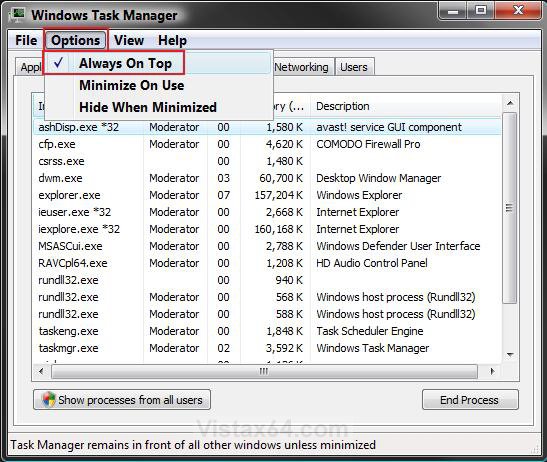
This will show you how to turn the Task Manager option of Always On Top of other windows on or off in Vista and Windows 7.
 Note
NoteHaving Always On Top turned on will have Task Manager to always be on top of any open window. This can make the Task Manager a lot easier to find and use when needed.
Here's How:
1. Open the Task Manager.
NOTE: To open the Task Manager press CTRL+SHIFT+ESC, or right click on the taskbar and click on Task Manager.
2. Click on Options on the menu bar. (see screenshot below step 4)
3. To Turn On Always On Top
A) Click on Always On Top to check it. (see screenshot below step 4)
4. To Turn Off Always On Top
A) Click on Always On Top to uncheck it. (see screenshot below)
That's it,
Shawn
Related Tutorials
- How to Enable or Disable Task Manager in Vista
- How to Restart Explorer in Vista
- How to Switch Between Regular and Small Footprint Mode in Vista Task Manager
- How to Use the Resource Monitor in Vista
- How to Log Off a Local User in Vista
- How to Disconnect a Network User Connection in Vista
- How to Send a Message to Another User in Vista
- How to Open and Close a Application and Process in Vista Task Manager
- How to Enable or Disable Taskbar Always on Top in Vista
- How to Create a Elevated Vista Task Manager Shortcut
Attachments

Last edited by a moderator: