
How to Lock or Unlock the Taskbar in Vista
 Information
This will show you how to lock or unlock the Taskbar to not allow (locked) or allow (unlocked) moving or resizing of the Taskbar.
 Note
NoteIf the Taskbar is set to unlocked, then you can resize it's width and/or move it to the left, right, top, or bottom of the desktop.
- To resize the taskbar, move the mouse pointer to the top of the taskbar until it turns into a double arrow. Click and hold, then drag the taskbar to the width you want. See: How to See the Date and Time on the Taskbar in Vista
- To move the taskbar, click and hold on a empty area of the taskbar and drag it to the desktop border you want it at.
EXAMPLE: Taskbar Locked

EXAMPLE: Taskbar UnlockedNOTE: Notice how the taskbar now has the three rows of dotted lines now. See the NOTE at the top of the tutorial for more on this.

 OPTION ONE
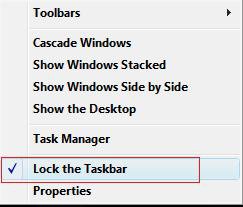
1. Right click on a empty space on the Taskbar.
2. To Unlock the Taskbar
A) Click on Lock the Taskbar to uncheck it. (See screenshot below step 3)
NOTE: If Lock the Taskbar is grayed out, then see:How to Enable or Disable Lock the Taskbar in Vista
3. To Lock the Taskbar
A) Click on Lock the Taskbar to check it. (See screenshot below)
NOTE: If Lock the Taskbar is grayed out, then see: How to Enable or Disable Lock the Taskbar in Vista
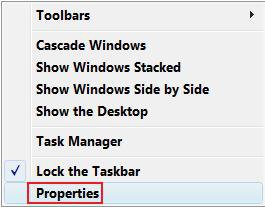
OPTION TWO 1. Right click on a empty space on the Taskbar.
2. Click on Properties. (See screenshot below)
3. To Unlock the Taskbar
A) Click on Lock the Taskbar to uncheck it. (See screenshot below step 4)
NOTE: If Lock the Taskbar is grayed out, then see: How to Enable or Disable Lock the Taskbar in Vista
B) Go to step 5.
4. To Lock the Taskbar
A) Click on Lock the Taskbar to check it. (See screenshot below)
NOTE: If Lock the Taskbar is grayed out, then see: How to Enable or Disable Lock the Taskbar in Vista
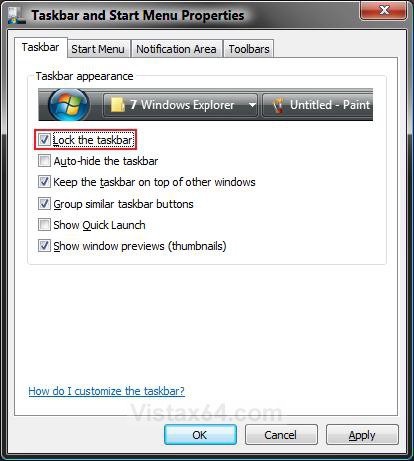
5. Click on OK. (See screenshot above)
OPTION THREE 1. To Lock the Taskbar
A) Click on the Download button below to download the Lock_Taskbar.reg file.

B) Go to step 3.
2. To Unlock the Taskbar
A) Click on the Download button below to download the Unlock_Taskbar.reg file.
3. Click on Save, and save the .reg file to the Desktop.
4. Right click on the downloaded .reg file and click on Merge.
5. Click on Run, Continue (UAC), Yes, and then OK when prompted.
6. Log off and log on, or restart the computer to apply changes.
7. When done, you can delete the downloaded .reg file if you like.
OPTION FOUR 1. Open the Start Menu, then type regedit in the search box and press Enter.
2. If prompted by UAC, then click on Continue.
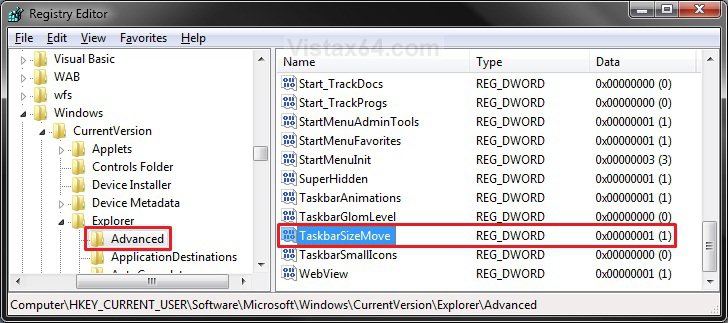
3. In regedit, go to: (See screenshot below)
HKEY_CURRRENT_USER\Software\Microsoft\Windows\CurrentVersion\Explorer\Advanced
4. To Unlock the Taskbar
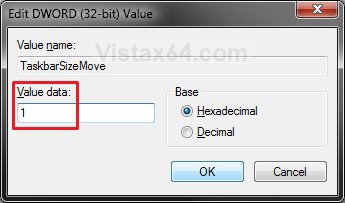
A) In the right pane, right click on TaskbarSizeMove and click on Modify. (See screenshot above)
B) Type in 1 and click on OK. (See screenshot below)
5. To Lock the Taskbar
A) In the right pane, right click on TaskbarSizeMove and click on Modify. (See screenshot below step 4)
B) Type in 0 (number zero) and click on OK. (See screenshot below step 5B)
6. Close regedit.
7. Log off and log on, or restart the computer to apply changes.
That's it,Shawn
Related Tutorials
- How to Use Quick Launch in Vista
- How to Hide or Show a Notification Icon in Vista
- How to Show or Hide All Notification Area System Tray Icons in Vista
- How to Turn Open Window Thumbnail Previews On or Off for the Taskbar in Vista
- How to Enable or Disable the Taskbar Thumbnail Previews in Vista
- How to Turn Group Similar Taskbar Buttons On or Off in Vista
- How to See the Date and Time on the Taskbar in Vista
- How to Add or Remove a Toolbar on the Taskbar in Vista
- How to Enable or Disable the Vista Taskbar Context Menus
- How to Enable or Disable the Taskbar and Start Menu Properties Window in Vista
- How to Enable or Disable Lock the Taskbar in Vista
- How to Show or Hide Folder Full Path in the Vista Taskbar Buttons
- How to Enable or Disable Taskbar Always on Top in Vista
- How to Turn Taskbar Auto-hide On or Off in Vista
Attachments
Last edited:


