Vista Forums
Vista Forums Home Join Vista Forums Donate Vista Tutorials Store Tags

Welcome to Vista Forums we are your forum to discuss Windows Vista x64 and x86 systems.

Go Back   Vista Forums > Vista Forums > Tutorials

Boot Up Time

Comment
 
Tutorial Tools Display Modes
<!-- google_ad_section_start -->Boot Up Time<!-- google_ad_section_end -->
Boot Up Time
How to See What Your Boot Up Time is in Vista
Published by sidney1st
05-06-2008

How to See What Your Boot Up Time is in Vista

To optimize the boot/shutdown of Windows, it is necessary to know precisely the reboot time of the computer to be able to refine its adjustments.
But rather than having the hand on a stop watch at the time of the reboot, better use this easy way, You will appreciate how simple it is to use and the precision of the result.
The relative time value will then give you a point of comparison to optimize the boot/shutdown of your computer.

NOTE
  For fun you can post your results here: ReBoot Time


EXAMPLE: ReBoot-Time dialog box
NOTE: This is what you will see after running the VB Script file from below and when you computer finishes restarting.
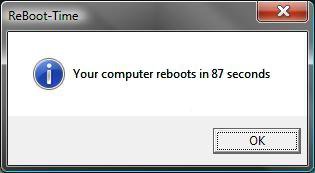
ReBoot_Time.jpg

RELATED LINKS:
1. How to Speed Up Shutdown in Vista

2. How to Speed Up Vista Boot Up Time

3. How to Speed Up the Performance of Vista

4. How to Logon Automatically at Startup in Vista

5. How to Change the Number of Processors Used at Boot Up in Vista

6. How to Check and Change the Startup Programs in Vista


Here's How:
In order to calculate the time of rebooting Windows, we will use a VB Script (Visual BASIC Scripting Edition). Let us learn first how it works.

The script writes a value in the registry (HKCU \ Software \ Microsoft \ Current Version \ run) so that it can be started again when booting. Then, another value containing the time is writen in the registry when the reboot is launched. While rebooting, the script records the hour in a variable then checks if the first value containing the time exists. If so, it is then enough to compare two times in order to obtain the time of rebooting. Then, the two keys added in the registry are removed (the run key and the key where the time is stored).
Open your favorite text editor (notepad will do the job perfectly) and copy/paste the following script:


Code:
 
Option Explicit
On Error Resume Next
Dim Wsh, Time1, Time2, Result, PathFile, MsgResult, MsgA, AppName, KeyA, KeyB, TimeDiff
MsgA = "Please close all running applications and click on OK."
KeyA = "HKEY_CURRENT_USER\Software\RestartTime\"
KeyB = "HKEY_CURRENT_USER\Software\Microsoft\Windows\CurrentVersion\Run\RestartTime"
AppName = "ReBoot-Time"
Set Wsh = CreateObject("WScript.Shell")
PathFile = """" & WScript.ScriptFullName & """"
Result = wsh.RegRead(KeyA & "Times")
if Result = "" then
MsgResult = Msgbox (MsgA, vbOKCancel, AppName)
If MsgResult = vbcancel then WScript.Quit
Wsh.RegWrite KeyA & "Times", left(Time,8), "REG_SZ"
Wsh.RegWrite KeyB, PathFile, "REG_SZ"
Wsh.Run "cmd /c Shutdown -r -t 00", false, 0 
else
Wsh.RegDelete KeyA & "Times"
Wsh.RegDelete KeyA
Wsh.RegDelete KeyB
TimeDiff = DateDiff("s",Result,left(Time,8))
MsgBox "Your computer reboots in " & TimeDiff & " seconds", VbInformation, AppName
end if
wscript.Quit
Save the file wherever you want on the same HDD (desktop for example) as ReBoot-Time.vbs (you can choose whatever name as far as the extension is ".VBS".
You can also download the script (zipped).

< Click to Download


Use of the Script:
  • Double click on the script icon if it is on your desktop or on the file if you saved it in a particular folder.
  • Close all the running applications and click the OK button in the dialog box.
  • The computer will reboot and when Windows will be ready to be used, a new dialog box will open displaying the time your computer took to reboot.
Voila!
Published by
sidney1st's Avatar
Member
Join Date: Apr 2008
Location: Paris
Posts: 927
Rep Power: 59
sidney1st has a reputation beyond reputesidney1st has a reputation beyond reputesidney1st has a reputation beyond reputesidney1st has a reputation beyond reputesidney1st has a reputation beyond reputesidney1st has a reputation beyond reputesidney1st has a reputation beyond reputesidney1st has a reputation beyond reputesidney1st has a reputation beyond reputesidney1st has a reputation beyond reputesidney1st has a reputation beyond repute

Tutorial Tools

Applies to
All Vista Versions
64 Bit & 32 Bit

Rating
Skill Level
40%40%40%
2

Page copy protected against web site content infringement by Copyscape

Old 05-13-2008  
dmex
ʛٯᴙᵁ

dmex has much to be proud ofdmex has much to be proud ofdmex has much to be proud ofdmex has much to be proud ofdmex has much to be proud ofdmex has much to be proud ofdmex has much to be proud ofdmex has much to be proud ofdmex has much to be proud ofdmex has much to be proud of
 
dmex's Avatar
 
Join Date: May 2007
Vista Ultimate
Posts: 1,713

Location: Fremantle, Western Australia
Re: Boot Up Time

Great Script...Thanks Sidney

Last edited by dmex; 05-18-2008 at 08:29 PM.
dmex is offline   Reply With Quote
Old 05-14-2008  
sidney1st
Member
sidney1st has a reputation beyond reputesidney1st has a reputation beyond reputesidney1st has a reputation beyond reputesidney1st has a reputation beyond reputesidney1st has a reputation beyond reputesidney1st has a reputation beyond reputesidney1st has a reputation beyond reputesidney1st has a reputation beyond reputesidney1st has a reputation beyond reputesidney1st has a reputation beyond reputesidney1st has a reputation beyond repute
 
sidney1st's Avatar
 
Join Date: Apr 2008
Ultimate SP1 x64 & x32
Posts: 927

Location: Paris
Re: Boot Up Time

I am glad you like it, You are welcome dmex
sidney1st is offline   Reply With Quote
Old 05-14-2008  
McGrady
Newbie
McGrady is on a distinguished road
 
Join Date: May 2008
vista home premium 32bit
Posts: 3

Re: Boot Up Time

You said that this writes a value in the registry then deletes itself from the registry after showing the Reboot Time?
Does it just remake the registry value everytime you use it and delete itself?
McGrady is offline   Reply With Quote
Old 05-14-2008  
sidney1st
Member
sidney1st has a reputation beyond reputesidney1st has a reputation beyond reputesidney1st has a reputation beyond reputesidney1st has a reputation beyond reputesidney1st has a reputation beyond reputesidney1st has a reputation beyond reputesidney1st has a reputation beyond reputesidney1st has a reputation beyond reputesidney1st has a reputation beyond reputesidney1st has a reputation beyond reputesidney1st has a reputation beyond repute
 
sidney1st's Avatar
 
Join Date: Apr 2008
Ultimate SP1 x64 & x32
Posts: 927

Location: Paris
Re: Boot Up Time

Hi McGrady,

When you click OK to reboot, those 2 keys are added to the registry so they are available when the computer boots.
Key A contains the time
Key B is in "run" so the script starts again when the computer has booted
A: HKEY_CURRENT_USER\Software\RestartTime\
B: HKEY_CURRENT_USER\Software\Microsoft\Windows\CurrentVersion\Run\RestartTime

At the end, the script calculates the difference between the 2 "times" and deletes the 2 keys.

So every time you use the script, it does it again and again.
sidney1st is offline   Reply With Quote
Old 05-17-2008  
McGrady
Newbie
McGrady is on a distinguished road
 
Join Date: May 2008
vista home premium 32bit
Posts: 3

Re: Boot Up Time

I just ran it, it rebooted and no dialog box came up
McGrady is offline   Reply With Quote
Old 05-21-2008  
sale666
Newbie
sale666 is on a distinguished road
 
Join Date: May 2008
Vista Ultimate x64
Posts: 3

Re: Boot Up Time

well i got this after i done it:

"Your computer reboots in 64 seconds"


after doing optimization for both cores

"Your computer reboots in 57 seconds"

=D... thats nice! works well!
thats with kaspersky,utorrent,ultramon running at start up!
and i have dual display!
sale666 is offline   Reply With Quote
Old 3 Weeks Ago  
bmb
Junior Member
bmb is on a distinguished road
 
Join Date: Jun 2008
Vista Ultimate
Posts: 13

Re: Boot Up Time

Thanks for great script ..but one question if u dont wants this thn only Delete it or u have to delete it from Registry too????
bmb is offline   Reply With Quote
Old 3 Weeks Ago  
sidney1st
Member
sidney1st has a reputation beyond reputesidney1st has a reputation beyond reputesidney1st has a reputation beyond reputesidney1st has a reputation beyond reputesidney1st has a reputation beyond reputesidney1st has a reputation beyond reputesidney1st has a reputation beyond reputesidney1st has a reputation beyond reputesidney1st has a reputation beyond reputesidney1st has a reputation beyond reputesidney1st has a reputation beyond repute
 
sidney1st's Avatar
 
Join Date: Apr 2008
Ultimate SP1 x64 & x32
Posts: 927

Location: Paris
Re: Boot Up Time

Hi bmb and welcome to the Vista forums!

If you do not want it anymore, just put the script in the bin.
The registry entries are automatically deleted when the script has finished its job

Sid.
sidney1st is offline   Reply With Quote
Old 4 Days Ago  
buggs1a
Newbie
buggs1a is on a distinguished road
 
Join Date: Jul 2008
Vista Home Premium SP1 64bit
Posts: 9

Re: Boot Up Time

how bout posting a download link that actually works?
buggs1a is offline   Reply With Quote
 
Comment

Tutorial Tools
Display Modes


Vistax64.com is an independent web site and has not been authorized,
sponsored, or otherwise approved by Microsoft Corporation.
"Windows Vista", the Start Orb, and related materials are trademarks of Microsoft Corp.
© Designer Media 2005-2008
Tutorial powered by GARS 2.1.8m ©2005-2006

1 2 3 4 5 6 7 8 9 10 11 12 13 14 15 16 17 18 19 20 21 22 23 24 25 26 27 28 29 30 31 32 33 34 35 36 37 38 39 40 41 42 43 44 45 46 47 48