
How to Enable or Disable the Command Prompt in Vista and Windows 7
 Information
This will show you how to enable or disable the command prompt with the option to also disable command scripts (.cmd and .bat files) from running for all users in Windows 7 and Vista.
The command prompt is enabled by default.
The command prompt is enabled by default.
 Note
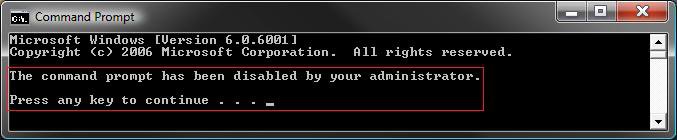
NoteIf you disable the command prompt and a user tries to open a command prompt window, the system displays a message explaining that a setting prevents the action. See the disabled example below.
EXAMPLE: Command Prompt Enabled
NOTE: The top screenshot is the normal command prompt, and the bottom screenshot is an elevated command prompt.


EXAMPLE: Command Prompt DisabledNOTE: You will see this message from both command prompts above when set as disabled.
 OPTION ONE
1. To Enable Command Prompt and Scripts
NOTE: This is the default setting.
A) Click on the download button below to download the file below.
Enable_Command_Prompt_and_Scripts.reg

B) Go to step 4.
2. To Disable Command Prompt Only and Allow Scripts
A) Click on the download button below to download the file below.
Disable_Command_Prompt.reg
B) Go to step 4.
3. To Disable Command Prompt and Scripts
WARNING: Do not prevent (disable) the computer from running batch files (Command Scripts) if the computer uses logon, logoff, startup, or shutdown batch file scripts, or for users that use Terminal Services. They will not work afterwards if you do.
A) Click on the download button below to download the file below.
Disable_Command_Prompt_and_Scripts.reg
4. Click on Save, and save the .reg file to the Desktop.
5. Right click on the downloaded .reg file and click on Merge.
6. Click on Run, Continue (UAC-Vista) or Yes (UAC-Windows7), Yes, and then OK when prompted.
7. When done, you can delete the downloaded .reg file if you like.
OPTION TWO 1. Open the all users, specific users or groups, or all users except administrators Local Group Policy Editor for how you want this policy applied.
2. In the left pane, click on User Configuration, Administrative Templates, and System. (See screenshot below)
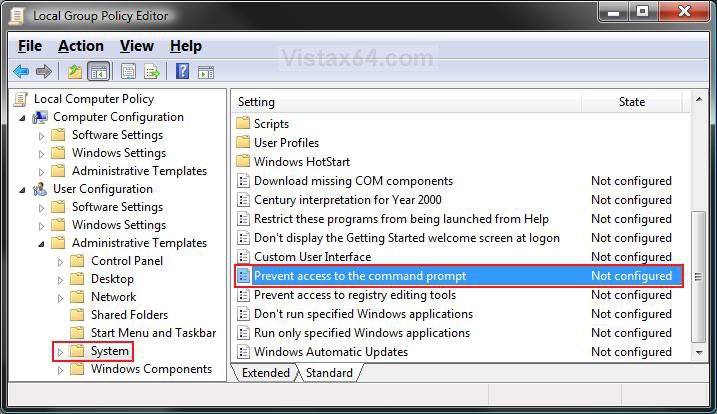
3. In the right pane, right click on Prevent access to the command prompt and click on Properties. (See screenshot above)
4. To Enable the Command Prompt and Scripts
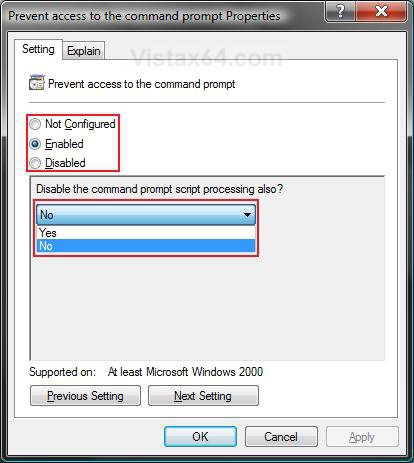
A) Select (dot) Disabled or Not Configured and click on OK. (See screenshot below 5C)
NOTE: Not Configured is the default setting.
B) Go to step 6.
5. To Disable the Command Prompt
A) Select (dot) Enabled.
B) Select Yes or No from the drop down menu to Disable or Allow Command Scripts (.cmd and .bat files) to still run.
WARNING: Do not prevent (disable) the computer from running batch files (Command Scripts) if the computer uses logon, logoff, startup, or shutdown batch file scripts, or for users that use Terminal Services. They will not work afterwards if you do.
C) Click on OK.
6. Close the Local Group Policy Editor window. Your done.
OPTION THREE 1. Open the Start Menu, then type regedit in the search box and press Enter.
2. If prompted by UAC, then click on the Continue (Vista) or Yes (Windows 7).
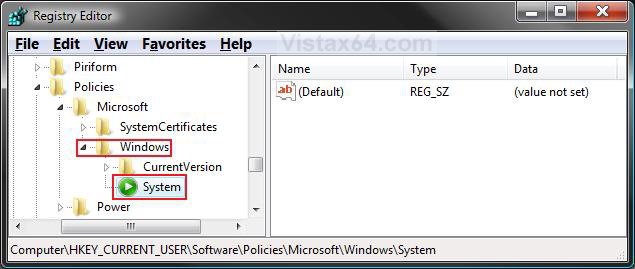
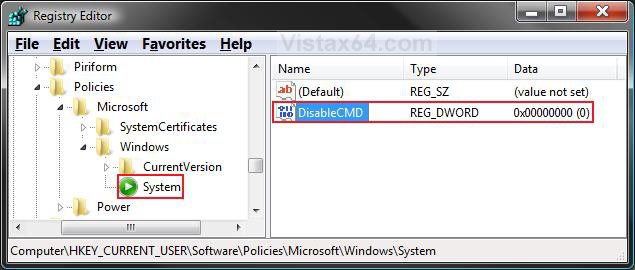
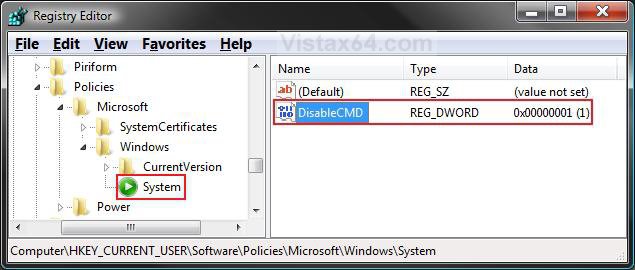
3. In regedit, navigate to the location below. (See screenshot below)
NOTE: If you do not have System in the left pane, then right click on Windows and click on New and Key. Type System and press Enter.
HKEY_CURRENT_USER\Software\Policies\Microsoft\Windows\System
4. To Disable the Command Prompt
A) In the right pane, right click on a empty area and click on New and DWORD (32-bit) Value. (See screenshot above)
B) Type DisableCMD and press Enter.
C) Right click on DisableCMD and click on Modify. (See screenshot below)
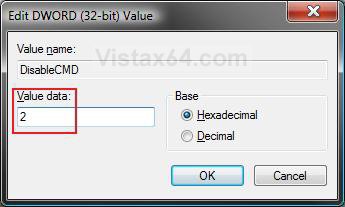
D) To Disable Command Prompt Only and Allow Scripts
- Type 2 and click on OK. (See screenshots below)
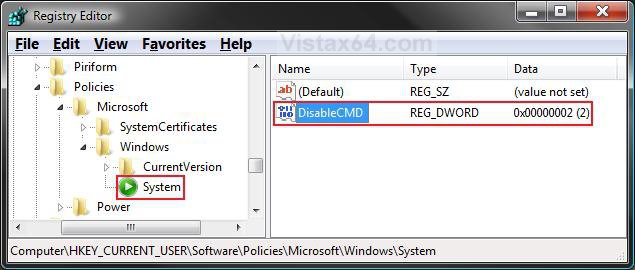
E) To Disable Command Prompt and Scripts
WARNING: Do not prevent (disable) the computer from running batch files (Command Scripts) if the computer uses logon, logoff, startup, or shutdown batch file scripts, or for users that use Terminal Services. They will not work afterwards if you do.
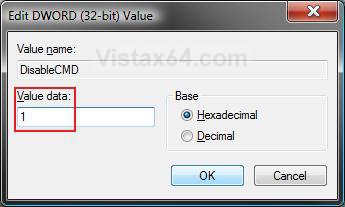
- Type 1 and click on OK. (See screenshots below)
F) Go to step 7.
6. To Enable Command Prompt and Scripts
NOTE: This is the default setting.
A) In the right pane, right click on DisableCMD and click on Delete. (See screenshot above)
B) Click on Yes to confirm deletion.
7. Close regedit.
That's it,Shawn
Related Tutorials
- How to Use Open Command Prompt Window Here in Vista
- How to Run Disk Defragmenter from the Command Prompt in Vista
- List of Commands for Vista and How to Use them
- How to Create a Elevated Command Prompt Shortcut in Vista
- How to Open a Elevated Command Prompt in Vista
- How to Open a Command Prompt at Startup in Vista
- How to Enable or Disable Regedit in Vista and Windows 7
Attachments
Last edited:


