
How to Restore Missing Default New Context Menu Items in Vista
 Information
This will show you how to restore any nonworking or missing default menu items from in the New context (right click) menu. This includes the Folder, Shortcut, Bitmap Image, Contact, Rich Text Document, Text Document, and Briefcase menu items.
 Note
NoteThis will restore the entire default key entry in the registry for the menu item that is missing in the New context menu. For more about the ShellNew key and how to add a menu item of your own, see:How to Add and Remove a New Menu Item in Vista
 Tip
TipIf New is missing from the context menu, then see: How to Restore or Remove New from the Context Menu in Vista and continue this tutorial to restore any missing menu items in the New menu.
NOTE: You can only see this New context menu when you right click on a empty space on the desktop or on a empty space in a Windows Explorer window.
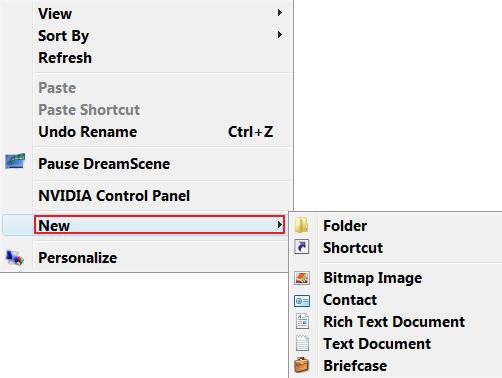
Here's How:
NoteSelect and download the New menu item(s) REG file(s) that is not working or is missing to restore them back to the New context menu item list.
1. To Restore Folder
A) Click on the download button below to download the
Restore_Folder.reg file.

2. To Restore Shortcut
A) Click on the download button below to download the
Restore_Shortcut.reg file.
3. To Restore Bitmap Image
A) Click on the download button below to download the
Restore_Bitmap_Image.reg file.
4. To Restore Contact
A) Click on the download button below to download the
Restore_Contact.reg file.
5. To Restore Rich Text Document
A) Click on the download button below to download the
Restore_Rich_Text_Document.reg file.
6. To Restore Text Document
A) Click on the download button below to download the
Restore_Text_Document.reg file.
7. To Restore Briefcase
A) Click on the download button below to download the
Restore_Briefcase.reg file.
8. Click on Save, and save the .reg file to the Desktop.
9. Right click on the downloaded .reg file and click on Merge.
10. Click on Run, Continue (UAC), Yes, and then OK when prompted.
11. Restart the computer to apply the changes.
12. When done, you can delete the downloaded .reg file(s) if you like.
That's it,Shawn
Related Tutorials
- How to Add and Remove a New Menu Item in Vista
- How to Restore or Remove New from the Context Menu in Vista
- How to Fix the New Folder Context Menu Item in Vista
- How to Enable or Disable the Context Menu in Vista
- Cannot Rename or Move a File or Folder in Vista Fix
- How to Fix the New Shortcut Context Menu Item in Vista
Attachments
-
Restore_Bitmap_Image.reg1.4 KB · Views: 3,312
-
Restore_Briefcase.reg2.8 KB · Views: 2,637
-
Restore_Contact.reg2.6 KB · Views: 2,718
-
Restore_Rich_Text_Document.reg700 bytes · Views: 3,741
-
Restore_Shortcut.reg3.8 KB · Views: 4,031
-
Restore_Text_Document.reg3.8 KB · Views: 6,544
-
Restore_Folder.reg7.2 KB · Views: 8,776
-
 thumb_Explorer_New.jpg3 KB · Views: 362
Last edited:


 .
.

 Any idea where i can start?

 "I tried your method and it did not work for me. I only show (Empty) when I right click to make a New Folder. This happen before and I had to restore to make it reappear. I have restored but perhaps not far enough back. HELP!"