How to Restrict or Unrestrict Drive Access in Vista and Windows 7
 Information
This will show you how to restrict all access (open or save) to all content of a drive or combination of drives that you select for all users on the computer.
All drives are set to be unrestricted by default in Vista and Windows 7.
All drives are set to be unrestricted by default in Vista and Windows 7.
 Note
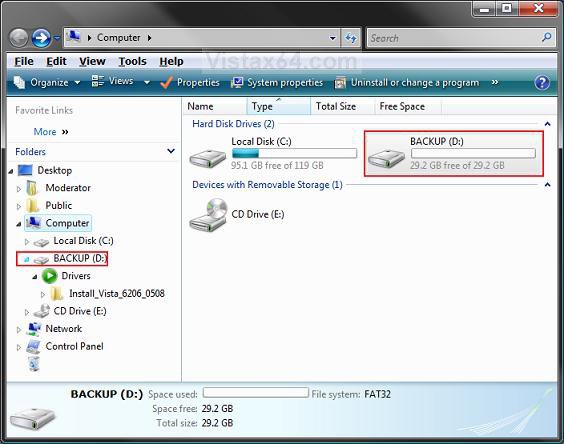
Note- When a drive is set as restricted, users can only browse through the drives directory in the Navigatoin Pane folder tree in Windows Explorer by clicking on the arrows to expand the folders. They will not be able to open a folder though in Windows Explorer. (See example below)
- If you would also like to hide or unhide this drive(s) in Computer and Windows Explorer, then see: How to Hide or Unhide a Drive in Vista
 Warning
This will not prevent users from using 3rd party programs to access restricted local and network drives. It also does not prevent administrators from using Disk Management to view and change restricted drive characteristics.
NOTE: Even when the drive is set as restricted, it will still be displayed in Computer. All users will not be able to access it though. They can only view the directory in the Navigation Pane folder tree.
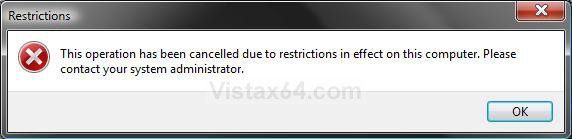
EXAMPLE: Displayed Error Message when a Drive is RestrictedNOTE: This is the error message a user will get when they try to open or save (access) anything to a restricted drive.
 METHOD ONE
NOTE: For more drive letter options, see the Method Three below.
1. Open the all users, specific users or groups, or all users except administrators Local Group Policy Editor for how you want this policy applied.
2. In the left pane, click on User Configuration, Administrative Templates, Windows Components, and Windows Explorer. (See screenshot below)
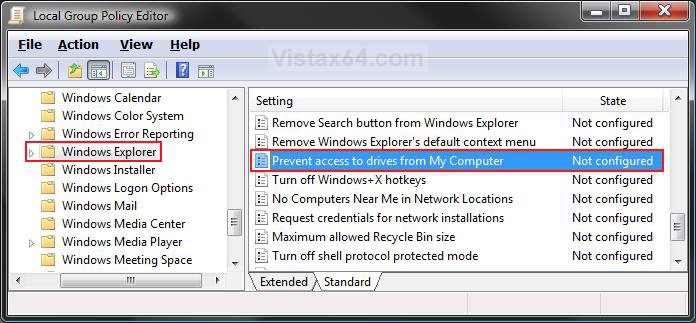
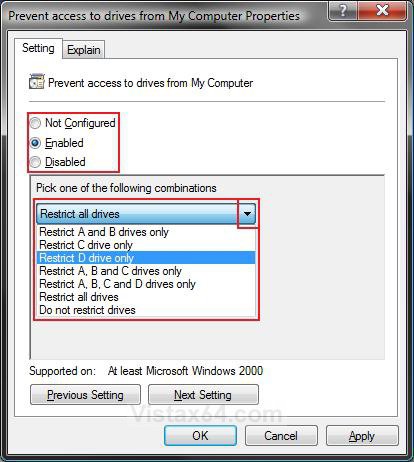
3. In the right pane, right click on Prevent access to drives from My Computer and click on Properties. (See screenshot above)
4. To Unrestrict All Drives Access
A) Select (dot) Disabled or Not Configured and click on OK. (See screenshot below step 5C)
B) Go to step 6.
5. To Restrict a Drive or Combination of Drives Access
A) Select (dot) Enabled. (See screenshot below step 5C)
B) Click on the drop down arrow and select the drive or combination of drives option that you want to set as restricted. (See screenshot below step 5C)
WARNING: Be careful of what you select. A restricted drive cannot be accessed by any users on the computer. This could be a problem if you need access to it.
C) Click on OK. (See screenshot below)
6. Close the Local Group Policy Editor window. Your done.
METHOD TWO NOTE: Which ever one REG file you choose to use, it will overide all of the others. For more drive letter options, see the Method Three below.
1. To Restrict A and B drives only
A) 
B) Go to step 8.
2. To Restrict C drive only
A)
B) Go to step 8.
3. To Restrict D drive only
A)
B) Go to step 8.
4. To Restrict A, B, and C drives only
A)
B) Go to step 8.
5. To Restrict A, B, C, and D drives only
A)
B) Go to step 8.
6. To Restrict All drives
A)
B) Go to step 8.
7. To Unrestrict All drives (Do not restrict drives)
A)
8. Click on Save, and save the .reg file to the Desktop.
9. Right click on the downloaded .reg file and click on Merge.
10. Click on Run, Continue (UAC-Vista) or Yes (Windows 7), Yes, and then OK when prompted.
11. When done, you can delete the downloaded .reg file if you like.
12. Log off and log on, or restart the computer to apply changes.
METHOD THREE 1. Open the Start Menu, then type regedit in the search box and press Enter.
2. If prompted by UAC, then click on the Continue (Vista) or Yes (Windows 7).
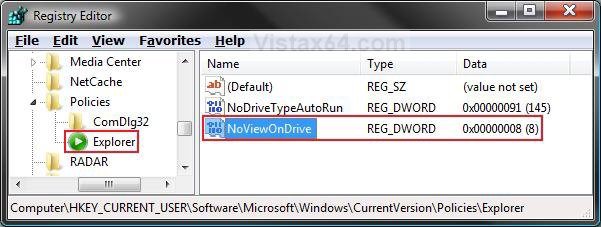
3. In regedit, navigate to the location below: (See screenshot below)
HKEY_CURRENT_USER\Software\Microsoft\Windows\CurrentVersion\Policies\Explorer
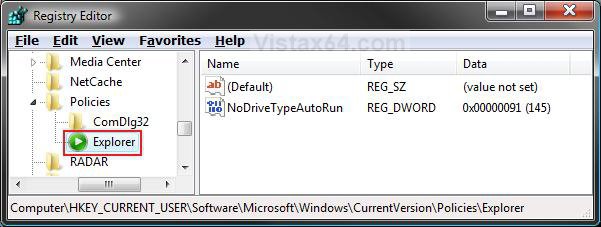
4. To Restrict a Drive or Combination of Drives Access
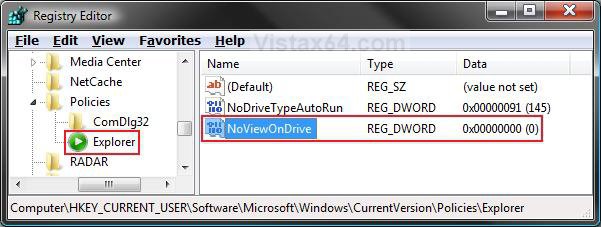
A) In the right pane of Explorer, right click on a empty area and click on New and DWORD (32-bit) Value. Type NoViewOnDrive and press Enter. (See screenshot below)
B) Right click on NoViewOnDrive and click on Modify.
C) Type in the drive option below in bold you want to set as restricted and click on OK. (See screenshot below)
NOTE: You can also dot Decimal and use one of these numbers for the drive with that letter you want to Restrict: A=1, B=2, C=4, D=8, E=16, F=32, G=64, H=128, I=256, J=512, K=1024, L=2048, M=4096, N=8192, O=16384, P=32768, Q=65536, R=131072, S=262144, T=524288, U=1048576, V=2097152, W=4194304, X=8388608, Y=16777216, Z=33554432, All drives=67108863
For Example: I'm using 8 to Restrict D drive only.
- Restrict A and B drives only - type 3
- Restrict C drive only - type 4
- Restrict D drive only - type 8
- Restrict A, B, and C drives only - type 7
- Restrict A, B, C, and D drives only - type f
- Restrict all drives - type 3ffffff
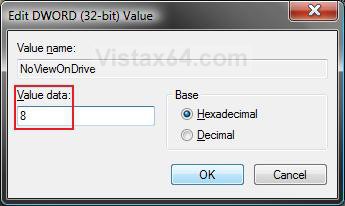
D) The registry will now look like this. (See screenshot below)
E) Go to step 6.
5. To Unrestrict All drives (Do not restrict drives)
A) In the right pane of Explorer, right click on NoViewOnDrive and click on Delete. (See screenshot above)
B) Click on Yes to confirm delete.
6. Close regedit.
7. Log off and log on, or restart the computer to apply changes.
That's it,Shawn
Related Tutorials
- How to Shrink and Create a Partition with Disk Management in Vista
- How to Delete and Extend a Partition with Disk Management in Vista
- How to Change a Drive Icon in Vista
- How to Hide or Show Drive Letters in Vista, Windows 7, and Windows 8
- How to Rename a Drive in Vista
- How to Disable or Enable Low Disk Space Warning in Vista
- How to Increase Hard Drive Performance in Vista
- How to Remove or Show Drives in the Vista and Windows 7 "Send To" Context Menu
- How to Add, Change, or Remove a Drive Letter in Vista
- How to Hide or Unhide a Drive in Vista
- How to Create a Drive Shortcut in Vista
- How to Take Ownership of a Item in Vista
- How to Deny or Allow Access to All Removable Drives in Vista
- How to Deny or Allow Read and Write Access to Floppy Drives in Vista
- How to Deny or Allow Read and Write Access to CD and DVD Drives in Vista
- How to Deny or Allow Read and Write Access to Removable Hard Drives in Vista
- How to Deny or Allow Read and Write Access to Tape Drives in Vista
- How to Mount or Dismount a Drive or Partition to a Folder in Vista
Attachments
-
Restrict_A_B_drives.reg312 bytes · Views: 11,086
-
Restrict_C_drive.reg312 bytes · Views: 10,485
-
Restrict_D_drive.reg312 bytes · Views: 9,569
-
Restrict_A_B_C_drives.reg312 bytes · Views: 8,851
-
Restrict_A_B_C_D_drives.reg312 bytes · Views: 9,670
-
Restrict_All_drives.reg312 bytes · Views: 11,306
-
Unrestrict_All_drives.reg286 bytes · Views: 14,882
-
 thumb_Hard_Drive.png8.3 KB · Views: 322
Last edited: