Windows Vista Forums
Vista Forums Home Join Vista Forums Windows 7 Forum Vista Tutorials Tags
Welcome to Windows Vista Forums. Our forum is dedicated to helping you find solutions with any problems, errors or issues you are experiencing with Windows Vista. The Vista forum also covers news and updates and has an extensive Windows Vista tutorial section that covers a wide range of tips and tricks.

Go Back   Vista Forums > Vista Forums > Tutorials

Vista - Folder Permissions

Comment
 

Folder Permissions

How to Change Folder Permissions
Published by Dzomlija
05-28-2008

How to Change Folder Permissions

Info: If you have multiple users on your computer, and there are specific folders that you do not want them to access (perhaps because they contain sensitive information of some sort), then this will show you how to modify the permissions of a folder so that only you can access them.

WARNING: Do not perform this procedure on a drive root (C:\, D:\, etc.), because you may not be able to easily restore the default permissions later. Incorrectly modifying the permissions of a drive root folder could render that drive inaccessible and could lead to data loss.


Option One
To Make a Folder Private:
1. Open Windows Explorer.
2. Navigate to the drive or folder containing the folder for which you want to modify the permissions.
3. Right-click on the folder, and select properties.
4. Click the "Security" tab:
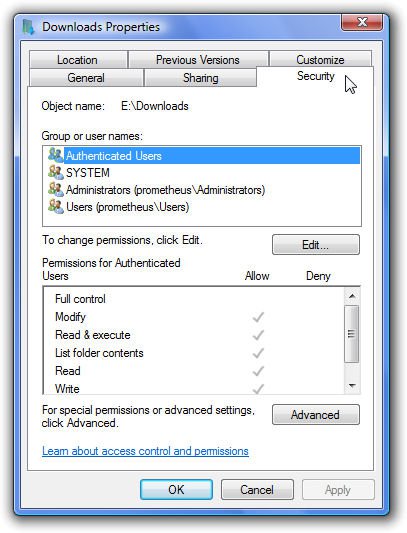
clicksecuritytab.jpg

5. Click the "Advanced" button to open the "Advanced Security Settings" window
6. Click the "Edit..." button.
7. Remove the check from "Include inheritable permissions from this objects parent". This will bring up a "Windows Security" prompt - click "Copy".
8. Click "OK".
9. Click "OK".
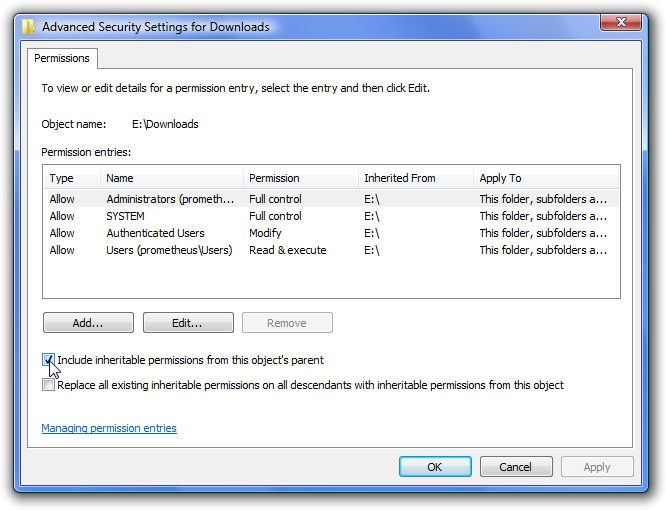
advancedsecuritysettings.jpg

10. Click "Edit..." to open the "Permissions for ..." window
11. Click "Add..."
12. Click "Advanced..."
13. Click "Find Now"
14. In the "Search Results" window, locate your user name, and click it once to highlight it
15. Click "OK"
16. Click "OK"
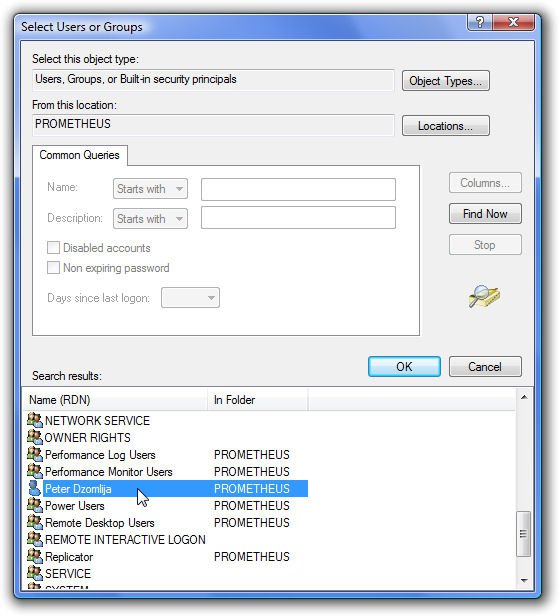
selectusersorgroups.jpg

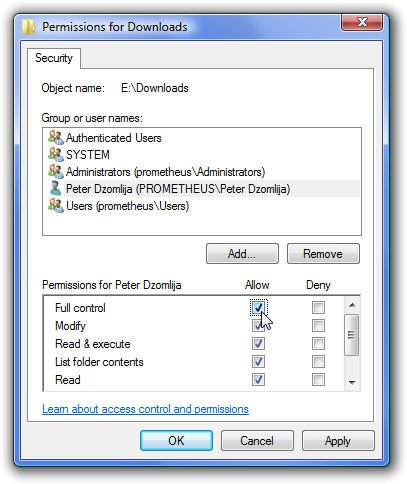
17. The user name you just added should be highlighted in the "Group or user names" list. If it is not, then click it once to highlight it.
18. Add a check to the box labelled "Full Control"
19. Click "OK"
20. Click "OK" again to close the "Properties" window
fullcontrol.jpg

21. Right-click on the folder again, and select "Properties", then click the "Security" tab
22. Click "Edit"
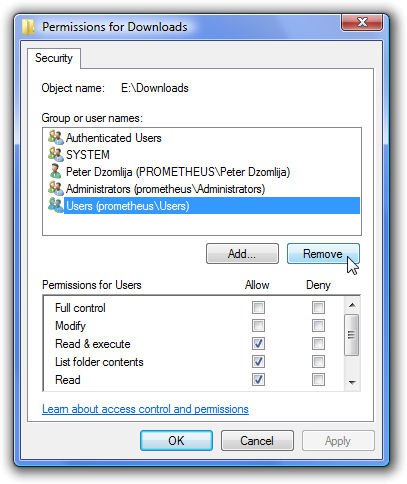
23. Click the "Users (COMPUTERNAME\Users)" item to highlight it, then click "Remove"
24. OPTIONAL: Click the "Administrators (COMPUTERNAME\Administrators)" item to highlight it, then click "Remove"
25. Click "OK"
removeusersgroup.jpg

26. Click "OK" to close the "Properties" window.

The folder, and all the files it contains will now only be accessible by you when you are logged in with your own user account.


Option Two
To Restore Inherited Permissions:
1. Open Windows Explorer.
2. Navigate to the drive or folder containing the folder for which you want to modify the permissions.
3. Right-click on the folder, and select properties.
4. Click the "Security" tab:
Click image for larger version

Name:	ClickSecurityTab.jpg
Views:	1130
Size:	71.3 KB
ID:	4168

5. Click the "Advanced" button to open the "Advanced Security Settings" window
6. Click the "Edit..." button.
7. Add a check to "Include inheritable permissions from this objects parent". This will bring up a "Windows Security" prompt - click "Copy".
8. Add a check to "Replace all existing inheritable permissions on all descendants..."
9. Click "OK"
10. Click "Yes" to the "Windows Security" prompt asking if you want to continue.
11. Click "OK"
12. Click "Edit..."
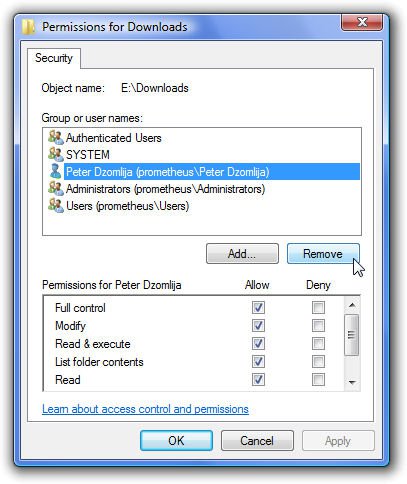
13. Click your user name in the "Group or user names" list, then click "Remove"
14. If you had previously added other users in addition to yourself, then repeat step 13 above for all those users. Leave "Authenticated Users", "SYSTEM", "Administrators" and "Users" in the "Group or user names" list.
15. Click "OK"
removeyouruseraccount.jpg

16. Click "OK"
Published by
Dzomlija's Avatar
Resistance is Futile

Join Date: Aug 2007
Location: South Africa
Posts: 2,217
Rep Power: 119
Dzomlija has a reputation beyond reputeDzomlija has a reputation beyond reputeDzomlija has a reputation beyond reputeDzomlija has a reputation beyond reputeDzomlija has a reputation beyond reputeDzomlija has a reputation beyond reputeDzomlija has a reputation beyond reputeDzomlija has a reputation beyond reputeDzomlija has a reputation beyond reputeDzomlija has a reputation beyond reputeDzomlija has a reputation beyond repute

Tutorial Tools

Applies to
Home Premium,Business,Enterprise,Ultimate
64 Bit & 32 Bit

Old 06-26-2009  
arielmanayon


Vista Ultimate x64


Re: Folder Permissions

Hi. I wish I have read this thread before I did something on my vista drives.
I tried to modify some permissions on my root drives. The "authenticated users" entry or group has been removed. I wasn't gonna remove it, I just edited it, removed all the check marks, and when I clicked "OK", the "Authenticated Users" was gone in the list.

My question is, how do I restore that entry? I wanted to reset what I did, so that I can restrict a drive or folder to the "limited" or standard users in my Vista System.

Thanks

My System SpecsSystem Spec
Old 07-26-2009  
ossimo


Vista Home Premium 32bit


Re: Folder Permissions

Hi there,
I have actually followed this tutorial to deny all permissions to a standard account but the problem is, when I tried to test it I noticed that I can still take the ownership of the folder from the Administrator account and therefore change the permission settings to gain full access to the contents of that folder..!?
I have also noticed that when I login as a standard account user I can easily change its type to an administrator account through “User Accounts” in Control Panel..?!
Is that normal?


Thanks.
My System SpecsSystem Spec
Comment

Tutorial Tools


Similar Threads
Tutorial Category
Folder permissions Vista General
Trouble with folder layout (not folder permissions) inheritance Vista file management
Re: Folder Permissions Vista file management
Folder Permissions Vista security
Folder gives me no permissions??? Vista security


Vista Forums is an independent web site and has not been authorized,
sponsored, or otherwise approved by Microsoft Corporation.
"Windows Vista", the Start Orb, and related materials are trademarks of Microsoft Corp.
© Designer Media Ltd
Tutorial powered by GARS 2.1.8m ©2005-2006

1 2 3 4 5 6 7 8 9 10 11 12 13 14 15 16 17 18 19 20 21 22 23 24 25 26 27 28 29 30 31 32 33 34 35 36 37 38 39 40 41 42 43 44 45 46