
Windows Vista Forums
Vista Forums Home Join Vista Forums Windows 7 Forum Vista Tutorials Tags
Welcome to Windows Vista Forums. Our forum is dedicated to helping you find solutions with any problems, errors or issues you are experiencing with Windows Vista. The Vista forum also covers news and updates and has an extensive Windows Vista tutorial section that covers a wide range of tips and tricks.

Go Back   Vista Forums > Vista Forums > Tutorials

Vista - Defragment Boot Files - Enable or Disable

Comment
 

Defragment Boot Files - Enable or Disable

How to Enable or Disable Defrag of Boot Files at Startup in Vista
Published by Brink
05-28-2008

How to Enable or Disable Defrag of Boot Files at Startup in Vista


Information
  This will show you how to enable or disable the defragging of the boot files automatically during the startup or restart of Vista. This is enabled by default in Vista.
NOTE
  When enabled, this can help improve the performance of the computer by consolidating the fragmented boot files to get a faster startup time.
Tip
  If you would like to create a Defragment Boot Files shortcut so you can manually defrag the boot files when you want to without having to restart the computer, then see: How to Create a Defragment Boot Files Shortcut in Vista
RELATED LINKS:


OPTION ONE:
Through a Download
1. To Disable Defrag of Boot Files at Startup -
A) Click on the download button below to download the Disable_Auto_Boot_Defrag.reg file.

B) Go to step 3.


2. To Enable Defrag of Boot Files at Startup -
A) Click on the download button below to download the Enable_Auto_Boot_Defrag.reg file.


3. Click on Save, and save the .reg file to the Desktop.

4. Right click on the .reg file (on Desktop) fand click Merge.

5. Click on the Run button for Security Warning pop-up.

6. Click on Continue (UAC), Yes, and then OK when prompted.

7. When done, you can delete the .reg file (on Desktop).


OPTION TWO:
The Manual Way
1. Open the Start Menu.

2. In the white line (Start Search) area, type regedit and press Enter.

3. Click on the Continue button for the UAC prompt.

4. In regedit, go to: (See screenshot below)
HKEY_LOCAL_MACHINE\SOFTWARE\Microsoft\Dfrg\BootOptimizeFunction
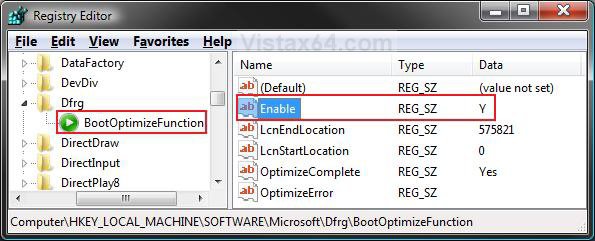
reg_enabled.jpg
5. To Disable Defrag of Boot Files at Startup -
A) In the right pane, right click on Enable and click Modify. (See screenshot above)

B) Type N and click OK. (See screenshot below)
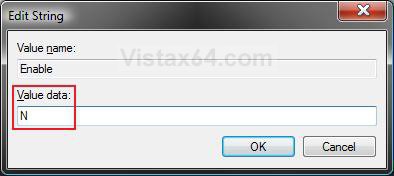
Name:  Modify_Disabled.jpg
Views: 17320
Size:  25.9 KB
C) The registry will now look like this. (See screenshot below)
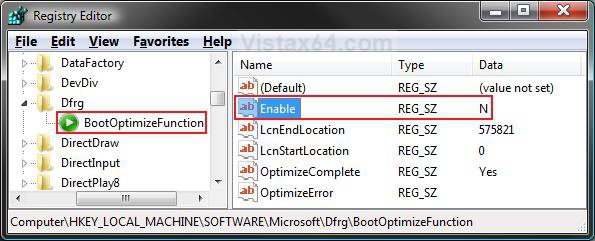
reg_disabled.jpg
D) Go to step 7.
6. To Enable Defrag of Boot Files at Startup -
A) In the right pane, right click on Enable and click Modify. (See screenshot above)

B) Type Y and click OK. (See screenshot below)
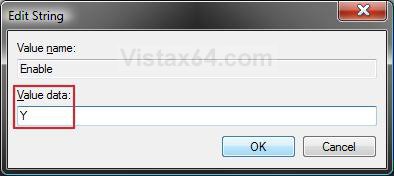
Name:  Modify_Enabled.jpg
Views: 17344
Size:  25.9 KB
C) The registry will now look like this. (See screenshot below step 4)
7. Close regedit.
That's it,
Shawn

Published by
Brink's Avatar
Administrator

Join Date: Apr 2007
Location: Texas, USA
Posts: 25,923
Rep Power: 150
Brink has a reputation beyond reputeBrink has a reputation beyond reputeBrink has a reputation beyond reputeBrink has a reputation beyond reputeBrink has a reputation beyond reputeBrink has a reputation beyond reputeBrink has a reputation beyond reputeBrink has a reputation beyond reputeBrink has a reputation beyond reputeBrink has a reputation beyond reputeBrink has a reputation beyond repute

Tutorial Tools

Applies to
All Vista Versions
64 Bit & 32 Bit

Old 07-30-2008  
krisdestruction


Vista Ultimate / XP Platinum


Re: Defragment Boot Files - Enable or Disable

does vista do this every time it starts up?

My System SpecsSystem Spec
Old 07-30-2008  
Brink


Vista x64 Ultimate SP2, Windows 7 Ultimate x64


Re: Defragment Boot Files - Enable or Disable

Hi Krisdestruction, and welcome to Vista Forums.

Yes, but only as needed.
My System SpecsSystem Spec
Old 08-08-2008  
WildEagle


Vista X64 Ultimate


Re: Defragment Boot Files - Enable or Disable

Gonna do the work to set the Vista defrag utility to defrag boot files, on boot up as needed, when I get a chance.

Thanks for this, I was wondering if something like this was possible, since I don't use Diskeeper anymore.
My System SpecsSystem Spec
Old 08-08-2008  
Brink


Vista x64 Ultimate SP2, Windows 7 Ultimate x64


Re: Defragment Boot Files - Enable or Disable

Your welcome WildEagle. It should be enabled by default though.
My System SpecsSystem Spec
Old 08-08-2008  
WildEagle


Vista X64 Ultimate


Re: Defragment Boot Files - Enable or Disable

Just checked it is enabled by default. Wasn't sure if it was enabled already.
My System SpecsSystem Spec
Old 08-11-2008  
krisdestruction


Vista Ultimate / XP Platinum


Re: Defragment Boot Files - Enable or Disable

I'm currently using PerfectDisk 2008 and defrag on boot is not a problem. Defragging the MTF and lots of other places are available too.
My System SpecsSystem Spec
Old 10-19-2008  
TorchMan


Vista Ultimate x64


Re: Defragment Boot Files - Enable or Disable

Hello. I have a little qestion. What mean's "LcnEndLocation"? In your registry entry i can seen value 575821, but in my registry is this value 0. Is this range of space in bytes of the system files on the disk or something?

Thank you in advice

TorchMan™
My System SpecsSystem Spec
Old 10-19-2008  
Brink


Vista x64 Ultimate SP2, Windows 7 Ultimate x64


Re: Defragment Boot Files - Enable or Disable

Hi Torchman,

Well basically LcnEndLocation stands for the "Logical Cluster Number (on the hard drive) End Location" of the files moved by Disk Defragmenter for boot optimization (defrag), and LcnStartLocation is for the start location.

The data within these cluster numbers is usually the prefetch data. The size numbers for LcnEndLocation and LcnStartLocation will vary and should not be manually modified.

Hope this helps,
Shawn
My System SpecsSystem Spec
Old 02-20-2009  
kiddieboy12


Vista Home Premium 32bit


Re: Defragment Boot Files - Enable or Disable

um. what if i use smart defrag. and i defag like every 20 minuites. will i need it?
My System SpecsSystem Spec
Comment

Tutorial Tools


Similar Threads
Tutorial Category
DEP - Enable or Disable Tutorials
Enable/Disable Devices using Batch files Drivers
Defragment Boot Files - Create Shortcut Tutorials
Select Files - Disable or Enable Full Row Select Tutorials
Files that won't defragment Vista performance & maintenance


Vista Forums is an independent web site and has not been authorized,
sponsored, or otherwise approved by Microsoft Corporation.
"Windows Vista", the Start Orb, and related materials are trademarks of Microsoft Corp.
© Designer Media Ltd
Tutorial powered by GARS 2.1.8m ©2005-2006

1 2 3 4 5 6 7 8 9 10 11 12 13 14 15 16 17 18 19 20 21 22 23 24 25 26 27 28 29 30 31 32 33 34 35 36 37 38 39 40 41 42 43 44 45 46
