Windows Vista Forums
Vista Forums Home Join Vista Forums Windows 7 Forum Vista Tutorials Tags
Welcome to Windows Vista Forums. Our forum is dedicated to helping you find solutions with any problems, errors or issues you are experiencing with Windows Vista. The Vista forum also covers news and updates and has an extensive Windows Vista tutorial section that covers a wide range of tips and tricks.

Go Back   Vista Forums > Vista Forums > Tutorials

Vista - Defragment Boot Files - Create Shortcut

Comment
 

Defragment Boot Files - Create Shortcut

How to Create a Defragment Boot Files Shortcut in Vista
Published by Brink
05-28-2008

How to Create a Defragment Boot Files Shortcut in Vista
Information
  This will show you how to create a Defragment Boot Files shortcut so you can manually defrag the boot files on the C: drive when you want to without having to restart the computer.
Tip
  To enable or disable the defrag of boot files at the startup or restart of Vista automatically, see: How to Enable or Disable Defrag of Boot Files at Startup in Vista
RELATED LINKS:

STEP ONE:
Create the Shortcut
Through a Download:
1. Click on the download button below to download the
Defragment_Boot_Files.zip file.

2. Click on Save and save it to the Desktop.

3. Right click on the Defragment_Boot_Files.zip file (on desktop) and click on Open.

4. Click on Allow in the UAC prompt.

5. Extract the Defragment Boot Files shortcut to the desktop.

6. Place the shortcut where you would like to use it at.

7. When done, you can delete the Defragment_Boot_Files.zip file (on desktop) if you want to.

8. Go to the STEP TWO section below.

The Manual Way:
1. Right click on a empty area of the desktop.

2. Click on New and Shortcut.

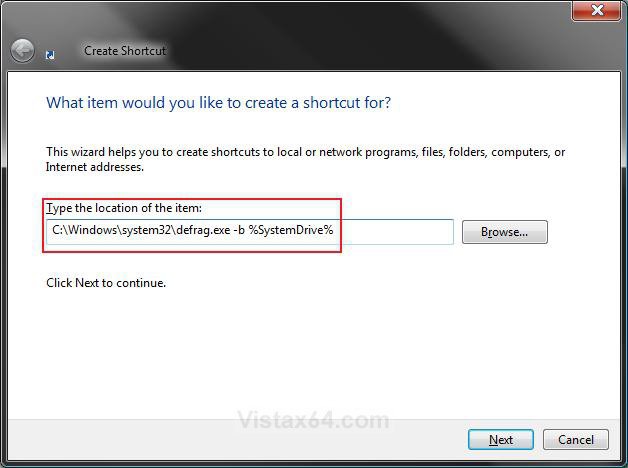
3. Type C:\Windows\System32\Defrag.exe -b %SystemDrive% in the location field. (See screenshot below step 4)

4. Click on the Next button.
step1.jpg
5. Type Defragment Boot Files for the name. (See screenshot below step 6)
NOTE: You can name it anything you would like though.

6. Click on the Finish button.
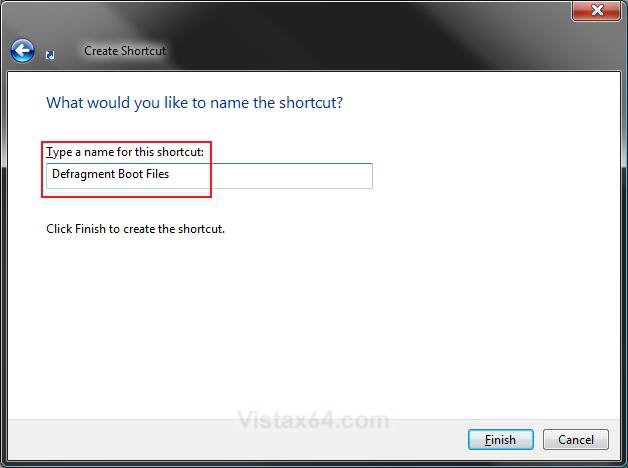
step2.jpg
7. Place the shortcut where you would like to use it at.

8. Go to the STEP TWO section below.


STEP TWO:
How to Use the Shortcut
1. Right click on the Defragment Boot Files (on desktop) shortcut and click Run as administrator. (See screenshot below)
NOTE: If you do not click Run as administrator, the shortcut will not work and you will only see a quick flash of the command prompt instead.
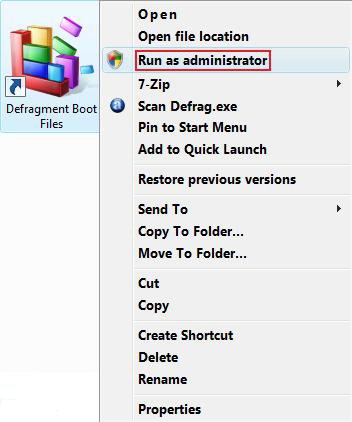
run_as_administrator.jpg
2. Click on Continue in the UAC prompt.

3. You will now see this command prompt window open. (See screenshot below)
NOTE:
A) This command prompt window will close on it's own when the defrag of the boot files is done. It will usually only take just a few minutes or so to finish.
B) If you need or want to stop it, then click on the command prompt window and press Ctrl+C. The command prompt will close soon after.
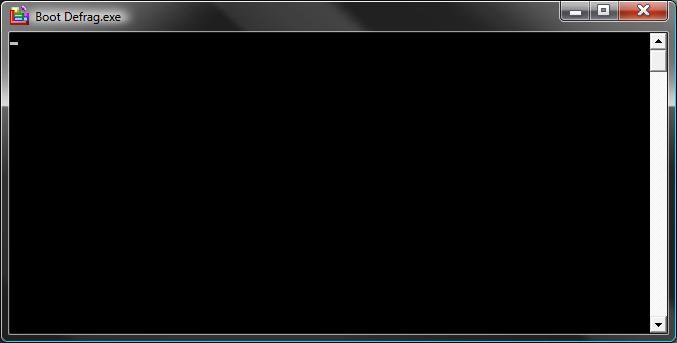
command_window.jpg
That's it,
Shawn

Published by
Brink's Avatar
Administrator

Join Date: Apr 2007
Location: Texas, USA
Posts: 25,927
Rep Power: 150
Brink has a reputation beyond reputeBrink has a reputation beyond reputeBrink has a reputation beyond reputeBrink has a reputation beyond reputeBrink has a reputation beyond reputeBrink has a reputation beyond reputeBrink has a reputation beyond reputeBrink has a reputation beyond reputeBrink has a reputation beyond reputeBrink has a reputation beyond reputeBrink has a reputation beyond repute

Tutorial Tools

Applies to
All Vista Versions
64 Bit & 32 Bit

Old 07-25-2008  
rav-e


Vista Ultimate x64


Re: Defragment Boot Files - Create Shortcut

hey thanks a lot~

My System SpecsSystem Spec
Old 07-26-2008  
Brink


Vista x64 Ultimate SP2, Windows 7 Ultimate x64


Re: Defragment Boot Files - Create Shortcut

You're welcome Rav-e.

Shawn
My System SpecsSystem Spec
Old 11-12-2008  
snadge


Vista Ultimate x64


Re: Defragment Boot Files - Create Shortcut

does this actually ONLY defrag the boot files or just defrag the drive?

how come this isnt a very popular tweak , this is only site I can find it on but yet its probably one of the best Vista tweaks?

does this work with readyboot? (not readyboost)
My System SpecsSystem Spec
Old 11-12-2008  
Brink


Vista x64 Ultimate SP2, Windows 7 Ultimate x64


Re: Defragment Boot Files - Create Shortcut

Hello Snadge,

This shortcut only defrags the boot files of the C: drive with Vista on it, so it will not work on another drive or with readyboost.

I'm not sure why other than you could set it to do this automatically during startup or restart.

Defragment Boot Files - Enable or Disable
My System SpecsSystem Spec
Old 11-13-2008  
snadge


Vista Ultimate x64


Re: Defragment Boot Files - Create Shortcut

thanks

i run this and it spent 10 minutes defragging? surely that cant be right if its just boot files and it does this auto every boot?
My System SpecsSystem Spec
Old 11-13-2008  
Brink


Vista x64 Ultimate SP2, Windows 7 Ultimate x64


Re: Defragment Boot Files - Create Shortcut

Not sure why it does take longer, but i would guess that it is because of it being done from within the OS and being allowed to completely finish.
My System SpecsSystem Spec
Comment

Tutorial Tools


Similar Threads
Tutorial Category
Defragment Boot Files - Enable or Disable Tutorials
Defragment versus moving files? Virtual Server
cannot create shortcut Vista General
Files that won't defragment Vista performance & maintenance
create shortcut. Vista installation & setup


Vista Forums is an independent web site and has not been authorized,
sponsored, or otherwise approved by Microsoft Corporation.
"Windows Vista", the Start Orb, and related materials are trademarks of Microsoft Corp.
© Designer Media Ltd
Tutorial powered by GARS 2.1.8m ©2005-2006

1 2 3 4 5 6 7 8 9 10 11 12 13 14 15 16 17 18 19 20 21 22 23 24 25 26 27 28 29 30 31 32 33 34 35 36 37 38 39 40 41 42 43 44 45 46