
How to Restore Missing Default Start Menu Shortcuts in Vista
 Information
This will provide you with separate downloads that include all of the All Programs default shortcuts in the Start menu for each edition of Vista so you can either restore all of the shortcuts or just the ones you need.
 Note
NoteA Start Menu shortcuts download for the Vista Enterprise edition is not included in this tutorial. You can use the download for Ultimate in it's place.
EXAMPLE: Start menu All Programs for Vista Home Basic, Home Premium, Business, and Ultimate
NOTE: To compare and see the features in each edition of Vista, see: Windows Vista Editions Overview and The Vista Editions Comparison Table
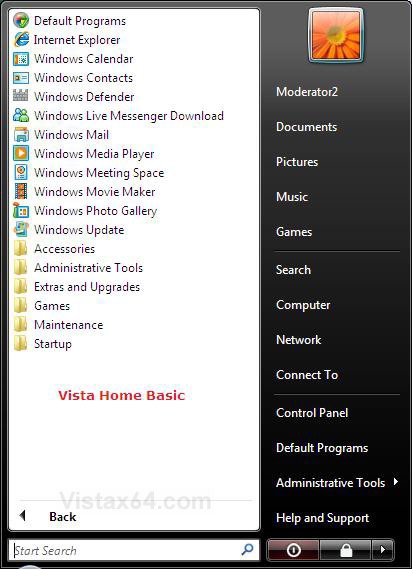
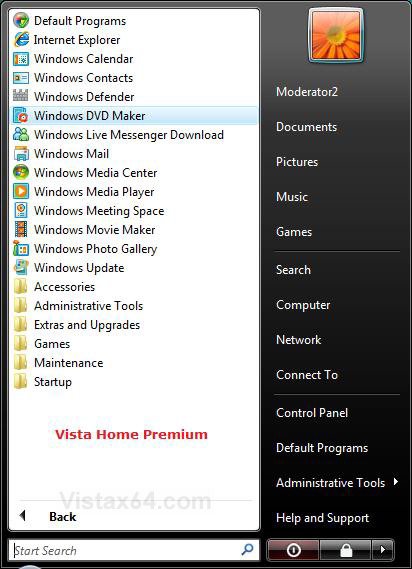
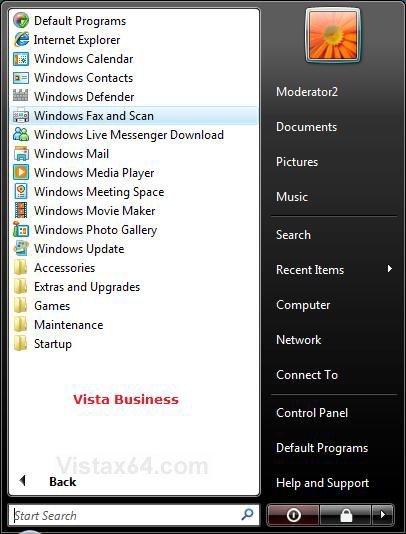
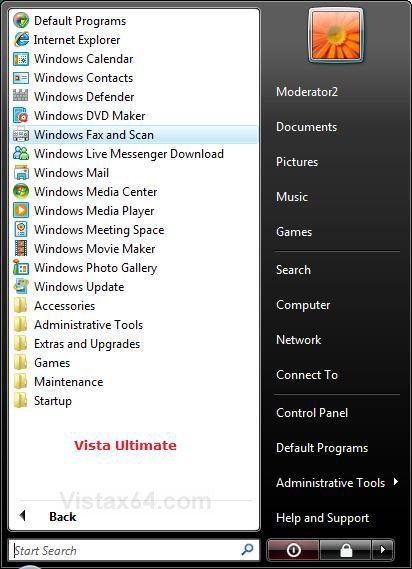
 STEP ONE
NOTE: All 32 bit and 64 bit editions of Vista have these same single current user default Start menu shortcuts. You will also need to download the All Users Default Shortcuts for your edition of Vista in STEP TWO below.
1. Click on the Download button below to download the file below.
Single_User_Shortcuts.zip

2. Save the Single_User_Shortcuts.zip file to the desktop.
3. Right click on the Single_User_Shortcuts.zip file (on desktop) and click on Open.
4. Click on Allow in the UAC prompt.
5. Extract the Single_User_Shortcuts folder to the desktop.
6. Right click on the Start button and click on Open or Explore, not Open/Explore All Users. (See screenshot below)
NOTE: This will open this hidden Start Menu folder in Windows Explorer:
C:\Users\(user name)\AppData\Roaming\Microsoft\Windows\Start Menu
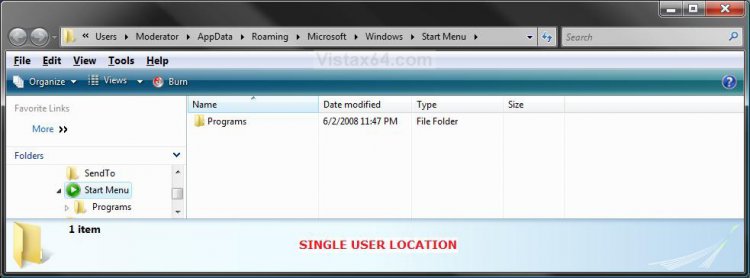
7. To Restore All Default Single User Start Menu Shortcuts
A) Open the Single_User_Shortcuts folder (on desktop) and right click on the Programs folder and click on Copy.
B) Right click on a empty space in the Windows Explore window and click on Paste. (See screenshot above)
C) Click on Yes and Copy and Replace to confirm the copying of the default shortcuts and desktop.ini files.
8. To Restore Just the Single User Shortcuts You Want
A) Open the Single_User_Shortcuts folder (on desktop) and manually copy the shortcuts you want over to the Start menu location in the Programs folder in the Windows Explorer window location above. (See screenshot below step 6)
STEP TWO NOTE: You will just need to select the download for your edition of Vista. You will also need to do STEP ONE above to restore the Single User default Start Menu shortcuts.
1. For Vista 32 bit or 64 bit Home Basic
A) Click on the download button below to download the file below.
All_Users_Home_Basic.zip
B) Go to step 5.
2. For Vista 32 bit or 64 bit Home Premium
A) Click on the download button below to download the file below.
All_Users_Home_Premium.zip
B) Go to step 5.
3. For Vista 32 bit or 64 bit Business
A) Click on the download button below to download the file below.
All_Users_Business.zip
B) Go to step 5.
4. For Vista 32 bit or 64 bit Ultimate
A) Click on the download button below to download the file below.
All_Users_Ultimate.zip
5. Save the ZIP file to the desktop.
6. Right click on the ZIP file (on desktop) and click on Open.
7. Click on Allow in the UAC prompt.
8. Extract the All_Users_(Vista Edition) folder to the desktop.
9. Right click on the Start button and click on Open All Users or Explore All Users, not Open/Explore. (See screenshot below)
NOTE: This will open this hidden Start Menu folder in Windows Explorer:
C:\ProgramData\Microsoft\Windows\Start Menu
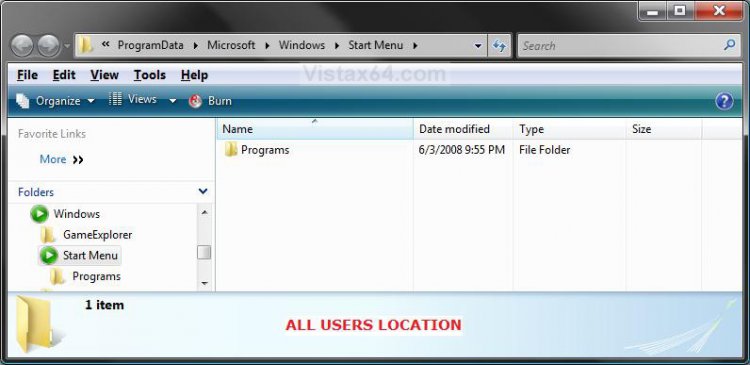
10. To Restore All Default All Users Start Menu Shortcuts
A) Open the All_Users_(Vista Edition) folder (on desktop) and highlight the Programs folder, Default Programs shortcut, and Windows Update shortcut, then right click on them and click on Copy.
B) Right click on a empty space in the Windows Explore window and click on Paste. (See screenshot above)
C) Click on Yes and Copy and Replace to confirm the copying of the default shortcuts and desktop.ini files.
11. To Restore Just the All Users Shortcuts You Want
A) Open the All_Users_(Vista Edition) folder (on desktop) and manually copy the shortcuts you want over to the Start menu location in the Programs folder in the Windows Explorer window location above. (See screenshot below step 9)
That's it,
Shawn
Related Tutorials
- How to Customize the Start Menu in Vista
- How to Display Small or Large Icons in the Vista Start Menu
- How to Enable or Disable the All Programs List in the Vista Start Menu
- How to Restore the Start Menu Search Button after Installing the Vista SP1
- How to Enable or Disable the Taskbar and Start Menu Properties Window in Vista
- How to Add or Delete a Shortcut or Folder From the Start Menu in Vista
- How to Hide or Show Hidden Files and Folders in Vista
- How to Restore the Administrative Tools Shortcuts in Vista
- How to Fix the Games Explorer Link in the Vista Start Menu
- Game Shortcut Links in Games Explorer Do Not Work
Attachments

Last edited by a moderator:


