
Folder Sorting
Standard Sorting
In all views of Windows Explorer, including File Dialogs used by programs, clicking on a column header will sort the view using that column. Clicking on the same column header will reverse the sort.
For purposes of clarity, the screenshots in this tutorial show a folder view where the columns have been customized to show only the Name, Tags, Size and Title headers.
In the above screenshot, you can see that the view has been sorted by the Name column.
If you were to click on the Tags column, the sort will be performed according to the Tags of the files. If the Tags are the same, then Windows Explorer will sort the files according to the Name column.
Clicking on the Title column will sort the view according to the Title of the file. If the Titles are the same, then Windows Explorer will sort the files according to the Name column.
Advanced Sorting
But what if you want to sort a view first by Tags, and then by Title? Under ordinary circumstances, you might think that this cannot be done, because if a sort is performed on any column header other than Name, then the Name column is used as a fallback if the values are identical, as shown in screenshots 2 and 3 above.
In Screenshot 4 above, the Tags column was clicked to sort by Tags. But the fallback sort for identical tags is being done on the Title column, not the default Name column.
This was accomplished by first clicking on the Tags column, and then holding down the <CTRL>+<SHIFT> keys when clicking on the Title column.
But it does not end there. If you then <CTRL>+<SHIFT>+Click the size column of Screenshot 4, then the sort will be extended to include the Size column, changing the sort order to Tags, Title then Size.
When modifying the sort order of folder views, make note of the following:
1. General Tips - Advanced Windows Searches
2. How to Change the Windows Explorer Columns and Sort Order in Vista
Standard Sorting
In all views of Windows Explorer, including File Dialogs used by programs, clicking on a column header will sort the view using that column. Clicking on the same column header will reverse the sort.
For purposes of clarity, the screenshots in this tutorial show a folder view where the columns have been customized to show only the Name, Tags, Size and Title headers.
Screenshot 1
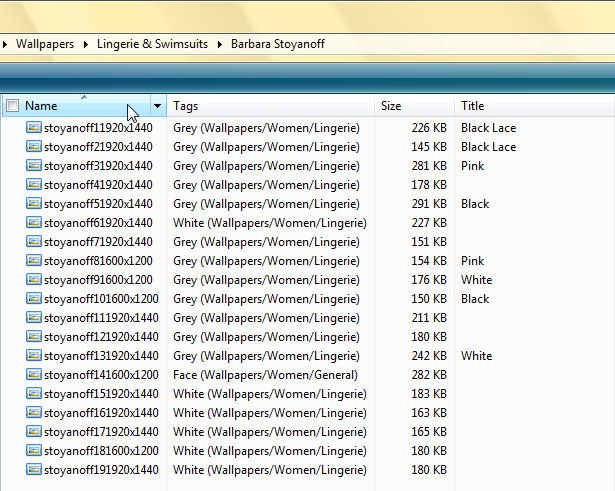
Folder sorted by Name
Folder sorted by Name
In the above screenshot, you can see that the view has been sorted by the Name column.
Screenshot 2
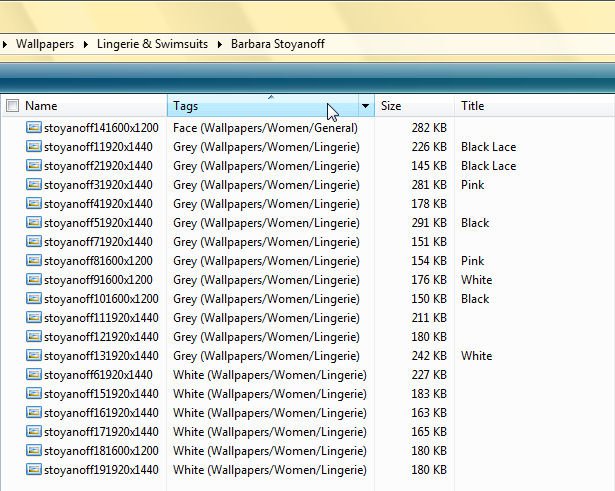
Folder sorted by Tags
Folder sorted by Tags
If you were to click on the Tags column, the sort will be performed according to the Tags of the files. If the Tags are the same, then Windows Explorer will sort the files according to the Name column.
Screenshot 3
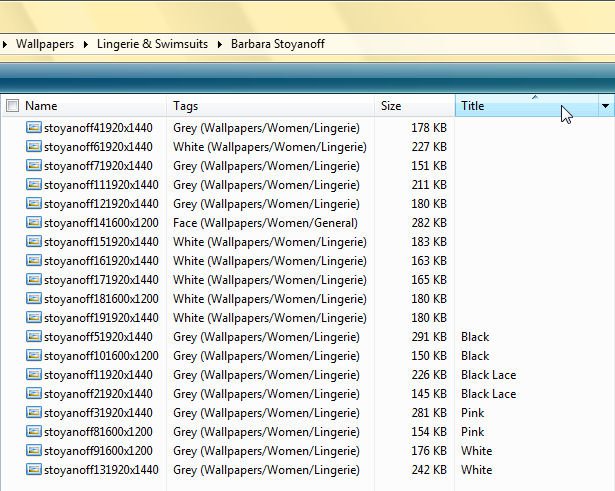
Folder sorted by Title
Folder sorted by Title
Clicking on the Title column will sort the view according to the Title of the file. If the Titles are the same, then Windows Explorer will sort the files according to the Name column.
Advanced Sorting
But what if you want to sort a view first by Tags, and then by Title? Under ordinary circumstances, you might think that this cannot be done, because if a sort is performed on any column header other than Name, then the Name column is used as a fallback if the values are identical, as shown in screenshots 2 and 3 above.
Screenshot 4
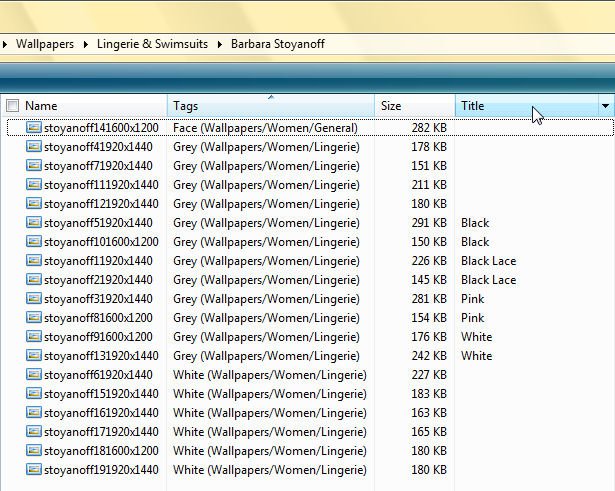
Folder sorted by Tags and Title
Folder sorted by Tags and Title
In Screenshot 4 above, the Tags column was clicked to sort by Tags. But the fallback sort for identical tags is being done on the Title column, not the default Name column.
This was accomplished by first clicking on the Tags column, and then holding down the <CTRL>+<SHIFT> keys when clicking on the Title column.
Screenshot 5
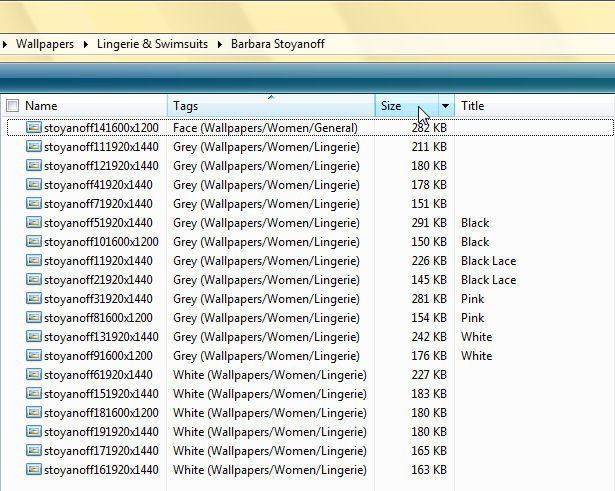
Folder sorted by Tags, Title and then Size
Folder sorted by Tags, Title and then Size
But it does not end there. If you then <CTRL>+<SHIFT>+Click the size column of Screenshot 4, then the sort will be extended to include the Size column, changing the sort order to Tags, Title then Size.
When modifying the sort order of folder views, make note of the following:
- You must use a normal click to specify the first column that will be used for the sort.
- The order in which you <CTRL>+<SHIFT>+Click additional headers determines the priority used when sorting.
- In all cases the Name column will always be last in the order of sorting, so that if all the criteria you have specified is identical, the files will be sorted by Name.
1. General Tips - Advanced Windows Searches
2. How to Change the Windows Explorer Columns and Sort Order in Vista
Attachments

Last edited by a moderator:

