
How to Create a "Local Area Network Connection Status" Shortcut in Vista
 Information
This will show you how to create a Local Area Network Connection Status shortcut so that you can quickly disable, enable, diagnose, or open a network adapter's connection properties.
 Note
NoteIf you decide you do not want this shortcut later, then you can simply right click on it and click on Delete to delete just this shortcut.
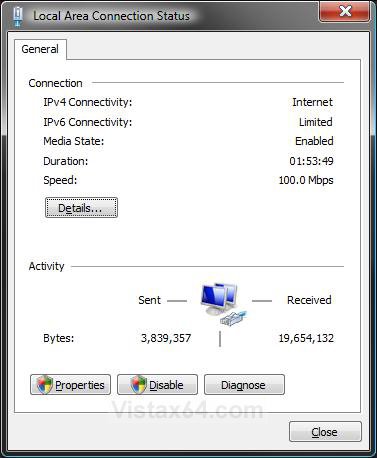
NOTE: This is what you will see when you click on the shortcut to open it. A Local Area Connection is created for an Ethernet network adapter. A Wireless Network Connection is created for a wireless network adapter.
Here's How:
1. Right click on the Network icon in the Notification area and click on Network and Sharing Center. (See screenshot below)
A) Go to step 3.

OR
2. Open the Control Panel (Classic View) and click on the Network and Sharing Center icon.
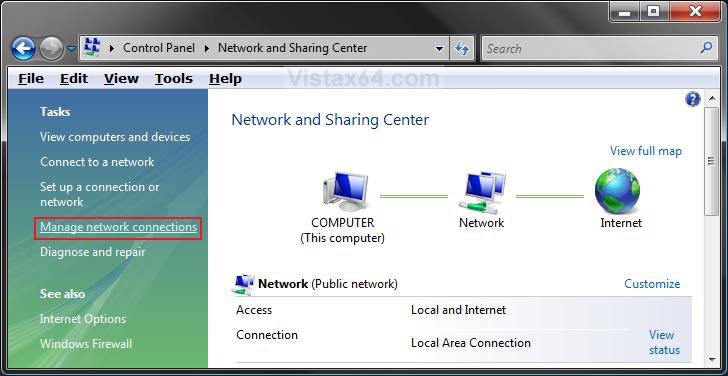
3. Click on the Manage network connections link in the left green pane. (See screenshot below)
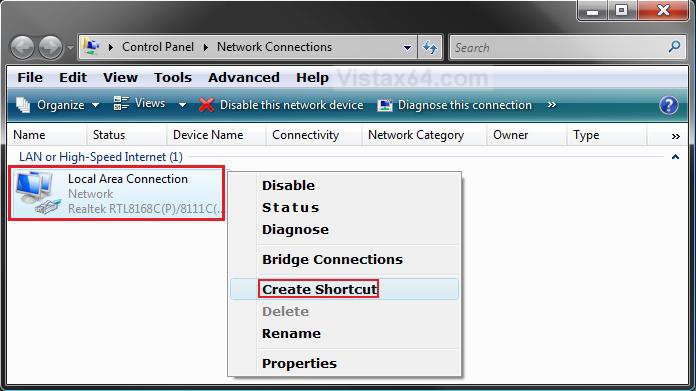
4. Right click on the network connection that you want the Status shortcut for and click on Create Shortcut. (See screenshot below)
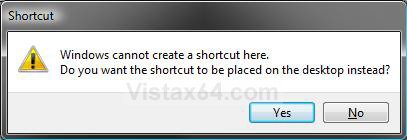
5. Click on Yes for the shortcut to be placed on the desktop. (See screenshot below)
NOTE: If you click No, then the shortcut will not be created.
6. You can now place the shortcut where you like for easy use.
NOTE: For example, in Quick Launch.
That's it,Shawn
Related Tutorials
- How to Change the Network Location Type in Vista
- How to Turn Network Discovery On or Off in Vista
- How to View and Browse a Computer or Device on a Network in Vista
- How to Enable or Disable the Receive Window Auto Tuning Level in Vista
- How to Change or Disable the QoS Reserved Bandwidth Limit in Vista
- How to Create a Network Connections Shortcut in Vista
- How to Delete a Network Connection in Vista
Attachments
Last edited by a moderator: