Windows Vista Forums
Vista Forums Home Join Vista Forums Windows 7 Forum Vista Tutorials Tags
Welcome to Windows Vista Forums. Our forum is dedicated to helping you find solutions with any problems, errors or issues you are experiencing with Windows Vista. The Vista forum also covers news and updates and has an extensive Windows Vista tutorial section that covers a wide range of tips and tricks.

Go Back   Vista Forums > Vista Forums > Tutorials

Vista - Ghost Devices & Drivers

Comment
 

Ghost Devices & Drivers

How to make Ghost Devices and Drivers Visible in Device Manager
Published by dmex
06-22-2008

Show All Ghost Devices & Drivers

This Tutorial will show how to make Ghost Devices you have removed from your Computer and Drivers used by programs Visible in Device Manager along with many other Ghost Devices and Drivers used by utilities and Applications within Vista, This will free up a bit of memory and stop any possible Conflicts between Devices while clearing out old devices that are no longer used.


Step 1
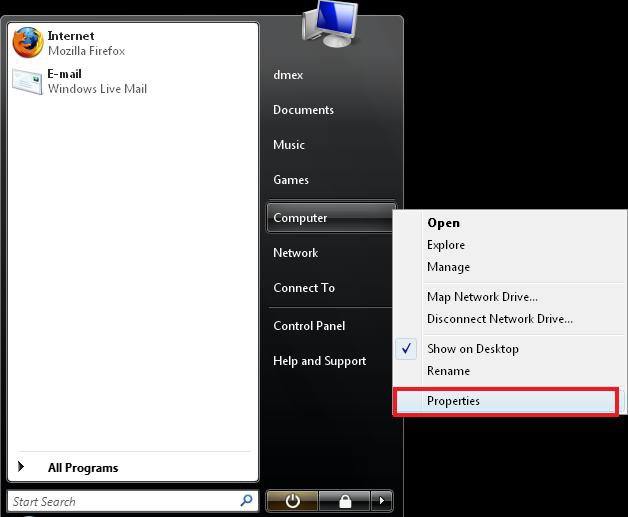
Right-Click Computer in your Start Menu and open Properties


Step 2
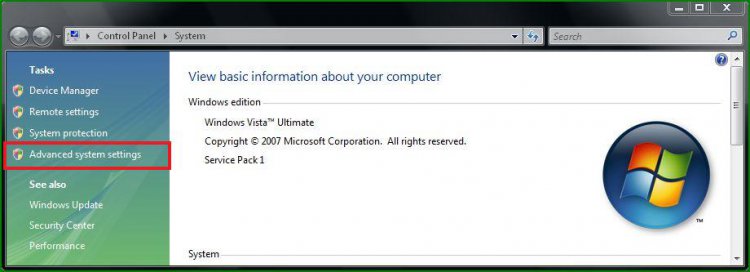
You can now see Basic Information about your Computer, on the left click Advanced System Settings


Step 3
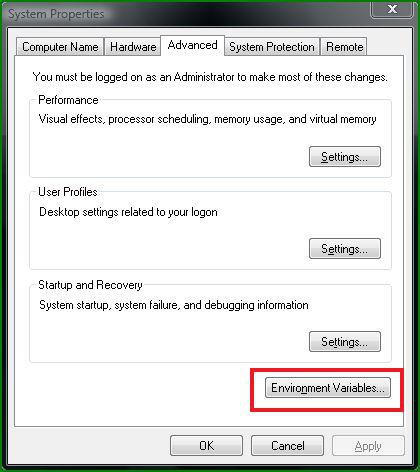
You will now see a System Properties window automatically opened to the Advanced Tab, Just click the Environment Variables button located at the bottom.


Step 4
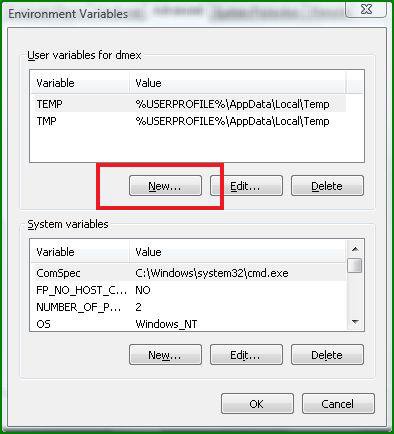
Under User Variables click New


Create a Variable name called devmgr_show_nonpresent_devices With a Variable Valve of 1
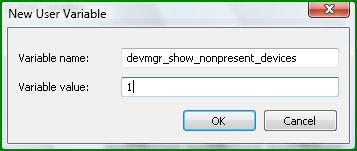


Click OK when Done.

Step 5


You will now see this entry appear under your User Variables at the top, Once you confirm it has been entered correctly just click OK on the Environment Variables Window then again on the System Properties Window.

Step 6
Open your Start-Menu again and right-click Computer and open Manage
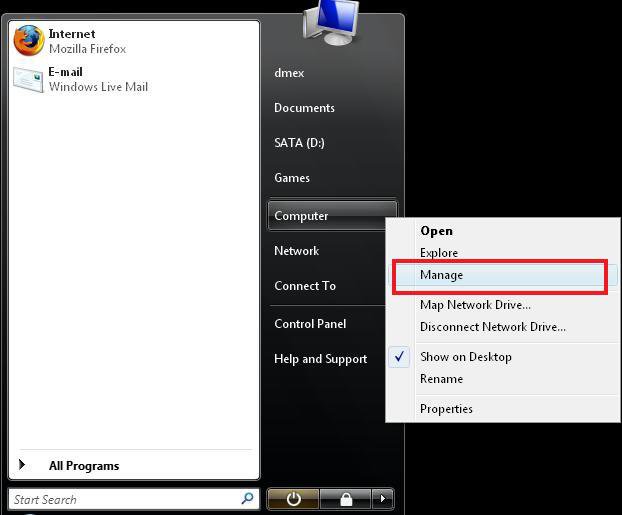


Step 7
Select Device Manager found on the left, then at the top click View > Show Hidden Devices


WARNING
 
Do Not Delete any Generic Volume Shadow Copy Drivers or Non-Plug and Play Devices without Checking what their functions are or some programs and utilities will fail.
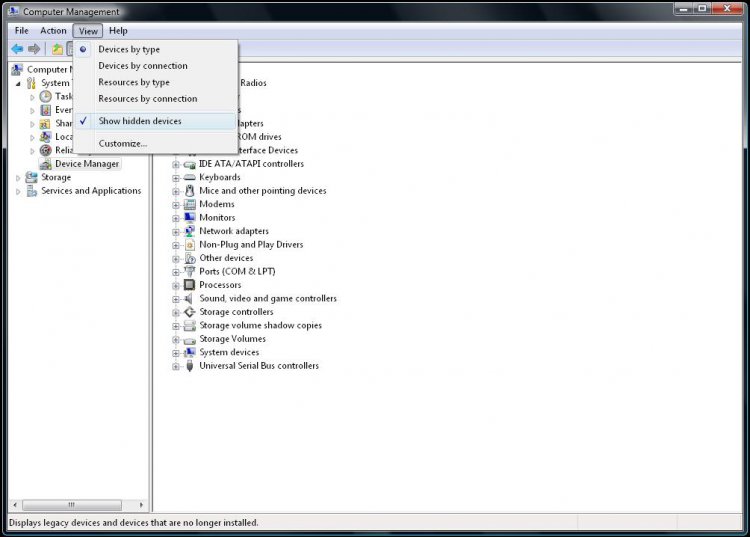

Alternatively use this Simple Device Manager


You can now see ghost Drivers and Devices by expanding the Groups in Device Manager, They will appear faded compared to other drivers.
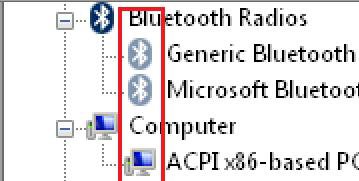
Your have now Successfully made hidden and unused Devices Visible in Device Manager.
Published by
dmex's Avatar
ɠɛɐǨ

Join Date: May 2007
Location: Fremantle, Western Australia
Posts: 2,631
Rep Power: 131
dmex has a reputation beyond reputedmex has a reputation beyond reputedmex has a reputation beyond reputedmex has a reputation beyond reputedmex has a reputation beyond reputedmex has a reputation beyond reputedmex has a reputation beyond reputedmex has a reputation beyond reputedmex has a reputation beyond reputedmex has a reputation beyond reputedmex has a reputation beyond repute

Tutorial Tools

Applies to
All Vista Versions
64 Bit & 32 Bit

Old 09-12-2008  
alexanderd


vista Buisness x 32


Re: Ghost Devices & Drivers

great tutorial saved me a lot of heart ache, my only problem is that it still does not help me. Let me explain, every so often my system close down unexpectedly. The sevice control manager shows a system failure with the following boot start or system-start driver failed to load " i8042prt", this is supposed to be driver controls for keyboard and PS/2 compatable mouse for the intel 8042 controler.
I am using a microsoft whireless multimedia keyboard 1.1 and optical mouse 2000.
in showing hidden devices, there are no groups to expand!!!!
can you point me in a direction to follow, i have windows vista buisness sp1 and office sbo 2007

My System SpecsSystem Spec
Old 09-12-2008  
Brink


Vista x64 Ultimate SP2, Windows 7 Ultimate x64


Re: Ghost Devices & Drivers

Hello Alexanderd,

Microsoft has recently released the 6.3 versions of the IntelliType and IntelliPoint drivers. You might see if they may work better for you.

http://www.microsoft.com/hardware/do...sta_32&lang=en

Hope this helps,
Shawn
My System SpecsSystem Spec
Old 09-12-2008  
alexanderd


vista Buisness x 32


Re: Ghost Devices & Drivers

The fault I get is so intermittent, it could be 1 month before it happens again. I will have to wait and see.
thank you for your quick reply
My System SpecsSystem Spec
Old 09-12-2008  
Brink


Vista x64 Ultimate SP2, Windows 7 Ultimate x64


Re: Ghost Devices & Drivers

Your welcome Alexanderd. I hope it sorts itself out for you.

Shawn
My System SpecsSystem Spec
Old 09-13-2008  
alexanderd


vista Buisness x 32


Re: Ghost Devices & Drivers

having downloaded and installed the update only time will tell
My System SpecsSystem Spec
Old 11-12-2008  
Submarine


Vista Ultimate 32bit SP2


Re: Ghost Devices & Drivers

This may not be the place for this issue, but since it is already started, I'll continue.
I have the same problem everytime I boot; the i8042prt driver fails to load. Running a bootlog confirms this failure, yet I can find the driver in the folder it is supposed to be. I have had it for a very long time, but I do not really think it is causing any problems. Would like to get rid of it at some point anyway. My guess is it appeared at a time I could not get my Bluetooth keybord to work when trying to log on. Had a PS2 keyboard and logged on with that; it has now gone for recycling and I am dependent on bluetooth. So, by today, I am a wizard on bluetooth keyboards, and always manage to log on, no matter what. Last time I got it running by hitting it with my head.

Anyway, ever since, I have had this error when starting. It has puzzled me, as I cannot find this driver for any of the 5 (!) mysterious keyboard entries I have in my Device Manager (2 HID Keyboard Devices, MS eHome MCIR 109 Keyboard, MS eHome MCIR Keyboard and MS eHome Remote Control Keyboard keys). None of them seem to be using the failing driver.

If I show the hidden devices in the Device Manager, an entry "Terminal Server Keyboard Driver" turns up under System Devices. This one use i.a. the i8042prt.sys driver. This also show in the dxdiag (thanks for the tutorials helping me find it).

So what is the "Terminal Server Keyboard Driver" and anybody having a suggestion how to fix the error?

alexanderd, are you still around, and did you find any solution?
My System SpecsSystem Spec
Comment

Tutorial Tools


Similar Threads
Tutorial Category
Disabling drivers/devices Vista hardware & devices
Drivers for sound devices Vista hardware & devices
ALL USB Devices need drivers??? Vista hardware & devices
Devices with missing Drivers. Vista General
Drivers for ATAPI/IDE devices Vista hardware & devices


Vista Forums is an independent web site and has not been authorized,
sponsored, or otherwise approved by Microsoft Corporation.
"Windows Vista", the Start Orb, and related materials are trademarks of Microsoft Corp.
© Designer Media Ltd
Tutorial powered by GARS 2.1.8m ©2005-2006

1 2 3 4 5 6 7 8 9 10 11 12 13 14 15 16 17 18 19 20 21 22 23 24 25 26 27 28 29 30 31 32 33 34 35 36 37 38 39 40 41 42 43 44 45 46