
How to Enable or Disable Windows Mail in Vista
 Information
This will show you how to enable or disable access to open Windows Mail for all users on the computer.
 Warning
This will not prevent a user from installing a 3rd party email program and using it instead. For example: Windows Live Mail, MS Office Outlook, etc...
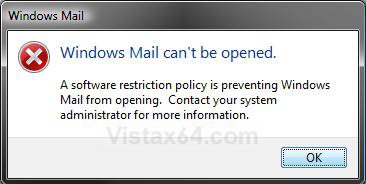
EXAMPLE: Windows Mail Disabled Message
NOTE: This is the error message all users will get when they try to open Windows Mail if it is disabled.
 METHOD ONE
NOTE: This method is only available for the Vista Business, Ultimate, and Enterprise editions. See Method Two or Method Three below for the Vista Home Basic and Home Premium editions.
1. Open the Local Group Policy Editor.
2. In the left pane, click on Computer Configuration, Administrative Templates, Windows Components, and Windows Mail. (See screenshot below)
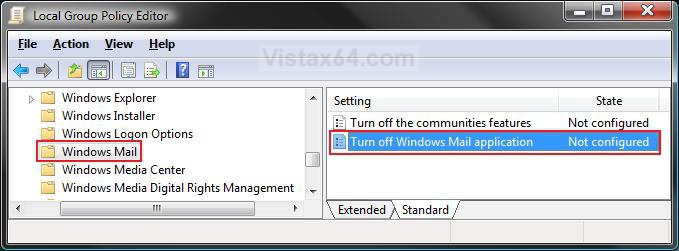
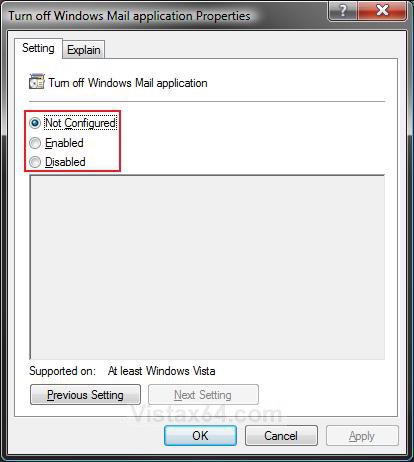
3. In the right pane, right click on Turn off Windows Mail application and click on Properties. (See screenshot above)
4. To Enable Windows Mail
A) Select (dot) Disabled or Not Configured and click on OK. (See screenshot below step 5A)
B) Go to step 6.
5. To Disable Windows Mail
A) Select (dot) Enabled and click on OK.
6. Close the Local Group Policy Editor window.
METHOD TWO NOTE: This method will work for all Vista versions.
1. To Enable Windows Mail
A) Click on the download button below to download the file below.
Enable_Windows_Mail.reg

B) Go to step 3.
2. To Disable Windows Mail
A) Click on the download button below to download the file below.
Disable_Windows_Mail.reg file.
3. Click on Save, and save the .reg file to the Desktop.
4. Right click on the downloaded .reg file and click on Merge.
5. Click on Run, Continue (UAC), Yes, and then OK when prompted.
6. When done, you can delete the .reg file (on Desktop).
7. Log off and log on, or restart the computer to apply.
METHOD THREE NOTE: This method will work for all Vista versions.
1. Open the Start Menu.
2. In the white line (Start Search) area, type regedit and press Enter.
3. Click on the Continue button in the UAC prompt.
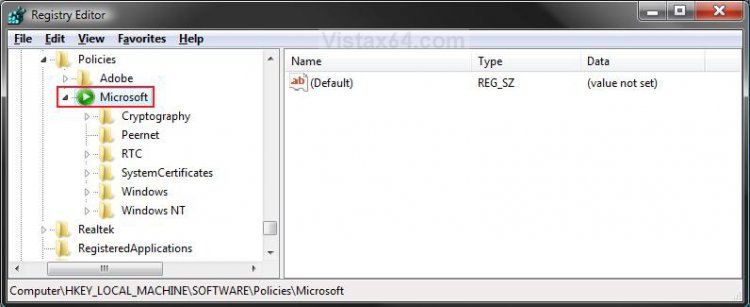
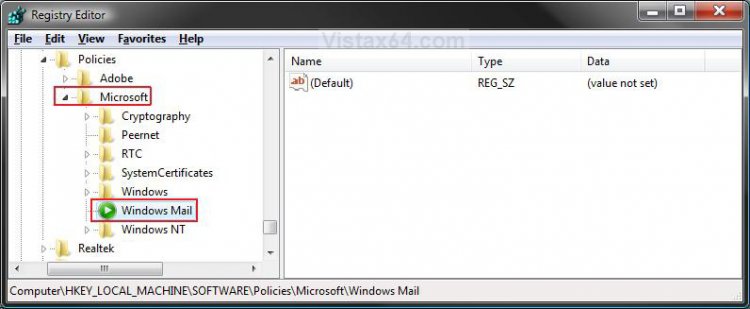
4. In regedit, go to: (See screenshot below)
HKEY_LOCAL_MACHINE\SOFTWARE\Policies\Microsoft
5. To Disable Windows Mail
A) In the left pane, right click on Microsoft and click on New and Key. Type Windows Mail and press Enter. (See screenshot below)
NOTE: If you already have Windows Mail in the left pane, then skip this step 5A and go to step 5B instead.
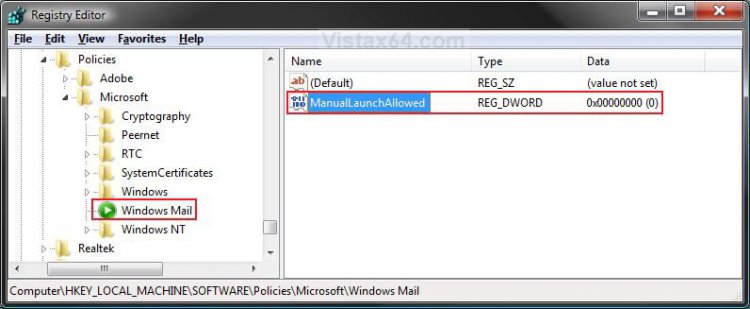
B) In the right pane of Windows Mail, right click on a empty space and click on New and DWORD (32-bit) Value. Type ManualLaunchAllowed and press Enter. (See screenshot below)
F) Go to step 7.
6. To Enable Windows Mail
A) In the right pane, right click on ManualLaunchAllowed and click on Delete. (See screenshot above)
B) Click on Yes to confirm deletion.
7. Close regedit.
8. Log off and log on, or restart the computer to apply.
That's it,Shawn
Attachments

Last edited:

