
How to Create a Task to Wake up the Computer to Run in Vista and Windows 7
 Information
This will show you how to create or modify an existing task in Task Scheduler so it will wake up the computer from a sleep mode and run. This way you can have the task wake up the computer and run automatically for when it is convenient for you instead. For a description of all of the default tasks in Vista, see: Microsoft Help and Support: KB939039
 Tip
TipSometimes the scheduled task will not wake the computer up even with everything set as it is below. It can sometimes be caused by your administrator account having a password created for it. A workaround is to remove the password for this account. Warning though, removing the password will leave you less secure.
 METHOD ONE
1. Create a new task in Task Scheduler (click to see tutorial), and check Run with highest privileges in step 10, and At Startup in step 12 in that tutorial link.
A) Use Option Two below as a guide with the link above for how to set the settings to have the new task wake up the computer to run.
2. You would need to change how long Vista will wait to go back to sleep mode automatically after waking up unattended (no activity made by the actual user) and idle. The default time is only 120 seconds (2 minutes), so you would need to set this for how long it may take for the program or task to run instead. The tutorial below can help show you how to. It will be the same in Windows 7. For how, see:
METHOD TWO NOTE: For more details about any of the settings below and other settings not shown here to change , see: How to Create a Task in Vista Task Scheduler. If you want to stop a task from waking up the computer than uncheck the Wake the computer to run this task box in step 10 below.
1. Open the Start Menu.
A) In the white line (Start Search) area, type taskschd.msc and press Enter.
B) Go to step 3.
OR
2. Open the Control Panel (Classic view).
A) Click on the Administrative Tools Icon.
B) Click on Task Scheduler.
3. If prompted by UAC, click on Continue (Vista) or Yes (Windows 7).
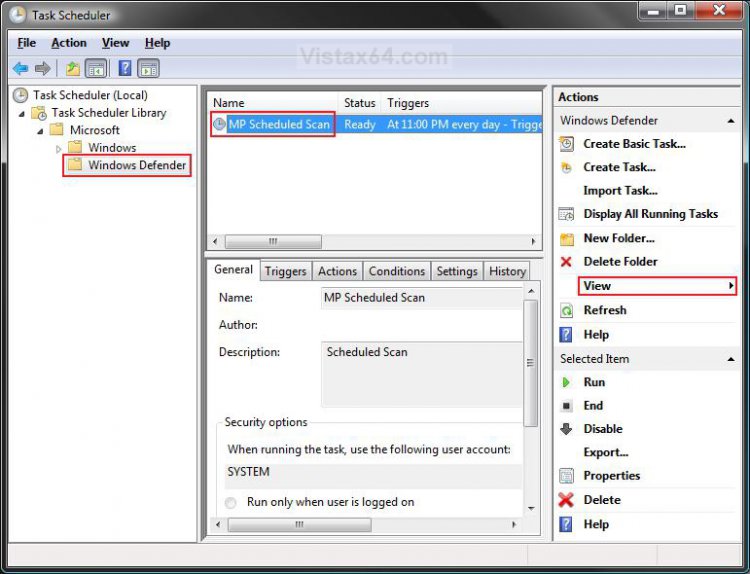
4. In the right pane, click on View and click on Show Hidden Tasks to check it. (See screenshot below step 7)
5. In the left pane, click on the arrow on the Task Scheduler Library folder, Microsoft folder, and Windows folder to expand them.
6. Click on the folder for the existing task you wish to change.
NOTE: For example, the Windows Defender folder, or one that you have created from OPTION ONE above.
7. In the middle pane, right click on the listed MP Scheduled Scan and click on Properties.
NOTE: For example, it would be MP Scheduled Scan for Windows Defender.
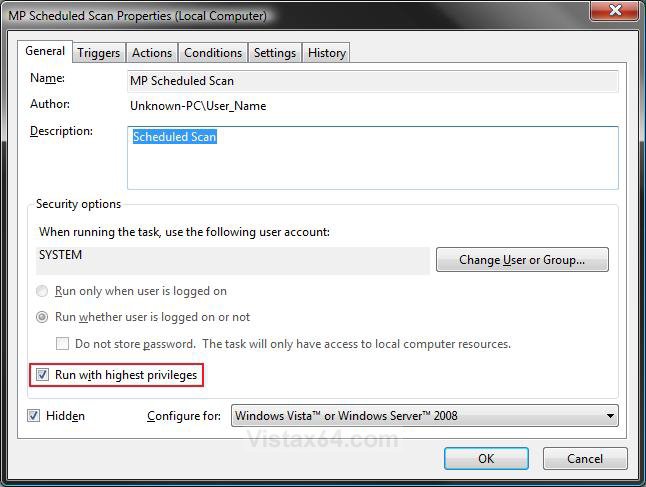
8. Under the General tab, check the Run with highest privileges box. (See screenshot below)
9. Select (dot) Run whether user is logged on or not.
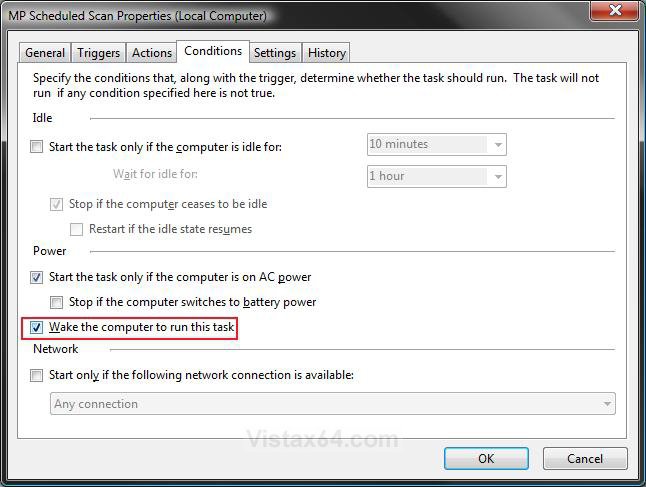
10. Click on the Conditions tab and check the Wake the computer to run this task box. (See screenshot below)
NOTE: For more details on the other options, see the Step Seven section here: How to Create a Task in Vista Task Scheduler
If you want to stop a task from waking up the computer than uncheck the Wake the computer to run this task box.
OPTION ONE:
Change the Schedule for the Task to Run
NOTE: This will show how to change when and how often you want the selected task to run. If you do not want to changed this, then proceed to the OPTION TWO section below instead.
11. Click on the Triggers tab and click on the listed trigger that you wish to change to highlight it. (See screenshot below step 12)
12. Click on the Edit button.
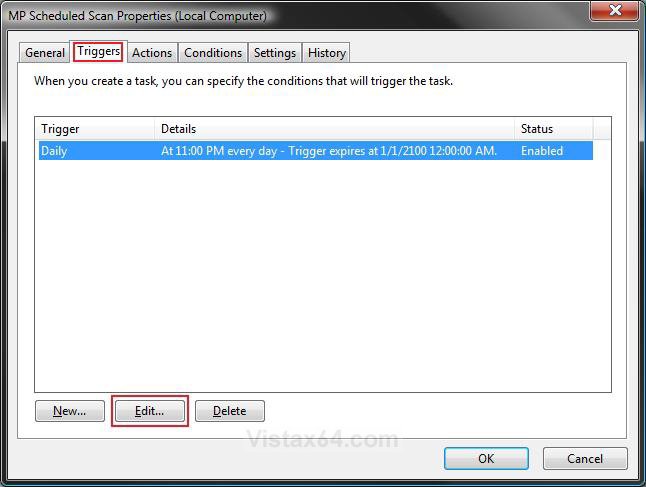
13. Change the schedule to when and how you want the task to run. (See screenshot below)
NOTE: For more details about these options, see the Step Five section here: How to Create a Task in Vista Task Scheduler
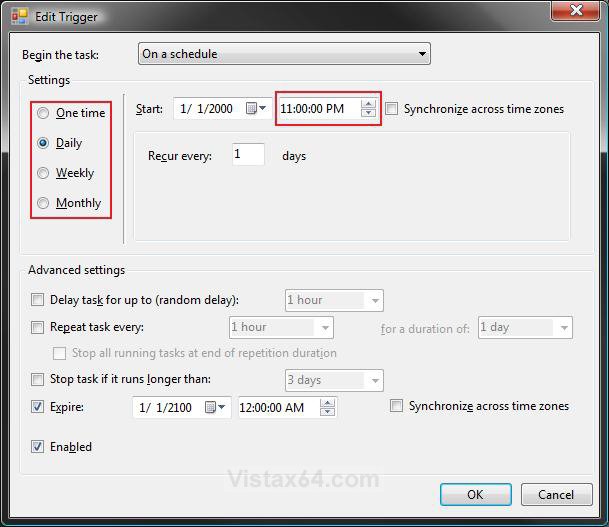
14. When done, click on OK. (See screenshot above)
OPTION TWO:
How to Set the Task to Attempt to Run Again if it Fails
NOTE: This will show you how to set the task to automatically attempt to run again if it fails when scheduled and to run automatically the next time you have the computer awake and running if all attempts to run failed. If you do not wish to do this, then proceed to step 18 instead.
15. Click on the Settings tab. (See screenshot below step)
16. Check the Run task as soon as possible after a scheduled start is missed box.
NOTE: This will allow the scheduled task to run the next time you have the computer awake and running if the scan was missed due to it not being able to run at it's scheduled time or failed the attempt to restart in step 17.
17. Check the If the task fails, restart every box.
A) Select how often and how many times you want the task to attempt to run again if it failed to run when scheduled for some reason.
NOTE: For more details on the other options, see the Step Eight section here: How to Create a Task in Vista Task Scheduler
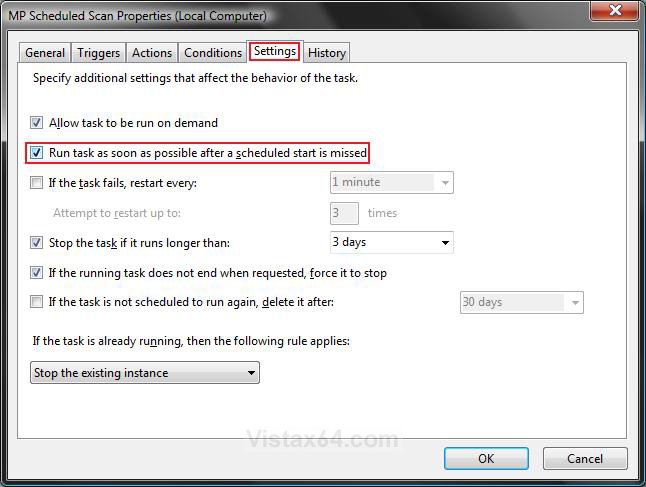
18. Click on OK to apply changes. (See screenshot above)
NOTE: This will also apply for the window that you are still in if you skipped some of the options above. EX: Screenshot below steps 10, 13, or 17.
19. Close Task Scheduler. (See screenshot below step 7)
That's it,Shawn
Related Tutorials
- How to Setup Event Viewer to Send a E-mail Notification in Vista
- How to Check and Change the Startup Programs in Vista
- How to Set Windows Defender Automatic Scanning Schedule in Vista
- How to Change the Schedule for Disk Defragmenter in Vista
- How to Create a Task in Vista Task Scheduler
- How to Change the Automatic System Restore Point Settings in Vista Task Scheduler
- How to Troubleshoot a Vista Sleep Mode Problem and Find a Solution
- How to Change the Return to Sleep Timeout for a Unattended Wake Up in Vista
- How to Display a Message Reminder in Windows with Task Scheduler
Attachments

Last edited:

