Windows Vista Forums
Vista Forums Home Join Vista Forums Windows 7 Forum Vista Tutorials Tags
Welcome to Windows Vista Forums. Our forum is dedicated to helping you find solutions with any problems, errors or issues you are experiencing with Windows Vista. The Vista forum also covers news and updates and has an extensive Windows Vista tutorial section that covers a wide range of tips and tricks.

Go Back   Vista Forums > Vista Forums > Tutorials

Vista - Encrypt Hard Drive with just One Drive (Not Bitlocker)

Comment
 

Encrypt Hard Drive with just One Drive (Not Bitlocker)

How to Encrypt your Entire Drive or a Partition without BitLocker
Published by PainlessTorture
07-10-2008
Smile

How to Encrypt your Entire Drive or a Partition without BitLocker

WARNING
  Using this will slow your computer slightly down as everything has to be encrypted/decrypted as the drive writes or reads.

Tip
  Ensure you have a recovery disk!

Information
  Administrative Access Required


Step One [1] The Download

Go to TrueCrypt - Free Open-Source On-The-Fly Disk Encryption Software for Windows Vista/XP, Mac OS X and Linux - Downloads and download the software

Step Two [2] The Installation

Follow the prompts to install the software, when you come to this section (below) click Encrypt the system...
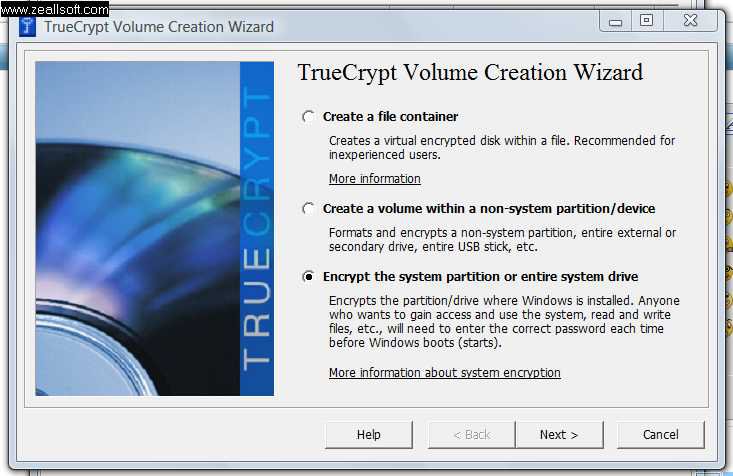

Step Three [3] The Encryption [Part A]

Follow the prompts, Pick an Algorithm (Recommend AES) . Pick a password, Ensure the password is at least 25 characters with upper & lower case letters, numbers and special characters.

Step Four [4] The Encryption [Part B]

When you pick a recovery disk location it should not exsist. Give the disk an name, then burn it via a burner application (Nero, windows burner etc.) OR If you do not have the resources to burn, download daemon tools and mount the Recovery Disk iso to verify disk. Just email yourself the iso and if your encryption codes should become corrupt just go download the attachment and burn at a friends or something.

Step Five [5] The Finishing Touches

After your computer reboots and assuming all the tests pass, your computer will begin encrypting ALL data for super security

NOTE
  Encryption takes time, you can pause to shutdown then resume encrypting when you log in again


Congrats, you have just increased your system security a lot!

Published by
PainlessTorture's Avatar
Official Best Member
Join Date: Jul 2008
Location: Northern Ireland
Posts: 471
Rep Power: 30
PainlessTorture is a glorious beacon of lightPainlessTorture is a glorious beacon of lightPainlessTorture is a glorious beacon of lightPainlessTorture is a glorious beacon of lightPainlessTorture is a glorious beacon of lightPainlessTorture is a glorious beacon of light

Tutorial Tools

Applies to
All Vista Versions
64 Bit & 32 Bit

Comment

Tutorial Tools


Similar Threads
Tutorial Category
Hard drive light constantly flashing ,reading hard drive during id Vista hardware & devices
No online media available on new hard drive - old hard drive had l Vista music pictures video
Crashed hard drive...copied hard drive but can't access User area Vista General
Bitlocker and a second hard drive Vista security
Transferring files from Slave XP hard drive to new Vista Hard drive - primary Vista installation & setup


Vista Forums is an independent web site and has not been authorized,
sponsored, or otherwise approved by Microsoft Corporation.
"Windows Vista", the Start Orb, and related materials are trademarks of Microsoft Corp.
© Designer Media Ltd
Tutorial powered by GARS 2.1.8m ©2005-2006

1 2 3 4 5 6 7 8 9 10 11 12 13 14 15 16 17 18 19 20 21 22 23 24 25 26 27 28 29 30 31 32 33 34 35 36 37 38 39 40 41 42 43 44 45 46