![]() |
![]() | ![]() | ![]() | ![]() | ![]() | ![]() | ![]() |
| Welcome to Windows Vista Forums. Our forum is dedicated to helping you find solutions with any problems, errors or issues you are experiencing with Windows Vista. The Vista forum also covers news and updates and has an extensive Windows Vista tutorial section that covers a wide range of tips and tricks. |
| |||||||
![]() |
| |
New Shortcut Fix | ||||||||||||||||||
| ||||||||||||||||||
| | ||||||||||||||||||
| | |
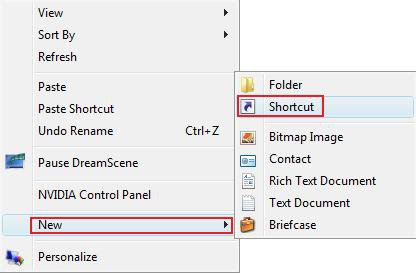
| Vista Home Premium 32bit | Re: New Shortcut Fix Thanks for this wonderful thread. I wonder if there is a way to remove New > Shortcut from context menu permanently. I think this function is unnecessary. |
My System Specs![]() |
| | |
| Vista Ult 64bit Windows 7 64 bit Server 2008 RC2 | Re: New Shortcut Fix Hi gixykings, Welcome to the forums. Try this tutorial: New Menu - Context and File the extension is .lnk. Gary |
My System Specs![]() |
| | |
| Vista Home Premium 32bit | Re: New Shortcut Fix Hi, I clicked on the link you've posted, but this is not a direct answer to my request. I want to remove "Shortcut" from "New" menu. Because this function is needless and annoying if you click on it instead of "Folder" by mistake. ----- Edit: I've tried to change ".lnk" (ShellNew to ShellOld) from "HKEY_CLASSES_ROOT". It works well on Vista, but it does not work in XP. I know this is a Vista forum but i guess it would work for XP, too. (I'm using XP Professional on VMware due to the compatibility problems of some important programs.) ----- Thanks for your post. |
My System Specs![]() |
| | |
| Windows 7 Ultimate x64 | Re: New Shortcut Fix The tutorial link posted by Gary is the answer to your request. |
My System Specs![]() |
| | |
| Vista Ult 64bit Windows 7 64 bit Server 2008 RC2 | Re: New Shortcut Fix Hi gixkings, To remove 'shortcut' from the new menu. Follow the directions at the above link. Use 'Option One', 'step 8'. The file extension you want to remove is .lnk. Worked for me. Gary |
My System Specs![]() |
| | |
| Vista Home Premium 32bit | Was wondering if somebody could help me. I have tried the .reg file posted but I still cannot use the New > Shortcut menu. When I select New Shortcut nothing happens. Does anybody have any ideas? Thank you! |
My System Specs![]() |
| | |
| Vista x64 Ultimate SP2, Windows 7 Ultimate x64 | Hello FiRe5tOrM, and welcome to Vista Forums. I have updated the reg file download. Please redownload it and give the new one a try to see if may fix it for you afterwards. Hope this helps, Shawn |
My System Specs![]() |
| | |
| Vista Home Premium 32bit | That works a treat. Greatly appreciated !![]() Edit: And such a quick response btw, very impressed. Thanks again! |
My System Specs![]() |
| | |
| Vista x64 Ultimate SP2, Windows 7 Ultimate x64 | You're most welcome FiRe5tOrM. I'm happy to hear it is working now. |
My System Specs![]() |
![]() |
| Tutorial Tools | |
| |
Similar Threads | ||||
| Tutorial | Category | |||
| shortcut on desktop - deleting the word "shortcut" | Vista General | |||
| Desktop Shortcut Icons are not actually Shortcut Icons | Vista file management | |||
| Log Off Shortcut | Vista account administration | |||
| How do you change the target of the shortcut or shortcut command l | Vista General | |||
| Removing "Shortcut" word after creating a shortcut? | Vista file management | |||