Windows Vista Forums
Vista Forums Home Join Vista Forums Windows 7 Forum Vista Tutorials Tags
Welcome to Windows Vista Forums. Our forum is dedicated to helping you find solutions with any problems, errors or issues you are experiencing with Windows Vista. The Vista forum also covers news and updates and has an extensive Windows Vista tutorial section that covers a wide range of tips and tricks.

Go Back   Vista Forums > Vista Forums > Tutorials

Vista Tutorial - Caps Lock Key - Enable or Disable

Comment
 

Caps Lock Key - Enable or Disable

How to Enable or Disable the Caps Lock Key in Vista
Published by Brink
08-05-2008

How to Enable or Disable the Caps Lock Key in Vista
Information
  This will show you how to enable or disable the Caps Lock key on your keyboard for all users on the computer. The Caps Lock key is enabled by default in Vista
RELATED LINKS:

METHOD ONE:
Through a Download
1. To Disable the Caps Lock Key -
A) Click on the download button below to download the Disable_Caps_Lock.reg file.

B) Go to step 3.
2. To Enable the Caps Lock Key -
A) Click on the download button below to download the Enable_Caps_Lock.reg file.

3. Right click on the .reg file (on Desktop) and click on Merge to add it to your registry.

4. Click Run button in the Security Warning prompt.

5. Click on Continue in the UAC prompt.

6. Click Yes in the confirmation prompt.

7. Click OK in the success prompt.

8. Logoff and logon, or restart the computer to apply the fix.

9. When done, you can delete the .reg file (On Desktop).


METHOD TWO:
The Manual Way
1. Open the Start Menu.

2. In the white line (Start Search) area, type regedit and press Enter.

3. Click on Continue in the UAC prompt.

4. In regedit, go to: (See screenshot below)
HKEY_LOCAL_MACHINE\SYSTEM\CurrentControlSet\Control\Keyboard Layout
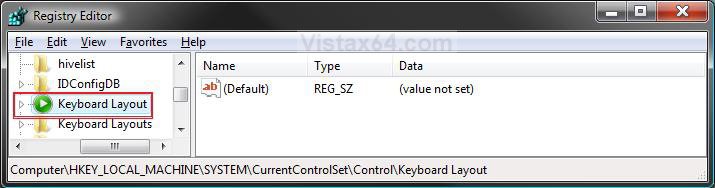
reg1.jpg
5. To Disable the Caps Lock Key -
A) In the right pane, right click on a empty area and click on New and Binary Value. (See screenshot above)

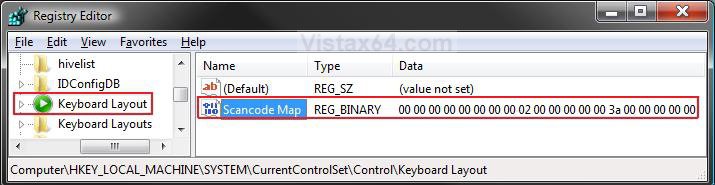
B) Type Scancode Map and press Enter. (See screenshot below)

C) Right click on Scancode Map and click on Modify.
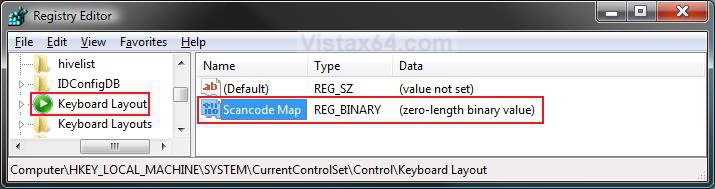
reg2.jpg
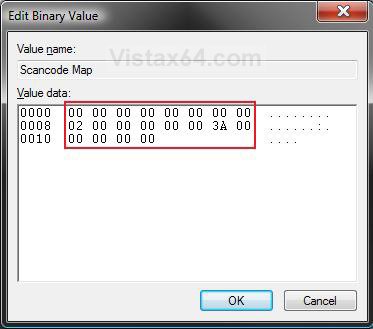
D) Type 00,00,00,00,00,00,00,00,02,00,00,00,00,00,3a,00,00,00,00,00 (no commas) and click on OK. (See screenshots below)
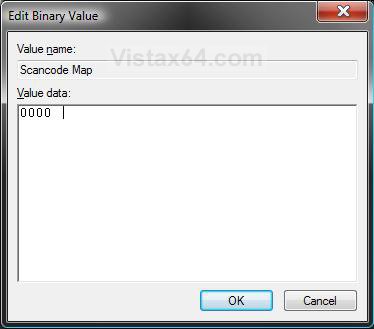
Name:  Modify1.jpg
Views: 2811
Size:  28.2 KBName:  Modify2.jpg
Views: 2803
Size:  42.8 KB
E) The registry will now look like this. (See screenshot below)

F) Go to step 7.
reg3.jpg
6. To Enable the Caps Lock Key -
A) In the right pane, right click on Scancode Map and click on Delete. (See screenshot above)

B) Click on Yes to confirm deletion.
7. Close regedit.

8. Logoff and logon, or restart the computer to apply the changes.
That's it,
Shawn

Published by
Brink's Avatar
Administrator

Join Date: Apr 2007
Location: Texas, USA
Posts: 25,812
Rep Power: 150
Brink has a reputation beyond reputeBrink has a reputation beyond reputeBrink has a reputation beyond reputeBrink has a reputation beyond reputeBrink has a reputation beyond reputeBrink has a reputation beyond reputeBrink has a reputation beyond reputeBrink has a reputation beyond reputeBrink has a reputation beyond reputeBrink has a reputation beyond reputeBrink has a reputation beyond repute

Tutorial Tools

Applies to
All Vista Versions
64 Bit & 32 Bit

Old 08-20-2008  
Brink
Administrator


Join Date: Apr 2007
Vista x64 Ultimate SP2, Windows 7 (7600) x64


Re: Caps Lock Key - Enable or Disable

Quote  Quote: Originally Posted by haroun View Post
السلام عليكم ، و شكرا على المعلومة

http://translate.google.com/translate_t?sl=ar&tl=en

Greetings, Thanks for the information and
Your welcome Haroun.

Thank you,
Shawn

My System SpecsSystem Spec
Old 06-26-2009  
pacinitaly
Master


Join Date: Jan 2009
VISTA home prem 32bit SP2 --- XP Pro SP3 32bit


Re: Caps Lock Key - Enable or Disable

I have not rebooted yet, do I have to?

Last edited by pacinitaly; 06-26-2009 at 10:33 AM.. Reason: forget it shawn, i just reread the post 7. Close regedit.
My System SpecsSystem Spec
Old 06-26-2009  
Brink
Administrator


Join Date: Apr 2007
Vista x64 Ultimate SP2, Windows 7 (7600) x64


Re: Caps Lock Key - Enable or Disable

Hi Pacinitaly,

You do not have to right now, but it will not be applied until you do though.
My System SpecsSystem Spec
Old 06-26-2009  
pacinitaly
Master


Join Date: Jan 2009
VISTA home prem 32bit SP2 --- XP Pro SP3 32bit


Exclamation

Quote  Quote: Originally Posted by Brink View Post
Hi Pacinitaly,

You do not have to right now, but it will not be applied until you do though.

Awesome. Thank You!

it worked


thank you again as usual
My System SpecsSystem Spec
Old 06-26-2009  
Brink
Administrator


Join Date: Apr 2007
Vista x64 Ultimate SP2, Windows 7 (7600) x64


Re: Caps Lock Key - Enable or Disable

You're welcome.
My System SpecsSystem Spec
Old 06-26-2009  
Annahliar
Newbie


Join Date: Jun 2009
Vista Ultimate 32bit


Re: Caps Lock Key - Enable or Disable

Hello Brink,

Once Caps Lock is disabled, can I use it as a hotkey in a game, or is it completely disabled?

Thanks!

Last edited by Annahliar; 06-26-2009 at 09:08 PM.. Reason: Typo
My System SpecsSystem Spec
Old 06-26-2009  
Brink
Administrator


Join Date: Apr 2007
Vista x64 Ultimate SP2, Windows 7 (7600) x64


Re: Caps Lock Key - Enable or Disable

Hello Annahliar, and welcome to Vista Forums.

It really depends on the game. If it is a game that goes into full game mode and not just a window in Vista, then it may still work for the game. It will not hurt anything to give it a try though to see. Please let us know how it worked for you, or not.

Shawn
My System SpecsSystem Spec
Old 06-27-2009  
Annahliar
Newbie


Join Date: Jun 2009
Vista Ultimate 32bit


Re: Caps Lock Key - Enable or Disable

Quote  Quote: Originally Posted by Brink View Post
Hello Annahliar, and welcome to Vista Forums.

It really depends on the game. If it is a game that goes into full game mode and not just a window in Vista, then it may still work for the game. It will not hurt anything to give it a try though to see. Please let us know how it worked for you, or not.

Shawn
Didn't work for my games. O well, was worth a shot. Thank you for your amazing tutorials!
My System SpecsSystem Spec
Old 06-27-2009  
Brink
Administrator


Join Date: Apr 2007
Vista x64 Ultimate SP2, Windows 7 (7600) x64


Re: Caps Lock Key - Enable or Disable

You're welcome. Sorry it didn't work in your games.
My System SpecsSystem Spec
Comment

Tutorial Tools


Similar Threads
Tutorial Category
Notification area/ How to get rid of Caps Lock, Scroll Lock Vista General
Lock the Taskbar - Enable or Disable Tutorials
Caps Lock Off Vista General
CAPS lock / SHIFT lock difficulty Vista General
Lock Computer - Enable or Disable Tutorials


Vista Forums is an independent web site and has not been authorized,
sponsored, or otherwise approved by Microsoft Corporation.
"Windows Vista", the Start Orb, and related materials are trademarks of Microsoft Corp.
© Designer Media Ltd
Tutorial powered by GARS 2.1.8m ©2005-2006

1 2 3 4 5 6 7 8 9 10 11 12 13 14 15 16 17 18 19 20 21 22 23 24 25 26 27 28 29 30 31 32 33 34 35 36 37 38 39 40 41 42 43 44 45 46