Windows Vista Forums
Vista Forums Home Join Vista Forums Windows 7 Forum Vista Tutorials Tags
Welcome to Windows Vista Forums. Our forum is dedicated to helping you find solutions with any problems, errors or issues you are experiencing with Windows Vista. The Vista forum also covers news and updates and has an extensive Windows Vista tutorial section that covers a wide range of tips and tricks.

Go Back   Vista Forums > Vista Forums > Tutorials

Vista - Color Bit Depth Settings

Comment
 

Color Bit Depth Settings

How to Change the Color Bit Depth Settings in Vista
Published by Brink
08-07-2008

How to Change the Color Bit Depth Settings in Vista

Information
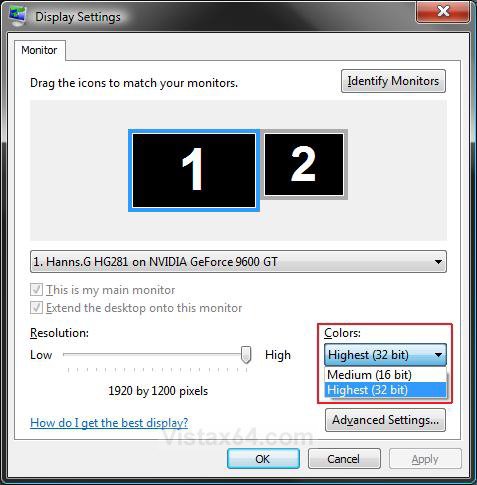
  This will show you how to change your Colors DPI settings to either Medium 16 bit or Highest 32 bit in the Display Settings window.
WARNING
  Make sure your Color Depth (Colors) is set to 32 bit for the best picture. If it is set to 16 bit, then the Windows Aero color scheme will be disabled and the Windows Vista Basic will be used instead.
RELATED LINKS:
Here's How:
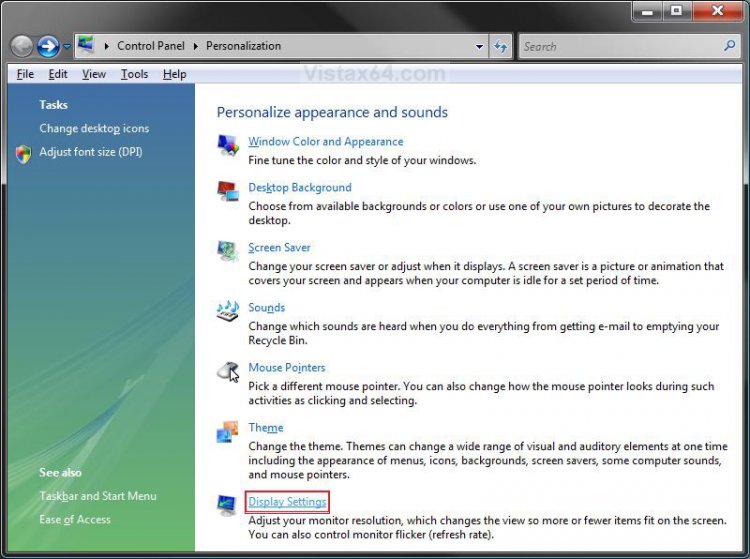
1. Right click on a empty area of your desktop and click on Personalize.

2. Click on the Display Settings link. (See screenshot below)
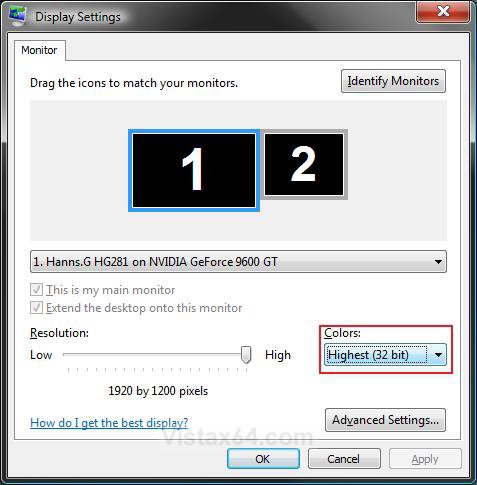
3. Click on the Colors drop down arrow. (See screenshots below step 6)

4. For a 32 bit Color Depth -
NOTE: This is the recommended setting to use for the best display picture quality and to have Windows Aero available. Windows Aero is not availble in the Vista Home Basic edition.
A) Click on Highest (32 bit).

B) Go to step 6.
5. For a 16 bit Color Depth -
A) Click on Highest (32 bit).
6. Click on OK.
settings1.jpgsettings2.jpg
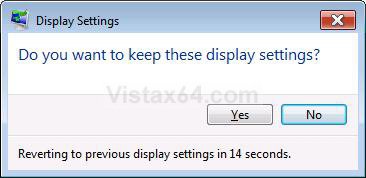
7. Click on Yes in the confirmation prompt. (See screenshot below)
Name:  Confirm.jpg
Views: 3516
Size:  33.5 KB
8. Close the Personalize appearance and sounds window. (See screenshot below step 2).
That's it,
Shawn

Published by
Brink's Avatar
Administrator

Join Date: Apr 2007
Location: Texas, USA
Posts: 25,919
Rep Power: 150
Brink has a reputation beyond reputeBrink has a reputation beyond reputeBrink has a reputation beyond reputeBrink has a reputation beyond reputeBrink has a reputation beyond reputeBrink has a reputation beyond reputeBrink has a reputation beyond reputeBrink has a reputation beyond reputeBrink has a reputation beyond reputeBrink has a reputation beyond reputeBrink has a reputation beyond repute

Tutorial Tools

Applies to
All Vista Versions
64 Bit & 32 Bit

Comment

Tutorial Tools


Similar Threads
Tutorial Category
change the color depth Vista General
Change the color depth through command line General Discussion
no color settings for nVidia control panel Vista General
Windows Photo Gallery COLOR DEPTH ISSUE Vista music pictures video
Remote Desktop - Color Depth Vista General


Vista Forums is an independent web site and has not been authorized,
sponsored, or otherwise approved by Microsoft Corporation.
"Windows Vista", the Start Orb, and related materials are trademarks of Microsoft Corp.
© Designer Media Ltd
Tutorial powered by GARS 2.1.8m ©2005-2006

1 2 3 4 5 6 7 8 9 10 11 12 13 14 15 16 17 18 19 20 21 22 23 24 25 26 27 28 29 30 31 32 33 34 35 36 37 38 39 40 41 42 43 44 45 46