
How to Join or Unjoin the Vista Help Experience Improvement Program
 Information
This will show you how to join or unjoin the Help Experience Improvement Program in Windows Vista. By default you are not joined up for this.
 Note
NoteThrough the Help Experience Improvement Program, users have the option of allowing data to be collected about how they navigate while using Online Help: typing search queries, clicking links to Help topics, clicking links to Web sites, and so on. This data (which does not include the user name or computer name) is collected and sent to Microsoft, where it is used to better understand how to improve navigation (better responses to searches, better choice and placement of links, and so on) for future Help. For more about this, see: Help and Support Features that Communicate Through the Internet in Windows Vista and Windows Vista Privacy Notice Highlights
Here's How:
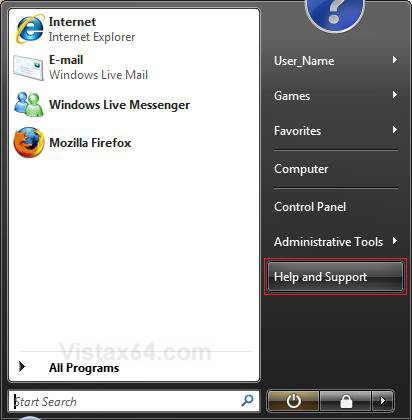
1. Open the Start Menu and click on the Help and Support button. (See screenshot below)
NOTE: If the Help and Support button is not there, then see Option One here: How to Customize the Start Menu in Vista and check Help in step 3.
A) Go to step 3.
OR
2. Open a Windows Explorer window and click on the  (help) toolbar icon. (See screenshot below)
(help) toolbar icon. (See screenshot below)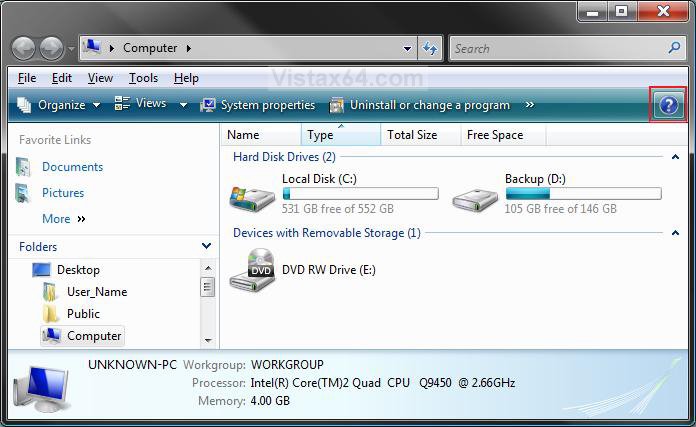
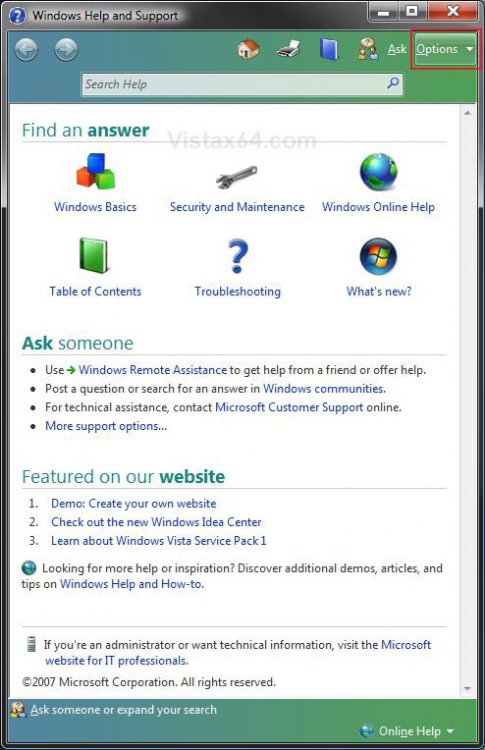
3. Click on Options in the upper right corner and click on Settings. (See screenshot below)
4. To Join the Help Experience Improvement Program
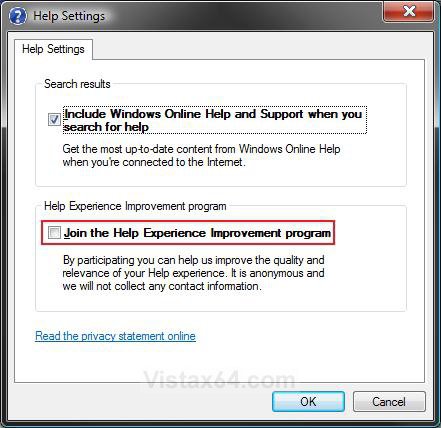
A) Check the Join the Help Experience Improvement Program box. (See screenshot below step 6)
B) Go to step 6.
5. To Unjoin the Help Experience Improvement Program
A) Uncheck the Join the Help Experience Improvement Program box.
NOTE: This is the default setting.
6. Click on OK.
7. Close the Windows Help and Support window. (See screenshot below step 3)
That's it,Shawn
Related Tutorials
- How to Join or Unjoin the Vista Customer Experience Improvement Program
- How to Add or Remove Help from the Normal and Classic Vista Start Menu
- How to Fix Windows Vista Help and Support
- How to Join or Unjoin Vista Microsoft SpyNet for Windows Defender
- How to Create a "Windows Help and Support" Shortcut
Attachments

Last edited: