Windows Vista Forums
Vista Forums Home Join Vista Forums Windows 7 Forum Vista Tutorials Tags
Welcome to Windows Vista Forums. Our forum is dedicated to helping you find solutions with any problems, errors or issues you are experiencing with Windows Vista. The Vista forum also covers news and updates and has an extensive Windows Vista tutorial section that covers a wide range of tips and tricks.

Go Back   Vista Forums > Vista Forums > Tutorials

Vista Tutorial - Reliability Monitor - Reset

Comment
 

Reliability Monitor - Reset

How to Reset the Reliability Monitor in Vista
Published by Brink
08-15-2008

How to Reset the Reliability Monitor in Vista
Information
  If you have fixed the errors or just want to clear the reported data in Reliabilty Monitor, then this will show you how to reset the Reliability Monitor back to a clean slate.
NOTE
  Reliability Monitor reports on system stability. Reliability Monitor displays detailed information about application installations, application removals, operating system and application failures, hardware errors, and system clock changes.


Reliability Monitor collects 24 hours of data before it calculates the System Stability Index (scales from 0 to 10, 10 is the best score) or generates the System Stability Report.
WARNING
  If you reset the Reliability Monitor, then any previously displayed data will no longer be available unless you backed it up in step 3 below.
RELATED LINK:EXAMPLE: Reliability Monitor
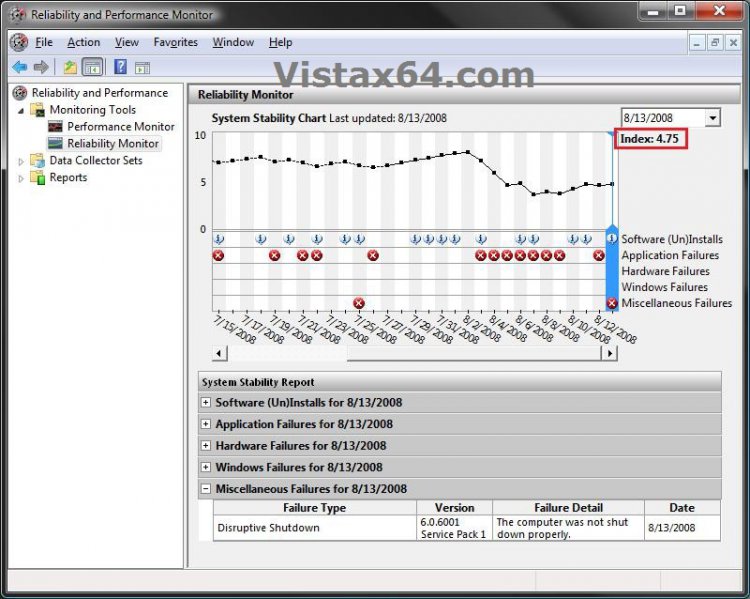
NOTE: Notice your Index score (scales from 0 to 10, 10 is the best score) in the upper right corner boxed in red below.
r-p_monitor_before.jpg

Here's How:
1. Open Folder Options and dot the Show hidden files and folders option and click on OK. (See screenshot below)
folder_options.jpg
2. Open Windows Explorer and navigate to C:\ProgramData\Microsoft\RAC. (See screenshot below)
rac.jpg
3. To Backup the Current Reliablity Monitor Data -
NOTE: This is an optional step, but if you do not backup this data, it will be gone for good when you reset it in step 4. If you want to skip this, then continue to step 4 instead.
A) Copy both the PublishedData and StateData folders and Paste them to another location as a backup. (See screenshot above)
4. To Reset Reliability Monitor -
A) Open the PublishedData folder. (See screenshot below step 2)

B) Select all the files in the folder and click on Delete. (See screenshot below)
NOTE: After you click on Delete, you will need to click on Yes (confirm), Continue (approve), and Continue (UAC) to delete these files.
publisheddata.jpg
C) Open the StateData folder. (See screenshot below step 2)

D) Select all the files in the folder and click on Delete. (See screenshot below)
NOTE: After you click on Delete, you will need to click on Yes (confirm), Continue (approve), and Continue (UAC) to delete these files.
statedata.jpg
E) Go to step 6.
6. To Restore the Current Reliablity Monitor Data -
A) Copy the contents of both the PublishedData and StateData folders from the location you saved the backups to in step 3 and Paste them back into their corresponding folders at the C:\ProgramData\Microsoft\RAC location. (See screenshot below step 2)
NOTE: After you click on Paste, you will need to check Do this for all current items an click on Yes, check Do this for the next 11 conflicts and click on Copy and Replace, click on Continue (approve), and Continue (UAC).
7. Close Windows Explorer.

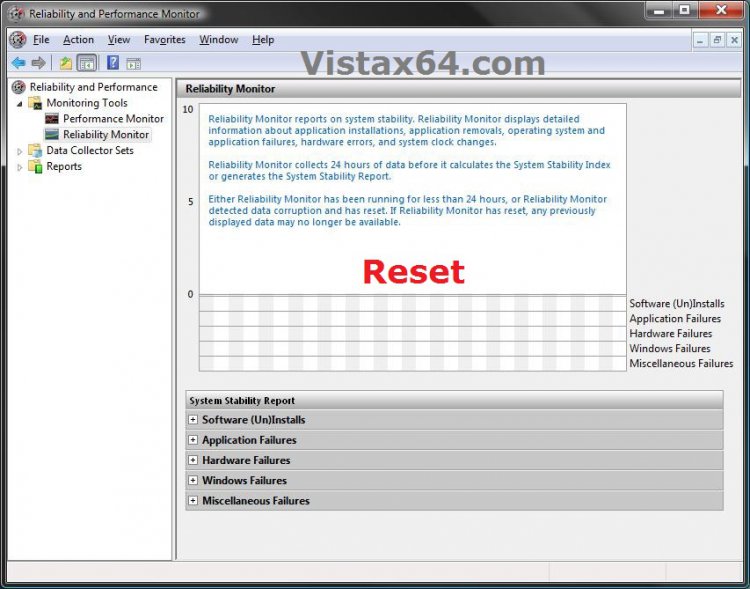
8. Open Reliablity Monitor to see it now reset clean. (See screenshot below)
NOTE: If Reliablity Monitor is already open, then close and reopen it.
r-p_monitor_reset.jpg
That's it,
Shawn

Published by
Brink's Avatar
Administrator

Join Date: Apr 2007
Location: Texas, USA
Posts: 25,813
Rep Power: 150
Brink has a reputation beyond reputeBrink has a reputation beyond reputeBrink has a reputation beyond reputeBrink has a reputation beyond reputeBrink has a reputation beyond reputeBrink has a reputation beyond reputeBrink has a reputation beyond reputeBrink has a reputation beyond reputeBrink has a reputation beyond reputeBrink has a reputation beyond reputeBrink has a reputation beyond repute

Tutorial Tools

Applies to
All Vista Versions
64 Bit & 32 Bit

Old 11-29-2008  
charlieo
Member


Join Date: Nov 2008
Vista Ultimate 32


Re: Reliability Monitor - Reset

Shawn,

I am beside myself. I love to track the reliability of my Vista machine... so, when I had a slight "hiccup" and dropped a few points I followed your article... to a "T". The only thing I did different was to re-insert files from a back-up that still had me at a perfect 10. After substituting the files it looked great and I had a "10" back.. alas with old dates. I waited 24 hours and then 48 hours, but the RAC never updated. I then deleted the files (so it looked like a new install) and again waited. Again the darn RAC will not update.

I then looked in the task manager and saw that the RAC task seems to be getting an "access denied" on completion. ... I am an administrator for both my PC and the domain (this is an attached client on my home network). No policies and no UAC. I did do a system restore just before I tried all of this.....

Any idea what I screwed up? I cannot for the life of me figure out why I am getting the access denied in the task manager. I compared the task on this machine to a known good machine and the tasks are identical.

I am running Vista Ultimate 32 with nothing fancy other than Office and some of the usual "apps.".

Any and all advice is appreicated.

Charlie

My System SpecsSystem Spec
Old 11-29-2008  
Brink
Administrator


Join Date: Apr 2007
Vista x64 Ultimate SP2, Windows 7 (7600) x64


Re: Reliability Monitor - Reset

Hello Charlie, and welcome to Vista Forums.

See if taking ownership of the PublishedData and StateData folders to see if that will stop the "access denied" message.

Hope this helps,
Shawn
My System SpecsSystem Spec
Old 11-29-2008  
charlieo
Member


Join Date: Nov 2008
Vista Ultimate 32


Re: Reliability Monitor - Reset

Thanks Shawn for the quick reply!!

I am familiar with the ownership concept under security. I read the article you pointed me to. I didn't see anything specific to the two directories or the RAC directory. In particular, can you tell me who needs to have ownership of the directories and what the permissions need to be? Sorry to be a pain.

I really do appreciate the time you are taking to help! I really don't want to do a clean install.... again...

Charlie
My System SpecsSystem Spec
Old 11-29-2008  
Brink
Administrator


Join Date: Apr 2007
Vista x64 Ultimate SP2, Windows 7 (7600) x64


Re: Reliability Monitor - Reset

It's no problem Charlie.

By default, both folders owner should be the Administrators group with full permission allowed. You should be able to take ownership of it with your administrator account user name and allow full permission for it to have access again.
My System SpecsSystem Spec
Old 04-28-2009  
charlieo
Member


Join Date: Nov 2008
Vista Ultimate 32


Talking Re: Reliability Monitor - Reset

Shawn,

Another question for you.... I reset my RAC again by using a set of saved data(folders) that still has a 10.0 rating froFebruary .

My question is this. I run "racagent"... but that does not cuase the data to update in the Reliability Monitor. Evidently this only happens at 4AM daily (eventhough data is collected hourly).

Is there a way to force an update to the monitor without waiting until 4Am tomorrow?

Thanks again!

Charlie
My System SpecsSystem Spec
Old 04-28-2009  
Brink
Administrator


Join Date: Apr 2007
Vista x64 Ultimate SP2, Windows 7 (7600) x64


Re: Reliability Monitor - Reset

Hi Charlie,

Yes, it will collect data every hour as per the task in Task Scheduler, but it will only update the Reliability Monitor every 24 hours with this data. In your case at 4AM. It cannot be changed or workred around as far as I know.
My System SpecsSystem Spec
Old 04-28-2009  
charlieo
Member


Join Date: Nov 2008
Vista Ultimate 32


Re: Reliability Monitor - Reset

Oh well...... that sucks... however, maybe I shouldn't be so "anal" about maintaining my 10.0 rating!!!.

Thanks once again...

Charlie
My System SpecsSystem Spec
Old 04-28-2009  
Brink
Administrator


Join Date: Apr 2007
Vista x64 Ultimate SP2, Windows 7 (7600) x64


Re: Reliability Monitor - Reset

LOL, yeah I like mine to be high to.
My System SpecsSystem Spec
Old 05-08-2009  
Slvr
Newbie


Join Date: May 2009
Vista Ultimate 32bit


Re: Reliability Monitor - Reset

Quote  Quote: Originally Posted by charlieo View Post
Shawn,

Another question for you.... I reset my RAC again by using a set of saved data(folders) that still has a 10.0 rating froFebruary .

My question is this. I run "racagent"... but that does not cuase the data to update in the Reliability Monitor. Evidently this only happens at 4AM daily (eventhough data is collected hourly).

Is there a way to force an update to the monitor without waiting until 4Am tomorrow?

Thanks again!

Charlie
3 things I noticed in resetting the reliability monitor:
  1. If you reset permissions on PublishedData and StateData folders be sure to give 'SYSTEM' and 'LOCAL SERVICE' accounts full control over it. So, if you deleted and recreated them, check permissions on both, in case add those two accounts and check Full Control.
  2. You can delete HKEY_LOCAL_MACHINE\SOFTWARE\Microsoft\Reliability Analysis\RAC before running the racagent executable, this will reset all the rac data (such as the timestamp of the last analysis). Clearing it, next time you run racagent it will start over from the beginning.
    The registry key will be automatically recreated, do a backup if you're not sure.
  3. If you want to start over, be sure to clear all the event logs using the event viewer. Clear event logs, delete the registry key from step 2 above, and then run racagent.
    If you don't want to clear the event logs, racagent will re-add all the events, from the beginning, at a step of 1-2 weeks each time; so you have to call racagent multiple times in order to re-analyze all events.

Hope this helps
My System SpecsSystem Spec
Comment

Tutorial Tools


Similar Threads
Tutorial Category
reliability monitor Vista General
Reliability Monitor Vista performance & maintenance
Reliability Monitor Vista General
reliability monitor... Vista General
Reliability Monitor Vista performance & maintenance


Vista Forums is an independent web site and has not been authorized,
sponsored, or otherwise approved by Microsoft Corporation.
"Windows Vista", the Start Orb, and related materials are trademarks of Microsoft Corp.
© Designer Media Ltd
Tutorial powered by GARS 2.1.8m ©2005-2006

1 2 3 4 5 6 7 8 9 10 11 12 13 14 15 16 17 18 19 20 21 22 23 24 25 26 27 28 29 30 31 32 33 34 35 36 37 38 39 40 41 42 43 44 45 46