
How to Restore or Remove "File" from the Windows Explorer Menu Bar
 Information
This will show you how to restore or remove File from the Menu bar in Windows Explorer and Internet Explorer for all users in Windows 7 and Vista.
 Note
NoteYou will need to have the Menu bar enabled to be able to see the File menu item.
EXAMPLE: Windows Explorer Menu bar with File Restored and Removed


 METHOD ONE
1. Open the all users, specific users or groups, or all users except administrators Local Group Policy Editor for how you want this policy applied.
2. In the left pane, click on User Configuration, Administrative Templates, Windows Components, and Windows Explorer. (See screenshot below)
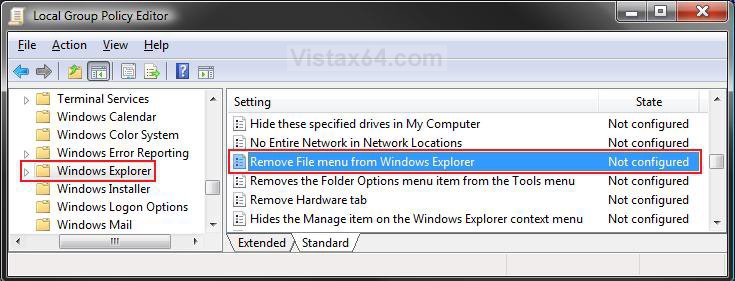
3. In the right pane, right click on Remove File menu from Winodows Explorer and click on Properties. (See screenshot above)
4. To Restore File Menu
A) Select (dot) Disabled or Not Configured and click on OK. (See screenshot below step 5A)
B) Go to step 6.
5. To Remove File Menu
A) Select (dot) Enabled and click on OK.
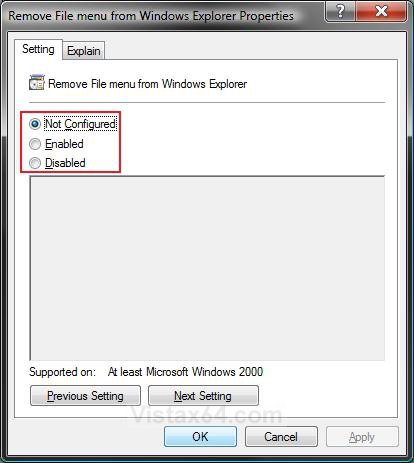
6. Close the Local Group Policy Editor window. Your done.
METHOD TWO 1. To Restore File Menu
A) Click on the download button below to download the file below.
Restore_File_Menu.reg

B) Go to step 3.
2. To Remove File Menu
A) Click on the download button below to download the file below.
Remove_File_Menu.reg
3. Click on Save, and save the .reg file to the Desktop.
4. Right click on the downloaded .reg file and click on Merge.
5. Click on Run, Continue (UAC-Vista) or Yes (UAC-Windows 7), Yes, and then on OK when prompted.
6. When done, you can delete the .reg file (On Desktop).
METHOD THREE 1. Open the Start Menu, then type regedit in the search box and press Enter.
2. If prompted by UAC, then click on the Continue (Vista) or Yes (Windows 7).
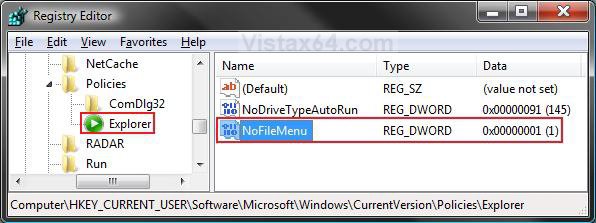
3. In regedit, go to: (See screenshot below)
HKEY_CURRENT_USER\Software\Microsoft\Windows\CurrentVersion\Policies\Explorer
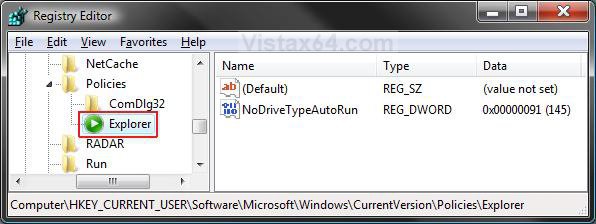
4. To Remove File Menu
A) In the right pane, right click on a empty area and click on New and on DWORD (32-bit) Value. (See screenshot above)
B) Type NoFileMenu and press Enter.
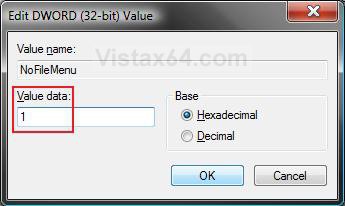
C) Right click on NoFileMenu and click on Modify. (See screenshot below)
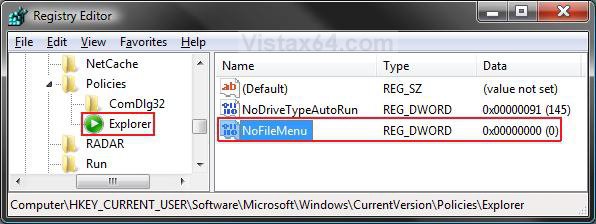
D) Type 1 and click OK. (See screenshot below)
E) The registry will now look like this. (See screenshot below)
F) Go to step 6.
5. To Restore File Menu
A) In the right pane, right click on NoFileMenu and click on Delete. (See screenshot above)
B) Click on Yes to confirm deletion.
6. Close regedit.
That's it,Shawn
Attachments

Last edited: