Windows Vista Forums
Vista Forums Home Join Vista Forums Windows 7 Forum Vista Tutorials Tags
Welcome to Windows Vista Forums. Our forum is dedicated to helping you find solutions with any problems, errors or issues you are experiencing with Windows Vista. The Vista forum also covers news and updates and has an extensive Windows Vista tutorial section that covers a wide range of tips and tricks.

Go Back   Vista Forums > Vista Forums > Tutorials

Vista Tutorial - Determine if your processor is x64 (64-bit) capable

Comment
 

Determine if your processor is x64 (64-bit) capable

Know if you can upgrade or install Windows Vista x64 Edition
Published by John_Lawrence
10-06-2008

How to Determine if your Processor is x64 (64-bit) Capable
Information
 
Windows Vista has it's own version for x64 processors like AMD and some Intel. Windows Vista x64 Edition offers extra security features and some speed improvements. (for more information about x64, click HERE!)

Now to determine if your processor can run x64, do the following :


  • click Start
  • right-click Computer
  • select Properties
  • open Windows Experience Index (right side of your score)
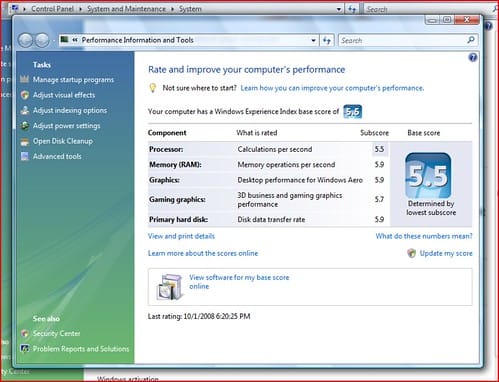
Click the image to open in full size.
  • Then click View and print Details.
  • When the details shown, Scroll a little bit and find System.
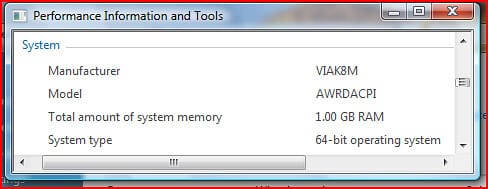
Just like this:

Click the image to open in full size.

If you're currently running x86 (32-bit) you'll see different from this. But just look at the "x64 Capable" or "x64 System" or something like that.

Then that should be "YES"
I repeat x64 bit capable should be "YES"

If it's set to "NO"
You cannot upgrade to x64.

just upgrade your processor instead.
Published by
WinTweaker!
Join Date: Jul 2008
Location: Philippines
Posts: 5
Rep Power: 13
John_Lawrence has a spectacular aura aboutJohn_Lawrence has a spectacular aura about

Tutorial Tools

Applies to
All Vista Versions
32 Bit

Old 12-02-2008  
Akuanauta
Member


Join Date: Nov 2008
Vista Home Premium 32bit


Re: Determine if your processor is x64 (64-bit) capable

My processor have x64 capablities, can i install vista x64 without problems and surfing on internet??

Thank you, for your help.

My System SpecsSystem Spec
Old 12-02-2008  
Brink
Administrator


Join Date: Apr 2007
Vista x64 Ultimate SP2, Windows 7 (7600) x64


Re: Determine if your processor is x64 (64-bit) capable

Hello Akuanauta,

Yes, since you have a 64-bit CPU, you can install Vista 64-bit. However, to avoid problems, I would check to make sure that all of your hardware devices have a 64-bit driver version available for them first. If they do, then you might go ahead and download and save them to have handy after installing the 64-bit Vista.

Hope this helps,
Shawn
My System SpecsSystem Spec
Old 05-09-2009  
The Cool Guy
Senior Member


Join Date: Mar 2009
Winodws Vista Ultimate SP2 x32


Re: Determine if your processor is x64 (64-bit) capable

Thanks a lot, John Lawrence. I exactly wanted to know this.

Thanks again,
The Cool Guy
My System SpecsSystem Spec
Old 08-16-2009  
Grayhair
Member


Join Date: Mar 2008
Vista Home Premium 32 Bit


Ok I have a problem I hope someone can direct to the answer. When I click on View and Print Details, after about a minute I receive the error "Could Not Create Details Page". I have removed SP2 and did a reinstall of SP1
My System SpecsSystem Spec
Old 08-16-2009  
dinesh
Vista Expert


Join Date: Sep 2008
Windows 7 RTM 64-bit


This tutorial is partially incorrect. I was running Vista and then i installed Windows 7 and both were 32bit OS. It never said that my pc is 64bit capable. Finally i installed this small handy utility which let me knew that i can go 64bit.
Download here:
My System SpecsSystem Spec
Old 08-16-2009  
Grayhair
Member


Join Date: Mar 2008
Vista Home Premium 32 Bit


Quote  Quote: Originally Posted by dinesh View Post
This tutorial is partially incorrect. I was running Vista and then i installed Windows 7 and both were 32bit OS. It never said that my pc is 64bit capable. Finally i installed this small handy utility which let me knew that i can go 64bit.
Download here:
Thank you for your answer and link, kind of helps but real concern is why I am getting the error and how to fix it.
My System SpecsSystem Spec
Comment

Tutorial Tools


Similar Threads
Tutorial Category
Vista x64 Capable antivirus System Security
Vista Capable? Vista hardware & devices
Aero not available, PC is capable Vista installation & setup
Aero not an option? PC is capable Vista installation & setup


Vista Forums is an independent web site and has not been authorized,
sponsored, or otherwise approved by Microsoft Corporation.
"Windows Vista", the Start Orb, and related materials are trademarks of Microsoft Corp.
© Designer Media Ltd
Tutorial powered by GARS 2.1.8m ©2005-2006

1 2 3 4 5 6 7 8 9 10 11 12 13 14 15 16 17 18 19 20 21 22 23 24 25 26 27 28 29 30 31 32 33 34 35 36 37 38 39 40 41 42 43 44 45 46