|
Welcome to Windows Vista Forums. Our forum is dedicated to helping you find solutions with any problems, errors or issues you are experiencing with Windows Vista. The Vista forum also covers news and updates and has an extensive Vista tutorial section that covers a wide range of tips and tricks.
| Vista Tutorial - Boot Screen - Change Boot Screen - Change
How to Change the Default Boot Screen in Vista SP1
Published by Brink
10-14-2008
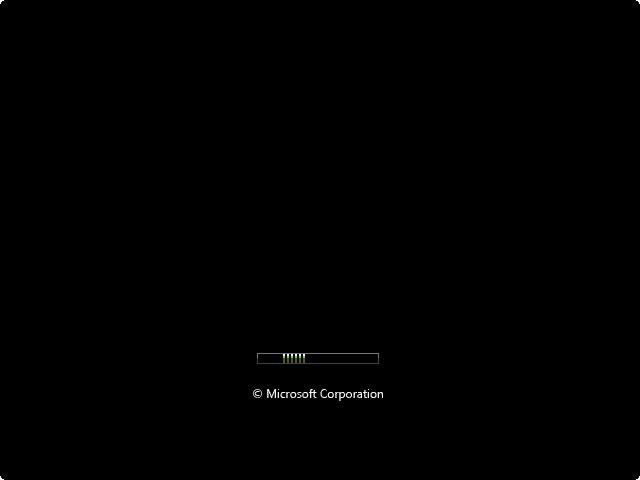
| | How to Change the Default Boot Screen in Vista SP1 Information | | The boot screen is the screen that displays during the bootup (startup) of Vista before the logon screen (welcome screen) and the desktop. |  | Tip | | Running the sfc/ scannow command will reset the boot screen back to default. |  | WARNING | | If you wanted to run chkdsk at startup or the Memory Diagnostic Tool and you have changed the default boot screen, then you will need to temporarily change the boot screen back to the default boot screen to be able to see what is happening first to be able to see what is happening when they run at startup. |  | RELATED LINKS:EXAMPLE: Default Vista boot screen | OPTION ONE: |
|---|
| Using Stardock BootSkins |
NOTE | | This free program will let you replace the default Vista boot screen with any free skin that you have downloaded from WinCustomize BootSkins. You cannot create a BootSkin with any image that you like with the free version of BootSkins though. |  | 1. Download and install Stardock BootSkin. 2. Download a BootSkin that you would like to use as your boot sceeen, and save it somewhere you would like to keep it at. 4. Run BootSkin. (See screenshot below) 3. To Add a BootSkin - NOTE: This will add a downloaded BootSkin to the bottom to have to select from. A) Click on the Add New BootSkin option, then browse to where you have saved the downloaded BootSkin and select it. 4. To Delete a BootSkin - NOTE: This will delete and remove the currently selected BootSkin from the bottom. 5. To Apply a BootSkin as the Vista Boot Screen -A) Select a BootSkin from the bottom so that it appears in the larger preview window.
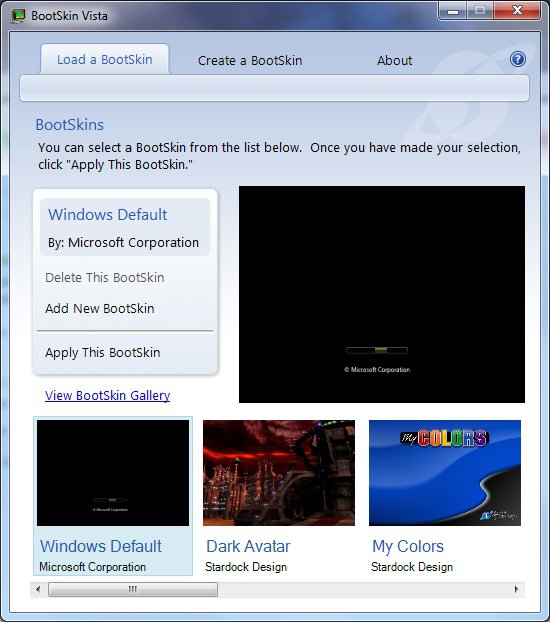
B) Click on the Apply This BootSkin option. 6. Restart the computer to see the changed boot screen. | OPTION TWO: |
|---|
| Using Vista Visual Master |
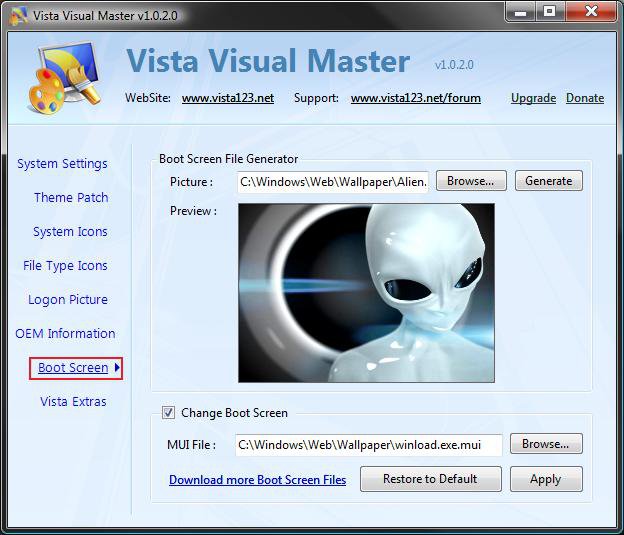
NOTE | | This free program will allow you to replace the default Vista boot screen with any .bmp, .jpg, .png, or .gif image of your choice instead. |  | 1. Download and install the free program Vista Visual Master. WARNING | | If you get a "cannot find en-CA" type error while running this program, then open the Control Panel, and go into Regional and Language Options. Change the default input language format to the folder that you have in your C:\Windows\System32\Boot folder. For example, en-CA (Canada), en-US (United States), etc.... |  | 2. Use Compatibility Mode on the Vista Visual Master shortcut, and check the Run this program as an administrator box (see step 8 at link). 3. Click on the Vista Visual Master shortcut to run the program. 4. Click on Allow in the UAC prompt. 5. Click on the Boot Screen option. (See screenshot below) 6. To Change the Default Boot Screen -A) Click on Browse button and navigate to and select the .bmp, .jpg, .png, or .gif image you want for as the new boot screen. (See screenshot above)
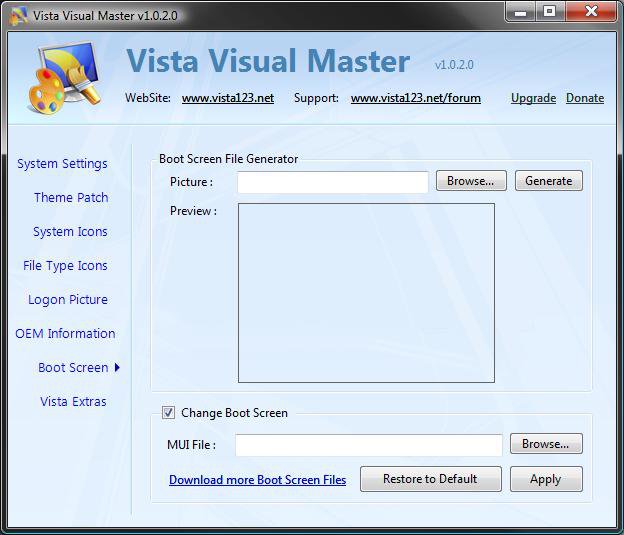
B) Click on the Generate button and save the winload.exe.mui file to use as the new boot screen. (See screenshot below step 6E) WARNING: The generated file must be named winload.exe.mui and remain on the computer for it to be able to be used at boot.
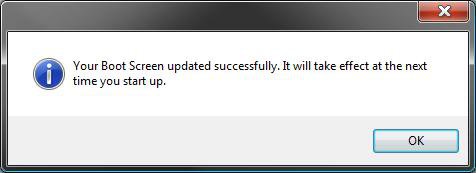
C) Click on OK in the success pop-up. (See screenshot below) D) Check the Change Boot Screen box. (See screenshot below step 6E) NOTE: If the location of the winload.exe.mui file you want to use is not correct, then click on Browse and navigate to where you saved it in step 6B.
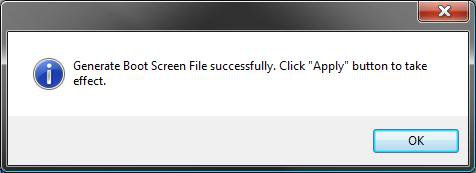
E) Click on the Apply button. (See screenshot below) F) Click on OK in the success pop-up. (See screenshot below) G) Go to step 8. 7. To Restore the Default Boot Screen -A) Check the Change Boot Screen box. (See screenshot below step 5)
B) Click on the Restore to Default button. (See screenshot below step 5)
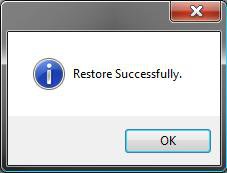
C) Click on OK in the success pop-up. (See screenshot below)
8. Close the Vista Visual Master window. 9. Restart the computer to see the changed boot screen. That's it,
Shawn |  Published by | | | Administrator Join Date: Apr 2007 Location: Texas, USA
Posts: 23,763
Rep Power: 150 | |
 Tutorial Tools | | |
 Applies to | | All Vista Versions | | 64 Bit & 32 Bit | |
| | | | | |
10-14-2008
|
| | Master Vista Ultimate 32bit SP2/ Windows 7 Ultimate 32bit/ Windows XP 32bit Rockford, IL | Re: Boot Screen - Change Thanks Brink been wondering if you could change that. | My System Specs | | System Manufacturer/Model Number HP Compaq Presario/SR5113WM OS Vista Ultimate 32bit SP2/ Windows 7 Ultimate 32bit/ Windows XP 32bit CPU AMD Athlon 64 X2 3600+ 1.9Ghz Motherboard Asus M2N68-LA Memory PNY Optima Memory DDR2 2GB 2x1 kit Graphics Card PNY Nvidia 8400 GS 256MB Sound Card On board RealTek Monitor(s) Displays Old A$$ CRT Screen Resolution 1024x768 Keyboard Standard 102 key with volume and sleep buttons Mouse Wireless Logitech LX7 PSU Dynex 400w Case Nothin Special Cooling Stock Hard Drives Western Digital 160 GB SATA 3G (3.0Gb/sec)
7200 rpm
Western Digital 160 GB IDE Internet Speed Comcrap 10mb cable Other Info Insignia 2.1 speakers, wireless Xbox 360 controller w/plug n play charger, Belkin wireless G + mimo usb network adapter.
10-14-2008
|
| | Administrator Vista x64 Ultimate SP2 Texas, USA | Re: Boot Screen - Change You're welcome Mansrm81. It took a bit since that option was disabled after SP1 was installed, but finally a solution had popped up. | My System Specs | | System Manufacturer/Model Number Custom OS Vista x64 Ultimate SP2 CPU Core2 Quad Q9450 2.66GHz 12MB Motherboard Gigabyte X48-DQ6 Memory 8 GB (4x2) DDR2 PC2-8500 1066 MHz Patriot Extreme Graphics Card BFG GeForce 9600 GT OC 512MB Sound Card Realtek HD Audio ALC889A Integrated Chip Monitor(s) Displays 28" Hanns-G HG281DJB and 17" eMachines E17T4 Screen Resolution 28" 1920x1200 and 17" 1280x1024 Keyboard Logitech Cordless Desktop MX 5500 Revolution Mouse Logitech Cordless Desktop MX 5500 Revolution PSU Antec NeoPower 500 Watt Case Tagan El-Diablo Full Tower Cooling 250 mm Front, 360 mm Side, stock CPU, 120 mm SiLenX Rear Hard Drives 64GB Patriot SSD (v2)
750GB Samsung HDD HD753LJ SATA 32MB Internet Speed 3382 kb/s Download and 312 kb/s Upload Other Info Creative WebCam Instant
10-15-2008
|
| | Vista Expert Vista Ultimate 32BIT sp2/Windows 7 RC build 7100/Ubuntu 9.04 India | Re: Boot Screen - Change Hello Brink,
Is this option available with vista ultimate x86? | My System Specs | | System Manufacturer/Model Number Compaq OS Vista Ultimate 32BIT sp2/Windows 7 RC build 7100/Ubuntu 9.04 CPU intel core 2 duo T 5550 @ 1.83 MHz Motherboard intel 965 chipset family Memory 2 GB DDR 2 SD RAM @ 667 MHz Graphics Card On board upto 358 MB RAM Sound Card Onboard Monitor(s) Displays 15" Hard Drives 160 GB WDC
10-15-2008
|
| | Master Vista Ultimate 32bit SP2/ Windows 7 Ultimate 32bit/ Windows XP 32bit Rockford, IL | Re: Boot Screen - Change Yes it is I'm using it right now. | My System Specs | | System Manufacturer/Model Number HP Compaq Presario/SR5113WM OS Vista Ultimate 32bit SP2/ Windows 7 Ultimate 32bit/ Windows XP 32bit CPU AMD Athlon 64 X2 3600+ 1.9Ghz Motherboard Asus M2N68-LA Memory PNY Optima Memory DDR2 2GB 2x1 kit Graphics Card PNY Nvidia 8400 GS 256MB Sound Card On board RealTek Monitor(s) Displays Old A$$ CRT Screen Resolution 1024x768 Keyboard Standard 102 key with volume and sleep buttons Mouse Wireless Logitech LX7 PSU Dynex 400w Case Nothin Special Cooling Stock Hard Drives Western Digital 160 GB SATA 3G (3.0Gb/sec)
7200 rpm
Western Digital 160 GB IDE Internet Speed Comcrap 10mb cable Other Info Insignia 2.1 speakers, wireless Xbox 360 controller w/plug n play charger, Belkin wireless G + mimo usb network adapter.
10-15-2008
|
| | Administrator Vista x64 Ultimate SP2 Texas, USA | Re: Boot Screen - Change Hi Dinesh,
It's for both the 64 bit and 32 bit Vista. See the Applies To box towards the upper right corner of the tutorial. | My System Specs | | System Manufacturer/Model Number Custom OS Vista x64 Ultimate SP2 CPU Core2 Quad Q9450 2.66GHz 12MB Motherboard Gigabyte X48-DQ6 Memory 8 GB (4x2) DDR2 PC2-8500 1066 MHz Patriot Extreme Graphics Card BFG GeForce 9600 GT OC 512MB Sound Card Realtek HD Audio ALC889A Integrated Chip Monitor(s) Displays 28" Hanns-G HG281DJB and 17" eMachines E17T4 Screen Resolution 28" 1920x1200 and 17" 1280x1024 Keyboard Logitech Cordless Desktop MX 5500 Revolution Mouse Logitech Cordless Desktop MX 5500 Revolution PSU Antec NeoPower 500 Watt Case Tagan El-Diablo Full Tower Cooling 250 mm Front, 360 mm Side, stock CPU, 120 mm SiLenX Rear Hard Drives 64GB Patriot SSD (v2)
750GB Samsung HDD HD753LJ SATA 32MB Internet Speed 3382 kb/s Download and 312 kb/s Upload Other Info Creative WebCam Instant
10-16-2008
|
| | Vista Expert Vista Ultimate 32BIT sp2/Windows 7 RC build 7100/Ubuntu 9.04 India | Re: Boot Screen - Change Hello Brink,
I m trying to put my pic on the logon screen. Its in .jpg format. i changed the boot screen using this tool and i also got the confirmation dialog box. but when i restart the system, its the same default vista boot screen. I also checked the change boot screen option. Its not working. | My System Specs | | System Manufacturer/Model Number Compaq OS Vista Ultimate 32BIT sp2/Windows 7 RC build 7100/Ubuntu 9.04 CPU intel core 2 duo T 5550 @ 1.83 MHz Motherboard intel 965 chipset family Memory 2 GB DDR 2 SD RAM @ 667 MHz Graphics Card On board upto 358 MB RAM Sound Card Onboard Monitor(s) Displays 15" Hard Drives 160 GB WDC
10-16-2008
|
| | Administrator Vista x64 Ultimate SP2 Texas, USA | Re: Boot Screen - Change Hi Dinesh,
Double check steps 6D on to make sure that the correct location is selected for the winload.exe.mui file created in steps 6A & 6B. | My System Specs | | System Manufacturer/Model Number Custom OS Vista x64 Ultimate SP2 CPU Core2 Quad Q9450 2.66GHz 12MB Motherboard Gigabyte X48-DQ6 Memory 8 GB (4x2) DDR2 PC2-8500 1066 MHz Patriot Extreme Graphics Card BFG GeForce 9600 GT OC 512MB Sound Card Realtek HD Audio ALC889A Integrated Chip Monitor(s) Displays 28" Hanns-G HG281DJB and 17" eMachines E17T4 Screen Resolution 28" 1920x1200 and 17" 1280x1024 Keyboard Logitech Cordless Desktop MX 5500 Revolution Mouse Logitech Cordless Desktop MX 5500 Revolution PSU Antec NeoPower 500 Watt Case Tagan El-Diablo Full Tower Cooling 250 mm Front, 360 mm Side, stock CPU, 120 mm SiLenX Rear Hard Drives 64GB Patriot SSD (v2)
750GB Samsung HDD HD753LJ SATA 32MB Internet Speed 3382 kb/s Download and 312 kb/s Upload Other Info Creative WebCam Instant
10-17-2008
|
| | Member | Re: Boot Screen - Change Why did this program come up in Ad-aware as having a key logger in it...
NOT HAPPY AT ALL | My System Specs | | System Manufacturer/Model Number Asus Laptop's = the best by far! OS Ultimate 64!!! CPU Intel core 2 duo 2.5gig Motherboard Asus Memory 4gigs DDR2 Graphics Card Nvidia 9500m Gs 512mb Monitor(s) Displays 15.4" laptop screen and 19" external Screen Resolution 1440x900 and 1280x1224 Hard Drives 250 in the laptop, 750gig external
10-17-2008
|
| | Administrator Vista x64 Ultimate SP2 Texas, USA | Re: Boot Screen - Change I would say that it was a false positive. I scanned this program with Avast, Spybot Search & Destroy, and many others with no malware found from it. | My System Specs | | System Manufacturer/Model Number Custom OS Vista x64 Ultimate SP2 CPU Core2 Quad Q9450 2.66GHz 12MB Motherboard Gigabyte X48-DQ6 Memory 8 GB (4x2) DDR2 PC2-8500 1066 MHz Patriot Extreme Graphics Card BFG GeForce 9600 GT OC 512MB Sound Card Realtek HD Audio ALC889A Integrated Chip Monitor(s) Displays 28" Hanns-G HG281DJB and 17" eMachines E17T4 Screen Resolution 28" 1920x1200 and 17" 1280x1024 Keyboard Logitech Cordless Desktop MX 5500 Revolution Mouse Logitech Cordless Desktop MX 5500 Revolution PSU Antec NeoPower 500 Watt Case Tagan El-Diablo Full Tower Cooling 250 mm Front, 360 mm Side, stock CPU, 120 mm SiLenX Rear Hard Drives 64GB Patriot SSD (v2)
750GB Samsung HDD HD753LJ SATA 32MB Internet Speed 3382 kb/s Download and 312 kb/s Upload Other Info Creative WebCam Instant | Tutorial Tools | | | | Display Modes | Linear Mode | Vista Forums is an independent web site and has not been authorized, sponsored, or otherwise approved by Microsoft Corporation. "Windows Vista", the Start Orb, and related materials are trademarks of Microsoft Corp. © Designer Media Ltd Tutorial powered by GARS 2.1.8m ©2005-2006
|