Windows Vista Forums
Vista Forums Home Join Vista Forums Windows 7 Forum Vista Tutorials Tags

Welcome to Windows Vista Forums. Our forum is dedicated to helping you find solutions with any problems, errors or issues you are experiencing with Windows Vista. The Vista forum also covers news and updates and has an extensive Vista tutorial section that covers a wide range of tips and tricks.

Go Back   Vista Forums > Vista Forums > Tutorials

Vista Tutorial - Windows Mail - Restore or Remove from Default Programs

Comment
 
LinkBack Tutorial Tools Display Modes
<!-- google_ad_section_start -->Windows Mail - Restore or Remove from Default Programs<!-- google_ad_section_end -->
Windows Mail - Restore or Remove from Default Programs
How to Restore or Remove Windows Mail from Default Programs
Published by Brink
10-15-2008

How to Restore or Remove Windows Mail from Default Programs
Information
  This will show you how to either restore or remove Windows Mail from the Set Default Programs list in Vista for all users.
Tip
  If you wanted to set Windows Mail as the default email program, then see this tutorial instead.
RELATED LINKS:
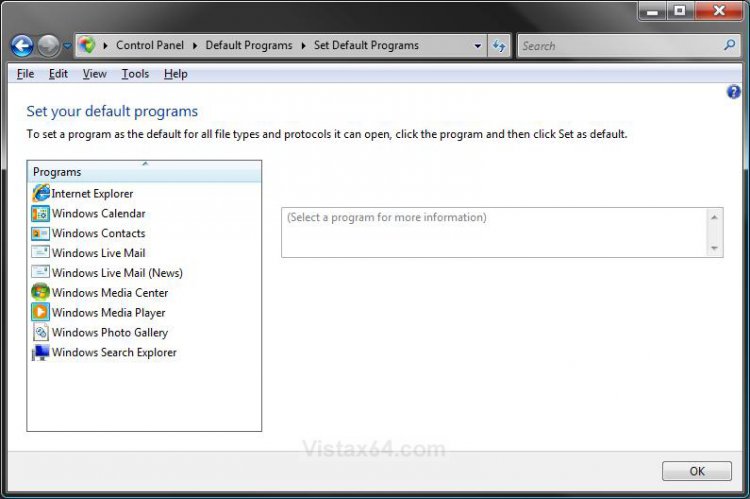
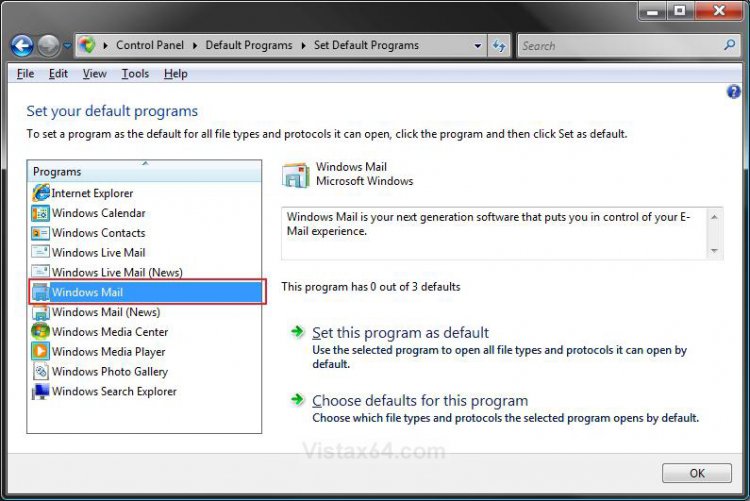
EXAMPLE: Internet Explorer Restored and Removed from Set Default Programs list


OPTION ONE:
Through a Download
NOTE
  This option will only restore Windows Mail back to the Set Default Programs list.
1. Click on the Download button below to download the WindowsMailRegistry.reg file.


2. Click on Save and save the WindowsMailRegistry.reg file to the desktop.
3. Right click on the WindowsMailRegistry.reg file (on Desktop) and click on Merge.
4. Click on the Run button in the Security Warning pop-up.
5. Click on YES and OK in the confirmation windows.
6. You can now delete the WindowsMailRegistry.reg file from the desktop if you like.


OPTION TWO:
Through Default Programs
1. Open the Control Panel (Classic View)
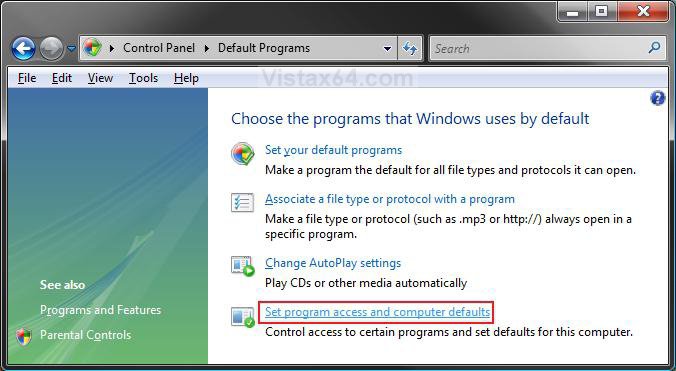
2. Click on the Default Programs icon.
3. Click on the Set program access and computer defaults link. (See screenshot below)


4. Click on Continue in the UAC prompt.
5. Dot Custom and click on the drop down arrow to the right of it to expand Custom. (See screenshot below step 6)
6. Scroll down to the Choose a default e-mail program section.
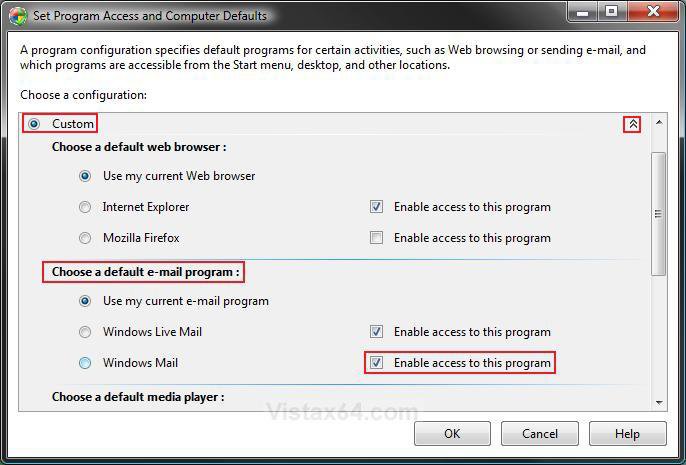


7. To Restore Windows Mail to the Set Default Programs List -
A) To the right of Windows Mail, check the Enable access to this program box. (See screenshot above)
B) Go to step 9.
8. To Remove Windows Mail from the Set Default Programs List -
A) To the right of Windows Mail, uncheck the Enable access to this program box. (See screenshot below step 6)
9. Click on OK. (See screenshot below step 6)
10. Windows Mail will now be restored or removed from the Set Default Program list. (See examples above)
That's it,
Shawn
Published by
Brink's Avatar
Administrator

Join Date: Apr 2007
Location: Texas, USA
Posts: 23,765
Rep Power: 150
Brink has a reputation beyond reputeBrink has a reputation beyond reputeBrink has a reputation beyond reputeBrink has a reputation beyond reputeBrink has a reputation beyond reputeBrink has a reputation beyond reputeBrink has a reputation beyond reputeBrink has a reputation beyond reputeBrink has a reputation beyond reputeBrink has a reputation beyond reputeBrink has a reputation beyond repute

Tutorial Tools
Show Printable Version Show Printable Version
Email this Page Email this Page

Applies to
All Vista Versions
64 Bit & 32 Bit

Page copy protected against web site content infringement by Copyscape

Old 11-30-2008  
gbgbernard
Newbie


Join Date: Nov 2008
ultimatex32
 
Rep Power: 5
gbgbernard is on a distinguished road
  gbgbernard is offline

Re: Windows Mail - Restore or Remove from Default Programs

Option two was exactly the same as shown in the control panel when i opened it
My System SpecsSystem Spec
Old 11-30-2008  
Brink's Avatar
Brink
Administrator


Join Date: Apr 2007
Vista x64 Ultimate SP2
Texas, USA
 
Rep Power: 150
Brink has a reputation beyond reputeBrink has a reputation beyond reputeBrink has a reputation beyond reputeBrink has a reputation beyond reputeBrink has a reputation beyond reputeBrink has a reputation beyond reputeBrink has a reputation beyond reputeBrink has a reputation beyond reputeBrink has a reputation beyond reputeBrink has a reputation beyond reputeBrink has a reputation beyond repute
  Brink is online now

Re: Windows Mail - Restore or Remove from Default Programs

Hello gbgBernard,

Have you already tried Option One to add Windows Mail back to the default program list?
My System SpecsSystem Spec
Comment

Tags
default, programs & features, windows mail

Tutorial Tools
Display Modes


Similar Threads
Tutorial Tutorial Starter Category Comments Last Post
Internet Explorer - Restore or Remove from Default Programs Brink Tutorials 0 10-01-2008 11:40 AM
Windows Media Center - Restore or Remove from Default Programs Brink Tutorials 0 09-30-2008 11:24 AM
Windows Media Player - Restore or Remove from Default Programs Brink Tutorials 0 09-30-2008 11:06 AM
RESTORE DEFAULT START PROGRAMS WINDOWS VISTA intheshushagain Vista performance & maintenance 0 09-29-2007 06:23 AM
remove default programs from recomended program list EinsteinGoneWrong Vista performance & maintenance 0 08-14-2007 07:56 PM


Vista Forums is an independent web site and has not been authorized,
sponsored, or otherwise approved by Microsoft Corporation.
"Windows Vista", the Start Orb, and related materials are trademarks of Microsoft Corp.
© Designer Media Ltd
Tutorial powered by GARS 2.1.8m ©2005-2006