
How to Enable or Disable the Chimney Offload State in Vista
 Information
This will show you how to enable or disable the TCP Chimney Offload State to offload TCP processing for a network connection from the CPU to the network adapter instead. This helps improve the processing of network data on your computer or server without the need for additional programs or any loss to manageability or security. Programs that are currently bound by network processing overhead will generally scale better when used with TCP Chimney Offload. For more information about this, see Information about the TCP Chimney Offload, Receive Side Scaling, and Network Direct Memory Access features in Windows Server 2008 and What is TCP Chimney Offload? - Windows Vista Help.
 Tip
Tip"The goal of TCP Chimney is to reduce CPU utilization and increase network throughput for long-lived TCP connections with bulk transfers and applications that pre-post buffers. Moving TCP processing tasks to hardware frees up the server's CPU for other application tasks."
Full read at: http://technet.microsoft.com/en-us/network/dd277645.aspx
Full read at: http://technet.microsoft.com/en-us/network/dd277645.aspx
 Note
NoteThe TCP Chimney Offload State is enabled by default in Vista. It is recommended to have this enabled. You can test to see how your network connection speed works with either setting.
Here's How:
1. To See the Current TCP Settings
A) Open a elevated command prompt.
B) Click on Continue in the UAC prompt.
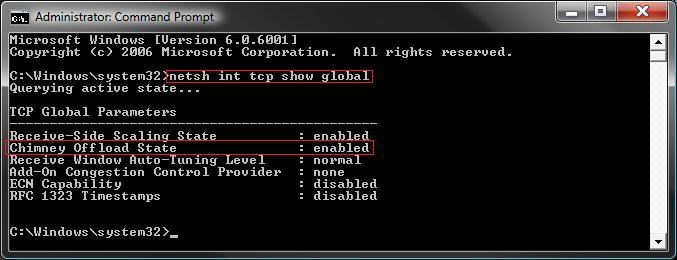
C) In the elevated command prompt, copy and paste the command below and press Enter. (See screenshot below)
netsh interface tcp show global
2. To Enable the Chimney Offload State
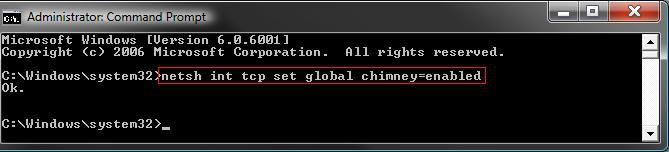
A) In the elevated command prompt, copy and paste the command below and press Enter. (See screenshot below)
netsh int tcp set global chimney=enabled
B) You will get a OK response if successful. If not, repeat step 2A.
C) Go to step 4.
3. To Disable the Chimney Offload State
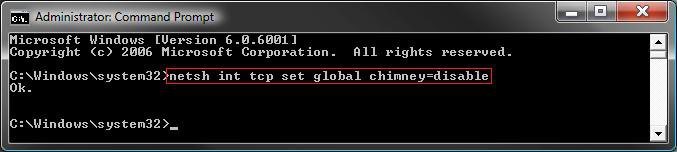
A) In the elevated command prompt, copy and paste the command below and press Enter. (See screenshot below)
netsh int tcp set global chimney=disable
B) You will get a OK response if successful. If not, repeat step 3A.
4. Repeat step 1 to verify the change.
5. Close the command prompt when done.
6. Restart the computer to apply.
That's it,Shawn
Attachments

Last edited:


