
How to Customize the Vista Bubbles Screen Saver Settings
 Information
By default the Bubbles screen saver has no options to set in the Screen Saver Settings window. However, you can customize the Bubbles screen saver settings through the registry instead. This will show you how to.
 Note
NoteThe default location of the Aurora screen saver file is at C:\Windows\System32\Bubbles.scr.
 Tip
TipYou will just need to play with the settings and adjust the Value Data (step 8) until you get the desired affect from the selected DWORD Value Name (step 5).
EXAMPLE: Bubbles Screen Saver with black background

 OPTION ONE
1. Click on the Download button below to download the file below.
Restore_Default_Bubbles.reg

2. Click on Save, and save the .reg file to the Desktop.
3. Right click on the downloaded .reg file and click on Merge.
4. Click on Run, Continue (UAC), Yes, and then OK when prompted.
5. When done, you can delete the .reg file (on Desktop).
OPTION TWO 1. Open the Start Menu, then type regedit in the search box and press Enter.
2. If prompted by UAC, click on Continue.
3. In regedit, navigate to the location below. (See screenshot below)
Code:
HKEY_CURRENT_USER\Software\Microsoft\Windows\Current
Version\Screensavers\Bubbles
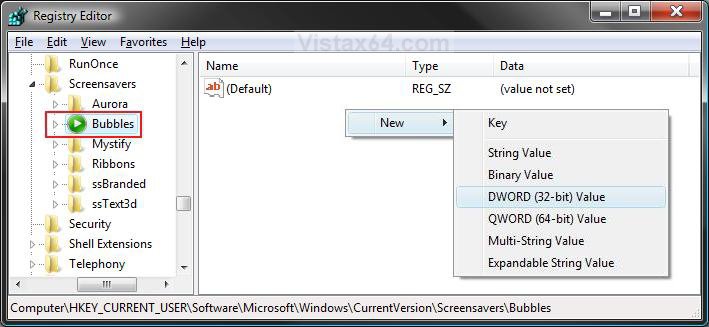
4. In the right pane, right click on a empty area and click on New and DWORD (32-bit) Value. (See screenshot above)
5. Type in a DWORD Value Name you want in the table below and press Enter.
DWORD Value Name | Value Data | Description |
MaterialGlass | 0 or 1 | Set this value to 0 for solid bubbles, 1 for transparent bubbles. |
Radius | 1130000000 to 1090000000 | For smaller or larger bubbles. Higher value number for larger bubbles. |
ShowBubbles | 0 or 1 | Set this value to 1 for current desktop background, 0 for black desktop background. |
ShowShadows | 0 or 1 | Set this value to 1 to enable, 0 to disable bubble shadows. |
SphereDensity | 1000000000 to 2100000000 | For more or less bubbles on screen. Higher value number for more bubbles. |
TurbulenceNumOctaves | 1 to 255 | For how fast the bubble colors will change. Higher value number for faster color change. |
6. Right click on the DWORD Value Name (from step 5) and click on Modify.
7. Dot Decimal, and type in the Value Data you want in the table above and click on OK. (See example screenshot below)
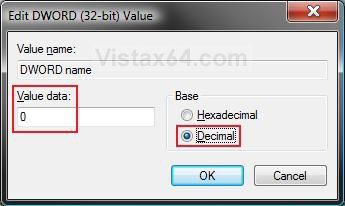
8. Repeat steps 4 to 7 to customize another available DWORD Value Name option.
NOTE: You can add and customize one, a few, or all of the available options if you like (see table below step 5), but only add one instance of each DWORD Value Name in step 4 to prevent problems.
9. Close Regedit when done.
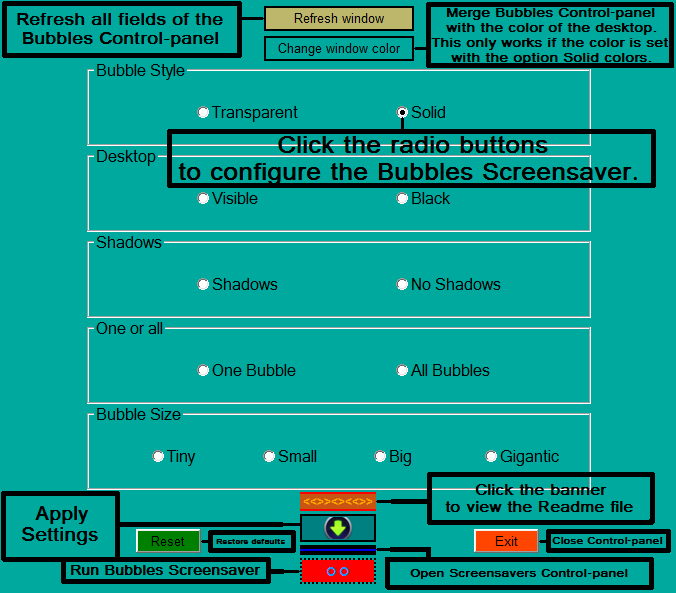
OPTION THREE NOTE: This program was written by our member Sweet.
1. Download the Bubbles.zip file to your desktop from here:
2. Extract (drag and drop) either the Bubble32.exe or Bubbles64.exe file to your desktop depending if you have Vista 32-bit (x86) or Vista 64-bit installed.
3. Run the Bubble32.exe or Bubbles64.exe file, and set your Bubbles screen saver settings.
That's it,
Shawn
Attachments
Last edited:


