Windows Vista Forums
Vista Forums Home Join Vista Forums Windows 7 Forum Vista Tutorials Tags
Welcome to Windows Vista Forums. Our forum is dedicated to helping you find solutions with any problems, errors or issues you are experiencing with Windows Vista. The Vista forum also covers news and updates and has an extensive Windows Vista tutorial section that covers a wide range of tips and tricks.

Go Back   Vista Forums > Vista Forums > Tutorials

Vista - Taskbar Icons

Comment
 

Taskbar Icons

How to Replace the Vista Taskbar Buttons with Icons
Published by Brink
11-08-2008

How to Replace the Vista Taskbar Buttons with Icons


Information
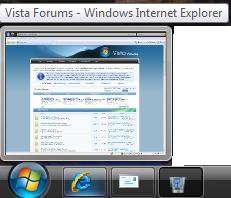
  This will show you how to have taskbar buttons for open windows to display with icons instead.
NOTE
  The taskbar button thumbnail previews will still display if you have the Windows Aero color scheme selected.
WARNING
  If the taskbar is moved vertically to either side of the display, then the icons will not work and only buttons are available instead. The icons will only only work with the taskbar at the top or bottom of the display instead.
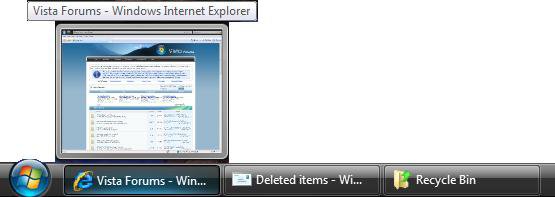
RELATED LINKS:EXAMPLE: Taskbar with Buttons
NOTE: This is the default taskbar.
tasbar_buttons.jpg
EXAMPLE: Taskbar with Icons
Name:  Taskbar_Icons.jpg
Views: 8151
Size:  11.1 KB

OPTION ONE:
Through a Download
1. To Have Taskbar Icons -
A) Click on the download button below to download the Taskbar_with_Icons.reg file.

B) Go to step 3.


2. To Restore Taskbar Buttons -
A) Click on the download button below to download the Taskbar_with_Buttons.reg file.


3. Click on Save, and save the .reg file to the Desktop.

4. Right click on the .reg file (On Desktop) and click on Merge.

5. Click on the Run button in the Security Warning pop-up.

6. Click on Continue (UAC), Yes, and then OK when prompted.

7. Log off and log on, or restart the computer to apply the changes.

8. When done, you can delete the .reg file (on Desktop).

OPTION TWO:
Manually Through the Registry
1. Open the Start Menu.

2. In the white line (Start Search) area, type regedit and press Enter.

3. Click on Continue in the UAC prompt.

4. In regedit, go to: (See screenshot below)
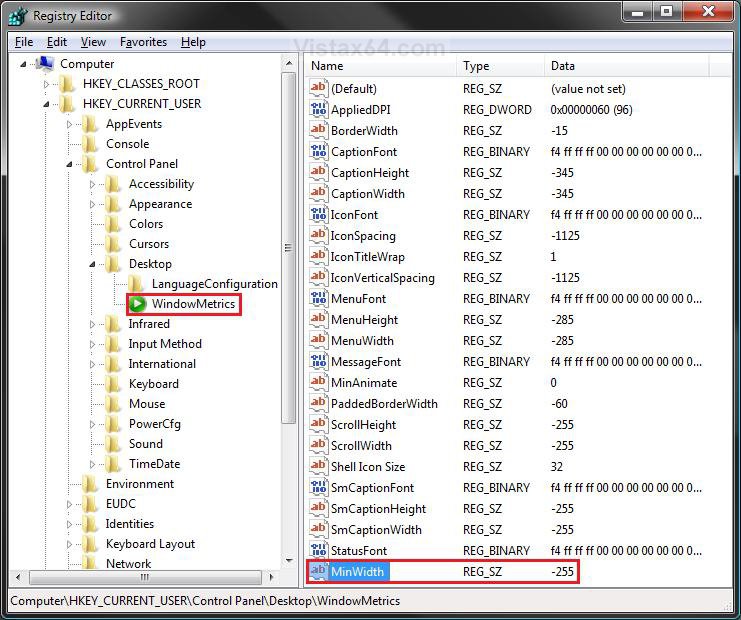
HKEY_CURRENT_USER\Control Panel\Desktop\WindowsMetrics
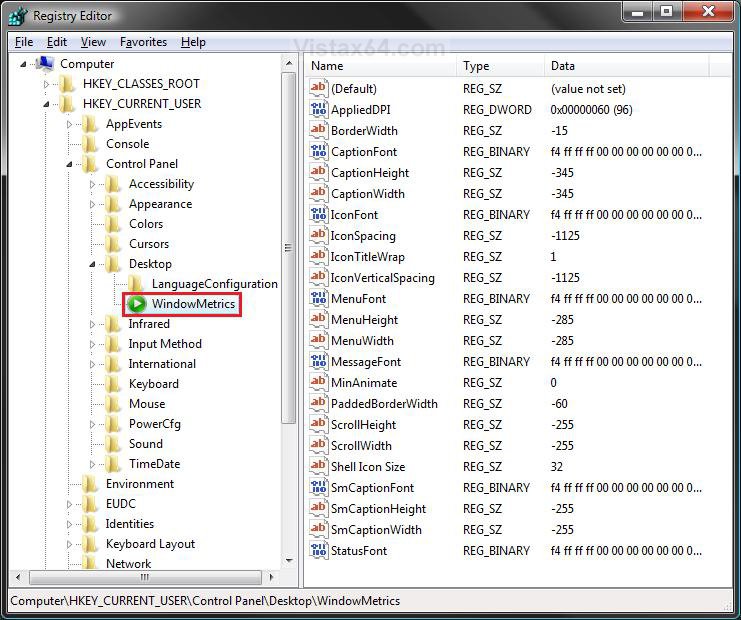
reg1.jpg
5. To Have Taskbar Icons -
A) In the right pane, right click on a empty area and click on New and String Value. (See screenshot above)

B) Type MinWidth and press Enter. (See screenshot below)

C) Right click on MinWidth and click on Modify. (See screenshot below)
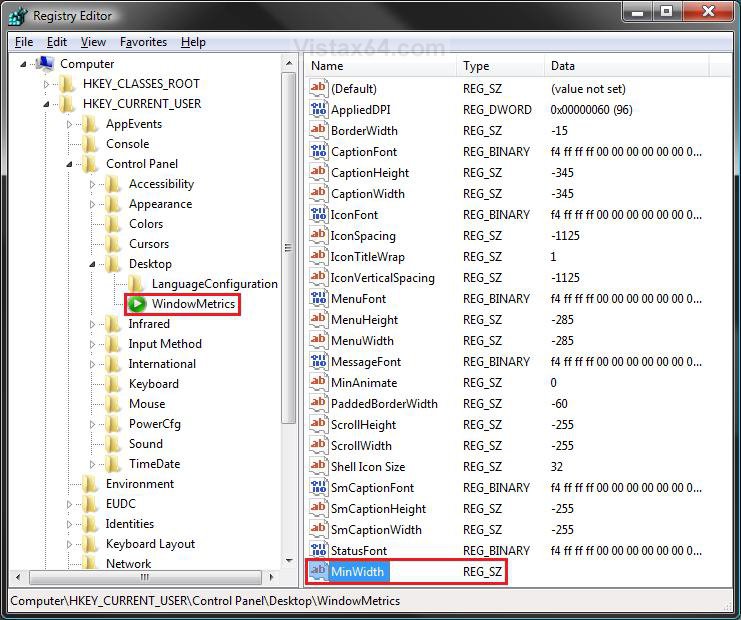
reg2.jpg
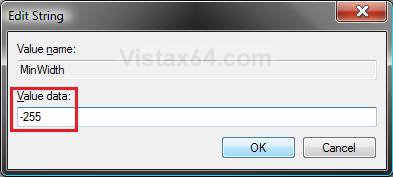
D) Type -255 and click on OK. (See screenshot below)
Name:  Modify.jpg
Views: 8141
Size:  26.5 KB
E) The registry will now look like this. (See screenshot below)
reg3.jpg
F) Go to step 7.
6. To Restore Taskbar Buttons -
A) In the right pane, right click on MinWidth and click on Delete. (See screenshot above)

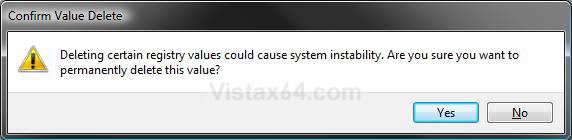
B) Click on Yes to confirm deletion.
confirm.jpg
7. Close regedit.

8. Log off and log on, or restart the computer to apply the changes.
That's it,
Shawn

Published by
Brink's Avatar
Administrator

Join Date: Apr 2007
Location: Texas, USA
Posts: 25,919
Rep Power: 150
Brink has a reputation beyond reputeBrink has a reputation beyond reputeBrink has a reputation beyond reputeBrink has a reputation beyond reputeBrink has a reputation beyond reputeBrink has a reputation beyond reputeBrink has a reputation beyond reputeBrink has a reputation beyond reputeBrink has a reputation beyond reputeBrink has a reputation beyond reputeBrink has a reputation beyond repute

Tutorial Tools

Applies to
All Vista Versions
64 Bit & 32 Bit

Old 11-13-2008  
RBonser


Vista Ultimate 32bit


Re: Taskbar Icons

I did this on my Vista at home and it works great.
I just tried it on my XP machine here at work and it works, except you can see the Icon and the first letter of the window name.
I tried adjusting the number (to -275) thinking that would make it a little smaller, but it did not help.
Any idea how to make this work good with XP?

My System SpecsSystem Spec
Old 11-13-2008  
Brink


Vista x64 Ultimate SP2, Windows 7 Ultimate x64


Re: Taskbar Icons

Hello RBonser,

I'm not sure if this will work with XP, but look at the other String Values ScrollHeight, ScrollWidth, SMCaptionHeight, SMCaptionWidth to see what their Data values are, and make MinWidth the same value. You will notice in Vista that they are all -255, not sure what they are in XP.

Hope this helps,
Shawn
My System SpecsSystem Spec
Old 12-22-2008  
nigel2205


Vista Home Premium 32bit


Re: Taskbar Icons

How do i show wireless icon on taskbar,its grey on taskbar when i connect,then it gowes to ethernet icon.

nigel2205
My System SpecsSystem Spec
Old 12-22-2008  
Brink


Vista x64 Ultimate SP2, Windows 7 Ultimate x64


Re: Taskbar Icons

Hello Nigel,

I do not believe that you can change these icons.

Sorry,
Shawn
My System SpecsSystem Spec
Old 12-24-2008  
nigel2205


Vista Home Premium 32bit


Re: Taskbar Icons

Thanks for info Shawn

nigel2205
My System SpecsSystem Spec
Old 12-24-2008  
Brink


Vista x64 Ultimate SP2, Windows 7 Ultimate x64


Re: Taskbar Icons

You're welcome Nigel. Wish that you could.
My System SpecsSystem Spec
Old 01-24-2009  
MilesAhead


Vista Home Premium 64 bit SP1


Re: Taskbar Icons

Just tried this and it does work. One thing though, if you have a "home made toolbar" where you make a desktop folder with nested folders to organize your shortcuts and drag it to the edge of the screen, once you do this registry modification, the folders won't have any associated text or tooltip text. When you hover the mouse all you will get is the modification date of the folder under the mouse.

In relation to that I'm trying to find out how you can "save" the home made toolbar. If you click the close button you get one warning and if you close it, then it's gone. For some reason resizing the toolbar that takes up the entire edge of the screen is really tedious. You have to just keep clawing at it with the mouse until it changes to a rectangle with a thick border. Then you can resize it. Weird.
My System SpecsSystem Spec
Old 01-24-2009  
Brink


Vista x64 Ultimate SP2, Windows 7 Ultimate x64


Re: Taskbar Icons

Interesting. Thank you MilesAhead.
My System SpecsSystem Spec
Old 02-17-2009  
Endless


Vista Home Premium 64bit


Re: Taskbar Icons

Right off the bat I really like this one :P However, I do have a feeling that it could be a pain if you at some point are working with multiple instances of the same application or have multiple conversations open in MSN, as you can no longer see the start of the name to quickly determine if it is the window you want to open or not.

We'll see, though.. Thanks, Brink
My System SpecsSystem Spec
Comment

Tutorial Tools


Similar Threads
Tutorial Category
Taskbar Icons Vista performance & maintenance
Taskbar icons Vista General
No icons in the taskbar Vista General
No icons on the taskbar Vista General
No icons in taskbar Vista General


Vista Forums is an independent web site and has not been authorized,
sponsored, or otherwise approved by Microsoft Corporation.
"Windows Vista", the Start Orb, and related materials are trademarks of Microsoft Corp.
© Designer Media Ltd
Tutorial powered by GARS 2.1.8m ©2005-2006

1 2 3 4 5 6 7 8 9 10 11 12 13 14 15 16 17 18 19 20 21 22 23 24 25 26 27 28 29 30 31 32 33 34 35 36 37 38 39 40 41 42 43 44 45 46