![]() |
![]() | ![]() | ![]() | ![]() | ![]() | ![]() | ![]() |
| Welcome to Windows Vista Forums. Our forum is dedicated to helping you find solutions with any problems, errors or issues you are experiencing with Windows Vista. The Vista forum also covers news and updates and has an extensive Windows Vista tutorial section that covers a wide range of tips and tricks. |
| |||||||
![]() |
| |
| | |
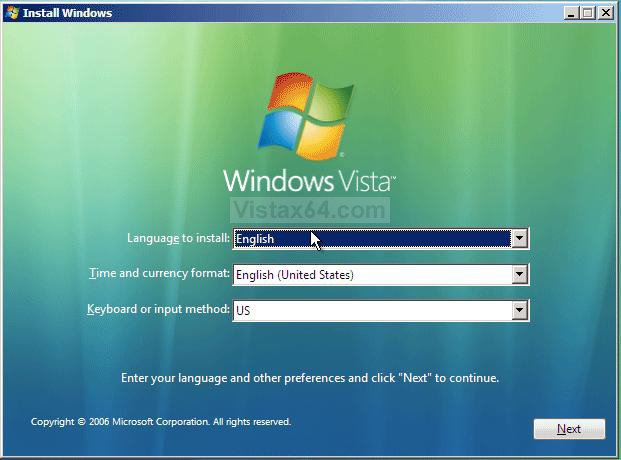
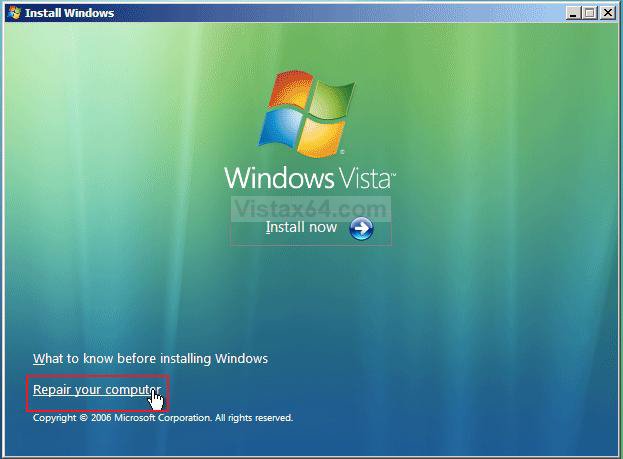
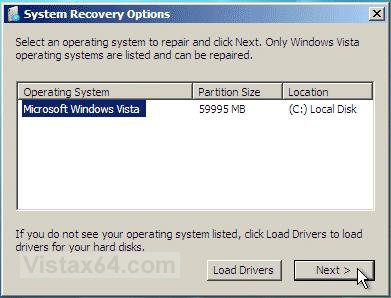
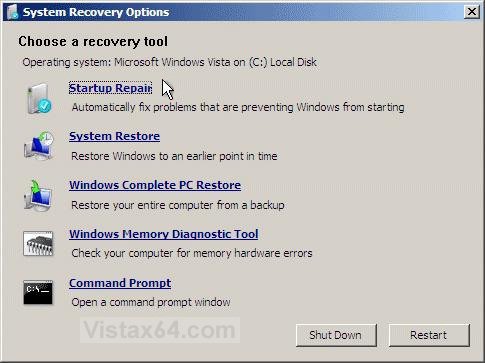
| Vista x64 Ultimate SP2, Windows 7 Ultimate x64 | System Recovery Options |
My System Specs![]() |
| | |
| window vista | Re: System Recovery Options Ahhhh...got it. Thanks. |
My System Specs![]() |
| | |
| Vista x64 Ultimate SP2, Windows 7 Ultimate x64 | Re: System Recovery Options You're welcome Bennys. Shawn |
My System Specs![]() |
| | |
| Ultimate x64 SP1 | Re: System Recovery Options Thx for the tutorial on this. I wasn't getting any O/S listing in the System Recovery Box. glad you cleared that up for me. How long does this process take? It says it might several minutes but it's been going on for almost 30 min. I guess if the O/S is really screwed up it might take several hrs. |
My System Specs![]() |
| | |
| Vista x64 Ultimate SP2, Windows 7 Ultimate x64 | Re: System Recovery Options Hello Overclock2much, It really depends on the option you choose and what all is wrong for how long it will take. Plus, how large the hard drive is and how much is saved on it. I would not think that it would take several hours though unless you have some serious corruption problems. |
My System Specs![]() |
| | |
| Vista Business x64 | Hi Shawn I am new writer looking to resolve a partial crash of Vista business. I have read your "recovery" tutorial but think mine may be disabled and don't want to dabble before I know a bit more! I am using a compaq 6715b with preloaded vista and have no back up discs. Following use of a Reg Clean from Regsoft I have lost linkage and set up options to numerous areas including printer, modem, Control Panel, and my windows shadow recovery is not accessible showing erroe 0x81000202 and neither is the HP recovery option for a timepoint. The update function is not working and my Vista software is not validating (error 0x80070426) but my Office software is and is functioning normally. The system is still up and semi-functional and I can now access my modem by cable but not wireless. Any direct advice or next steps/contacts I could take? Kind Regards Mark |
My System Specs![]() |
| | |
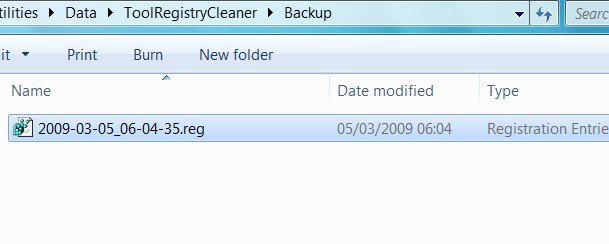
| VISTA HOME PREMIUM X64/ 7 x64 / 7x86 | Re: System Recovery Options Hi MWB, Registry cleaners can be dangerous- if you use one, it is best to check the entries it offers, before removing them. I am not familiar with regclean , but if you are able to open the program , you will probably find it backed up the entries it removed and can restore them for you. Otherwise, if you browse to the regclean install files folder, probably in Program files (x86) there will likely be backups there in the form of .reg files. Double click on those and they will merge back into the registry - you will get a warning it is dangerous to merge files- but under the circumstances, I would do it. If you are not able to open Regclean directly, type C: in the start search box and Program Files (x86) should pop up. Alternatively, type Regclean in the start search box - when it pops up, rt click and select Open file Location - there will be a folder called Data or Backups, or similar, containing the .reg files. Will Look like this : ![]() Hope it helps SIW2 |
My System Specs![]() |
| | |
| Vista Business x64 | Hi MWB, Registry cleaners can be dangerous- if you use one, it is best to check the entries it offers, before removing them. I am not familiar with regclean , but if you are able to open the program , you will probably find it backed up the entries it removed and can restore them for you. Otherwise, if you browse to the regclean install files folder, probably in Program files (x86) there will likely be backups there in the form of .reg files. Double click on those and they will merge back into the registry - you will get a warning it is dangerous to merge files- but under the circumstances, I would do it. If you are not able to open Regclean directly, type C: in the start search box and Program Files (x86) should pop up. Alternatively, type Regclean in the start search box - when it pops up, rt click and select Open file Location - there will be a folder called Data or Backups, or similar, containing the .reg files. Will Look like this : Attachment 10548 Hope it helps SIW2 Many thanks for the support and advice. The software I used was regpair v1.8 from regsofts.com and was a recommended download from Cnet. Not being aware of the dangers you've highlighted I ran a full scan and full fix twice in a row without checking the detail before restarting and subsequently losing OS functionallity. I did immediately go back and restore both of the "fixes" from within the registry cleaner but to no avail. I have followed your suggested process and the back up files are there but are empty presumably because of previusly running the restore process. I am awaiting feedback from Regsofts and Microsoft but am open to any good advice which could avoid me having to run a full PC restoration. Many Thanks Mark |
My System Specs![]() |
| | |
| Vista x64 Ultimate SP2, Windows 7 Ultimate x64 | Re: System Recovery Options Hello Mark, and welcome to Vista Forums. You might see if you can do a Vista System Restore using a restore point dated before this issue to see if it can fix it for you. Hope this helps, Shawn |
My System Specs![]() |
| | |
| VISTA HOME PREMIUM X64/ 7 x64 / 7x86 | Re: System Recovery Options Hi Mark, Type services.msc in the start search box, click it when it pops up and make sure that Task Scheduler, Microsoft Shadow Copy provider and Volume Shadow Copy Service are all running. Services Then try System restore. System Restore - How to Hope it helps SIW2 Last edited by SIW2; 03-05-2009 at 07:49 PM.. |
My System Specs![]() |
| | |
| Vista Business x64 | Hello Mark, and welcome to Vista Forums. You might see if you can do a Vista System Restore using a restore point dated before this issue to see if it can fix it for you. Hope this helps, Shawn When I access this option it says it is not available although I have used it once before some months ago without issue. I checked the set up in services as per the default comment in your tutorial and it shows the volume shadow copy as not started and manual but when I do try to start it a pop up comment says Error 2 cannot find file? presumably this has been disabled in some way by the registry cleaner that I ran! The HP recovery F drive has 8MB of data within it but the recovery option won't run and I unable to access the data helped in this partition. The E drive has over 1MB of OS Tools which I can access but don't know if or what I could usefully action. Kind Regards ![]() Mark |
My System Specs![]() |
![]() |
| Tutorial Tools | |
| |
Similar Threads | ||||
| Tutorial | Category | |||
| How to creat recovery partition with recovery image in vista to restore the system | Vista installation & setup | |||
| System Recovery Options Not Available | Vista installation & setup | |||
| No operating systems in System recovery options | Vista installation & setup | |||
| Data Recovery Options | Vista General | |||
| Stuck in System Recovery Options | Vista General | |||