Windows Vista Forums
Vista Forums Home Join Vista Forums Windows 7 Forum Vista Tutorials Tags
Welcome to Windows Vista Forums. Our forum is dedicated to helping you find solutions with any problems, errors or issues you are experiencing with Windows Vista. The Vista forum also covers news and updates and has an extensive Windows Vista tutorial section that covers a wide range of tips and tricks.

Go Back   Vista Forums > Vista Forums > Tutorials

Vista - Printer - Connect to Wireless Router

Comment
 

Printer - Connect to Wireless Router

How to Connect a Printer to a Wireless Router
Published by pooch
12-02-2008

How to Connect a Printer to a Wireless Router
Information
  This Tutorial will show you how to connect a printer to a wireless router to allow more computers on your wireless network to access a single printer.
NOTE
  This will work with most modern Printers and Wireless routers that can be connected by USB. Some settings may vary with different Routers and Printers.


Here's How:
1. First connect the Printer to the Wireless Router by usb cable and switch on the Printer
2. Installl te printer drivers on all computers that are to have acces to the printer.

3. With each computer proceed as follows:
A. Open the Start Menu.
B. Click on the Control Panel button.
C. Click on Printer.
D. Right click on your Printer Icon and click on Properties.
E. Click on the Ports tab.
F. Remove the tick from the Enable bidirectional support box.
G. Click on add port, highlight Standard TCP/IP Port, and click on new port.
capture1.jpg
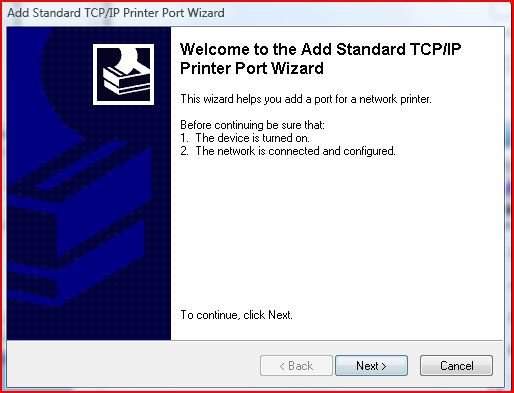
H. This will open the Add Standard TCP/IP Printer Port Wizard.
capture2.jpg
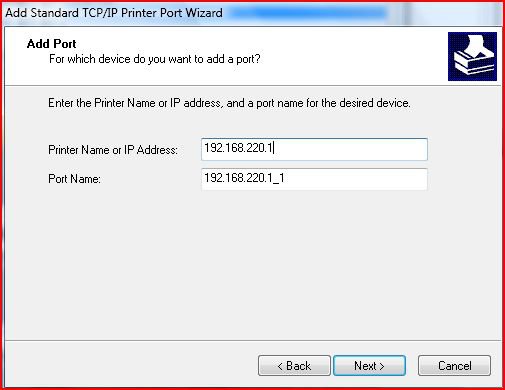
I. Click on Next, Give in the IP for your Router, The port name will be filled out automatically
capture3.jpg
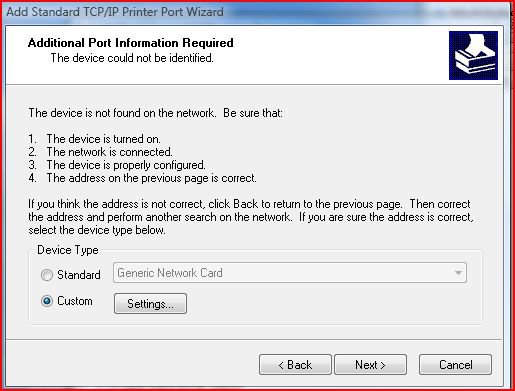
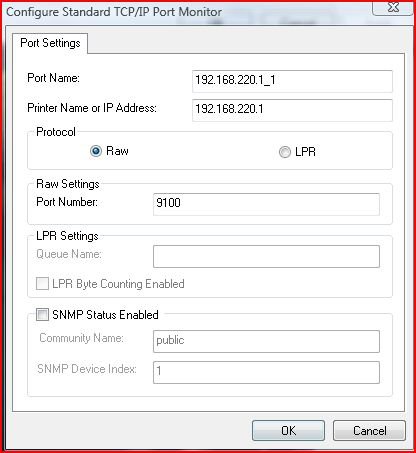
J. Click on Next. Vista will try to find your printer. Wait for this to fail and click on Custom in the new window and then on settings
capture4.jpg
K. In the new window check that Raw and port number 9100 is selected.

L. Click on OK, Next, Finish, Close, Apply and Close.
Thats it the Printer is now set up!!
Published by
pooch's Avatar
Old Dog


Join Date: Sep 2008
Location: Germany
Posts: 1,046
Rep Power: 53
pooch has much to be proud ofpooch has much to be proud ofpooch has much to be proud ofpooch has much to be proud ofpooch has much to be proud ofpooch has much to be proud ofpooch has much to be proud ofpooch has much to be proud ofpooch has much to be proud of

Tutorial Tools

Applies to
All Vista Versions
64 Bit & 32 Bit

Old 12-05-2008  
RBonser


Vista Ultimate 32bit


Re: Printer - Connect to Wireless Router

Will this work with an All-In-One printer and allow me to scan from any PC?

My System SpecsSystem Spec
Old 12-05-2008  
pooch


Vista Ultimatex64 Windows 7 build 7100


Re: Printer - Connect to Wireless Router

Hi RBonser,

This will work with an all in one printer yes, but the scan function will only be available from the printer itself.

Pooch
My System SpecsSystem Spec
Old 12-22-2008  
RichFrogg


Vista Home Premium x64


Re: Printer - Connect to Wireless Router

Pooch,

I have Windows 98 (don't laugh) as my desktop right now. It's connected to the Router and the printer is connected to the Win98 machine. Will Win98 be able to find the printer if I hook it up to the router? Or should I use some typr of splitter?
My System SpecsSystem Spec
Old 12-23-2008  
pooch


Vista Ultimatex64 Windows 7 build 7100


Re: Printer - Connect to Wireless Router

Quote  Quote: Originally Posted by RichFrogg View Post
Pooch,

I have Windows 98 (don't laugh) as my desktop right now. It's connected to the Router and the printer is connected to the Win98 machine. Will Win98 be able to find the printer if I hook it up to the router? Or should I use some typr of splitter?
Hi Rich,

I really do not know, I suppose there is only one way to find out and that's to try it

As it would appear to windows as another piece of hardware on a network and the drivers are already installed, then I would guess yes, you could be in luck

Please let me know either way.

Pooch
My System SpecsSystem Spec
Old 12-23-2008  
barman58


Windows 7 RC x64 Vista HP x86


Re: Printer - Connect to Wireless Router

Hi rich,

In order to access a printer on the network it has to be attached to a "Print Server" which handles the print Queue, it is possible to achive this without a computer either by using a printer with a built in print server or using add-on units from the network hardware manufacturers.

If you connect a windows 98 machine into the network vista should have no problem seeing the computer and any shared printers connected to it. What may be a problem is vista drivers for the printer which are required on the vista machine to actually print

Hope this helps
My System SpecsSystem Spec
Comment

Tutorial Tools


Similar Threads
Tutorial Category
Can't connect to a wireless router? Vista networking & sharing
Cannot connect to wireless router Network & Sharing
cannot connect to a wireless dsl router Vista networking & sharing
Cant connect to my wireless router Vista networking & sharing
Can not connect to my wireless router Vista General


Vista Forums is an independent web site and has not been authorized,
sponsored, or otherwise approved by Microsoft Corporation.
"Windows Vista", the Start Orb, and related materials are trademarks of Microsoft Corp.
© Designer Media Ltd
Tutorial powered by GARS 2.1.8m ©2005-2006

1 2 3 4 5 6 7 8 9 10 11 12 13 14 15 16 17 18 19 20 21 22 23 24 25 26 27 28 29 30 31 32 33 34 35 36 37 38 39 40 41 42 43 44 45 46