Windows Vista Forums
Vista Forums Home Join Vista Forums Windows 7 Forum Vista Tutorials Tags
Welcome to Windows Vista Forums. Our forum is dedicated to helping you find solutions with any problems, errors or issues you are experiencing with Windows Vista. The Vista forum also covers news and updates and has an extensive Windows Vista tutorial section that covers a wide range of tips and tricks.

Go Back   Vista Forums > Vista Forums > Tutorials

Vista - Security Center - Not Reporting Correct Information

Comment
 

Security Center - Not Reporting Correct Information

How to Fix the Vista Security Center Reporting Incorrect Information
Published by Brink
12-02-2008

How to Fix the Vista Security Center Reporting Incorrect Information
Information
  Sometimes the Security Center may show outdated or misleading information or status due to a problem in the WMI repository. This will show you how to rebuild the WMI repository to have the Security Center information reported correctly again.
NOTE
  For example, it may show that you have a antivirus or firewall program still installed and on, when you have actually uninstalled that program.
RELATED LINKS:EXAMPLE: Security Center
NOTE: You can see the Security Center by opening the Control Panel (classic View) and clicking on the Security Center icon.
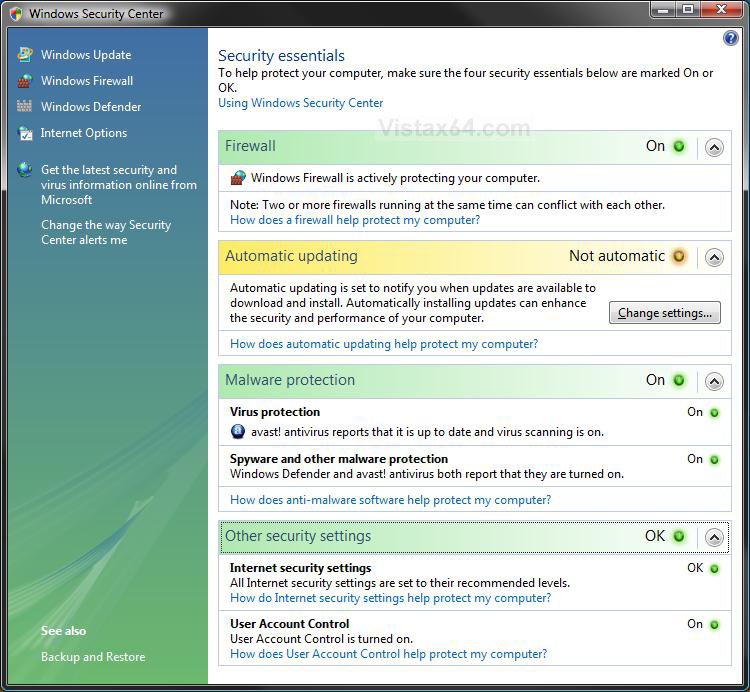
security_center.jpg


OPTION ONE:
To Only Verify the WMI Repository Status
1. Open a elevated command prompt.

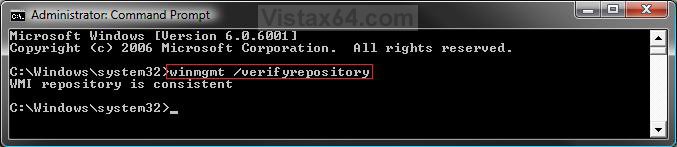
2. In the elevated command prompt, type winmgmt /verifyrepository and press Enter. (See screenshot below)
verify.jpg
3. You will get either one of these results: (See screenshot above)
  • WMI repository is consistent - no problems detected.
  • WMI repository is inconsistent - problems detected. You should do OPTION TWO below.
4. Close the elevated command prompt.

OPTION TWO:
To Rebuild the WMI Repository
1. Open a elevated command prompt.

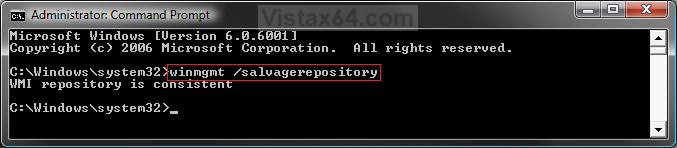
2. In the elevated command prompt, type winmgmt /salvagerepository and press Enter. (See screenshot below)
salvage.jpg
3. You will get either one of these results: (See screenshot above)
  • WMI repository is consistent - no problems as from Option One above. You are done.
  • WMIrepository salvage failed - failed to rebuild WMI repository. Try repeating step 2 again.
  • WMIrepository has been salvaged - WMI repository has been successfully rebuilt.
4. Close the elevated command prompt.

5. Restart the computer to apply.

6. Check Security Center to see if the correct information is now being reported.
That's it,
Shawn

Published by
Brink's Avatar
Administrator

Join Date: Apr 2007
Location: Texas, USA
Posts: 25,919
Rep Power: 150
Brink has a reputation beyond reputeBrink has a reputation beyond reputeBrink has a reputation beyond reputeBrink has a reputation beyond reputeBrink has a reputation beyond reputeBrink has a reputation beyond reputeBrink has a reputation beyond reputeBrink has a reputation beyond reputeBrink has a reputation beyond reputeBrink has a reputation beyond reputeBrink has a reputation beyond repute

Tutorial Tools

Applies to
All Vista Versions
64 Bit & 32 Bit

Old 12-11-2008  
RedDawn


Vista Home Premium SP1 32bit


Re: Security Center - Not Reporting Correct Information

Excellent as usual, Shawn, thanks.

My System SpecsSystem Spec
Old 12-11-2008  
Brink


Vista x64 Ultimate SP2, Windows 7 Ultimate x64


Re: Security Center - Not Reporting Correct Information

You're welcome RedDawn.
My System SpecsSystem Spec
Old 12-12-2008  
dinesh


Windows 7 RTM 64-bit


Re: Security Center - Not Reporting Correct Information

Hi Shawn, do you have any idea as to why this issue occurs?
My System SpecsSystem Spec
Old 12-12-2008  
Brink


Vista x64 Ultimate SP2, Windows 7 Ultimate x64


Re: Security Center - Not Reporting Correct Information

Hello Dinesh,

It could be from a number of things that caused the corruption in the WMI repository : bad install, bad uninstall, WMI service not started or disable, etc...
My System SpecsSystem Spec
Old 12-12-2008  
dinesh


Windows 7 RTM 64-bit


Re: Security Center - Not Reporting Correct Information

Thanks Shawn.
MS has come up with so many different models that helps the OS to run more efficiently( like the Windows Management Instrumentation {WMI}). All these makes use of VB scripts that actually makes Vista fit into a DVD instead of a CD.
My System SpecsSystem Spec
Old 12-12-2008  
Groffeaston


Windows Vista Home Premium 32bit


Re: Security Center - Not Reporting Correct Information

What should I do, when I get "Generic Failure" as the outcome at the end of both options?
My System SpecsSystem Spec
Old 12-12-2008  
Brink


Vista x64 Ultimate SP2, Windows 7 Ultimate x64


Re: Security Center - Not Reporting Correct Information

Hello Groffeaston, and welcome to Vista Forums.

Did you use a elevated command prompt and not a regular command prompt?

If you did, then try a System Restore using a restore point dated before this problem. If that still does not help, then you can do a repair (upgrade) install.

Hope this helps,
Shawn
My System SpecsSystem Spec
Old 12-12-2008  
Groffeaston


Windows Vista Home Premium 32bit


Re: Security Center - Not Reporting Correct Information

Yes I did use the elevated command prompt. I can try it again to be doubly sure.

I tried it again and got the same results. Here is what it says:
WMI repository verification failed
Error code: 0x80041001
Facility: WMI
Description: Generic failure

Last edited by Groffeaston; 12-12-2008 at 11:34 PM.. Reason: added more information
My System SpecsSystem Spec
Comment

Tutorial Tools


Similar Threads
Tutorial Category
Windows cannot connect to... (Wireless network security key is not correct) Network & Sharing
Security Center Reporting No Antu-Virus Software Vista security
Vista does not seem to be reporting correct memory through taskbar Vista performance & maintenance
Showing correct information in folders Vista General
What's the correct way do design an Exif image information cmdlet? PowerShell


Vista Forums is an independent web site and has not been authorized,
sponsored, or otherwise approved by Microsoft Corporation.
"Windows Vista", the Start Orb, and related materials are trademarks of Microsoft Corp.
© Designer Media Ltd
Tutorial powered by GARS 2.1.8m ©2005-2006

1 2 3 4 5 6 7 8 9 10 11 12 13 14 15 16 17 18 19 20 21 22 23 24 25 26 27 28 29 30 31 32 33 34 35 36 37 38 39 40 41 42 43 44 45 46