Windows Vista Forums
Vista Forums Home Join Vista Forums Windows 7 Forum Vista Tutorials Tags
Welcome to Windows Vista Forums. Our forum is dedicated to helping you find solutions with any problems, errors or issues you are experiencing with Windows Vista. The Vista forum also covers news and updates and has an extensive Windows Vista tutorial section that covers a wide range of tips and tricks.

Go Back   Vista Forums > Vista Forums > Tutorials

Vista - Dual Boot - Change OS Name in Windows Boot Manager

Comment
 

Dual Boot - Change OS Name in Windows Boot Manager

How to Change the OS Name in Windows Boot Manager
Published by Brink
03-11-2009

How to Change the OS Name in Windows Boot Manager

Information
  When you dual boot, this will show you how to change a listed operating system name in the Windows Boot Manager to what you want from within the operating system that you want to change the name of. For example, in Vista.
Tip
  It can be real useful to rename a operating system if you have more than one OS listed with the same name, or you would like to have a better description (ex: 32-bit, 64-bit, build number), etc..)
RELATED LINKS:EXAMPLE: Windows Boot Manager
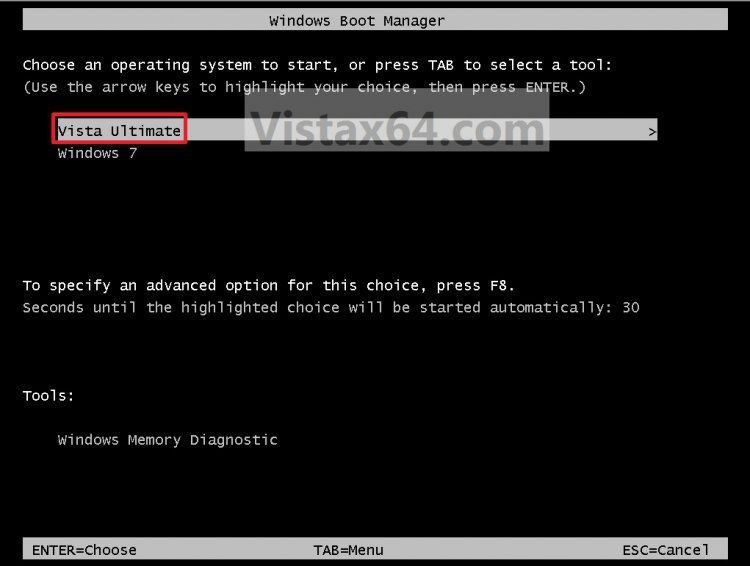
NOTE: This is an example of the default Microsoft Windows Vista name (left) renamed to Vista Ultimate (right) instead. You can rename the OS to any name you like though.
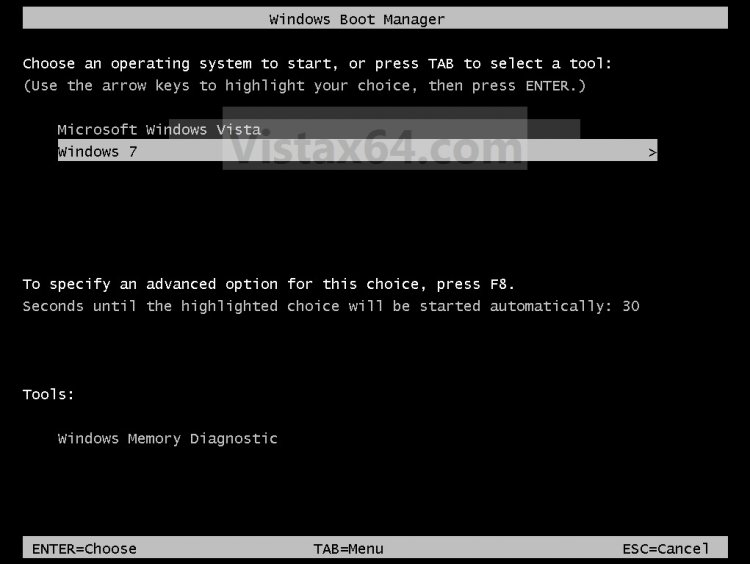
boot_manager_vista.jpg
.
boot_manager-2-vista.jpg


METHOD ONE:
With bcdedit Command
1. Start the Operating System (ex: Vista) that you want to change the name of in the Windows Boot Manager screen.

2. Open a elevated command prompt.

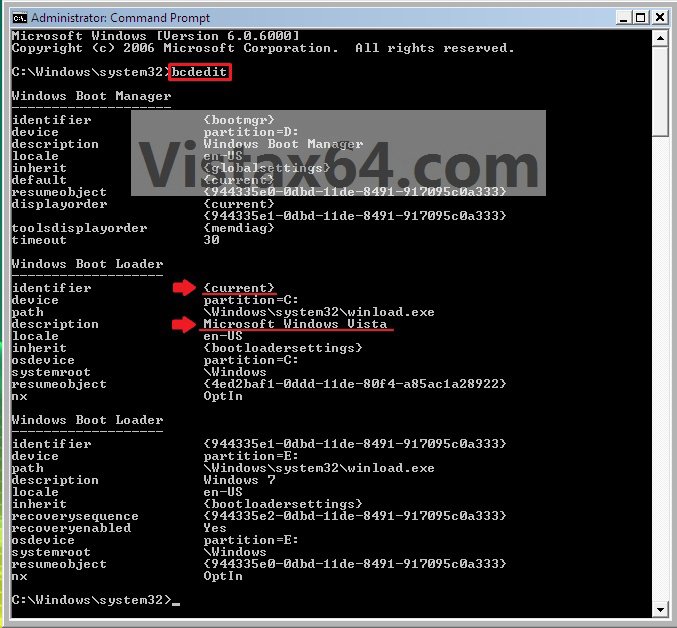
3. In the elevated command prompt, type bcdedit and press enter. (See screenshot below)
NOTE: This will let you see what the name of the {current} operating system name is. This will be the operating system that you are currently in (ex: Microsoft Windows Vista).
step1-vista.jpg
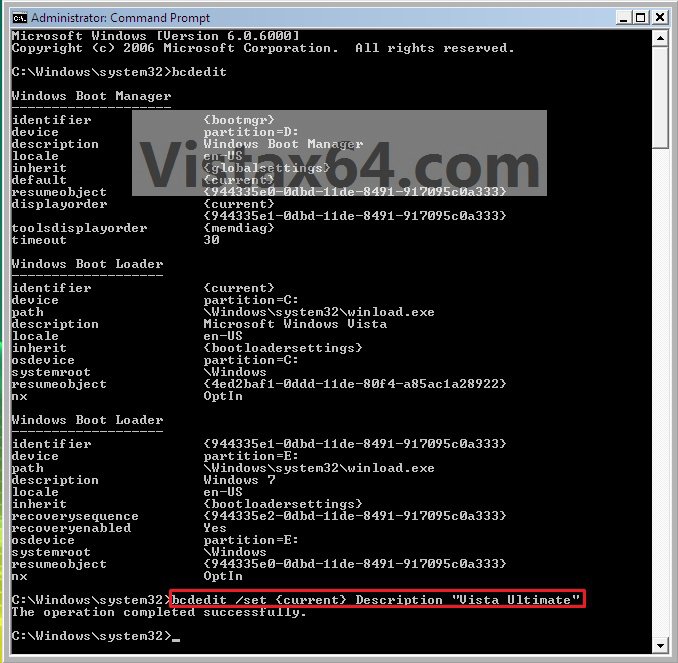
4. In the elevated command prompt, type:
bcdedit /set {current} Description "name you want"
and press enter. (See screenshot below)
NOTE: For example, if I wanted to change the name to Vista Ultimate, I would type bcdedit /set {current} Description "Vista Ultimate" and press enter.
step2_vista.jpg
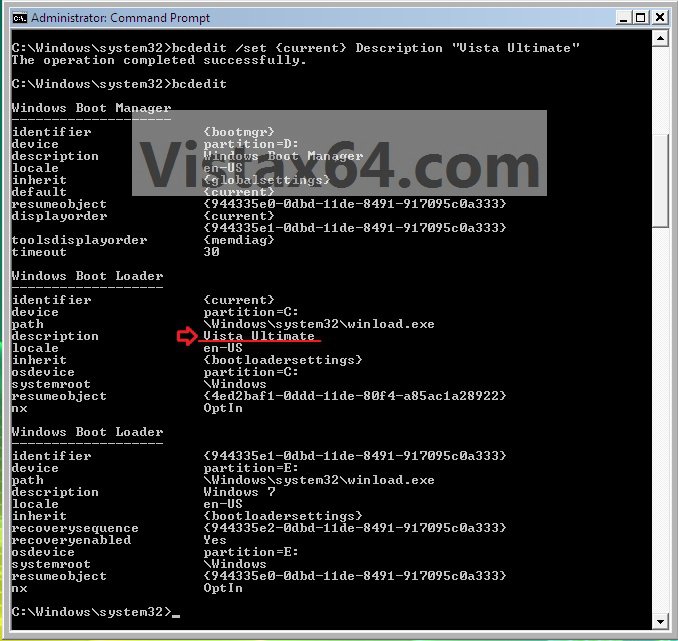
5. In the elevated command prompt, type bcdedit and press enter. (See screenshot below)
NOTE: This will let you see and verify the new name of the {current} operating system.
step3-vista.jpg
6. Close the elevated command prompt.

7. When you restart the computer next, you will see the new name listed for the operating system. (See example screenshots at the top of the tutorial)


METHOD TWO:
With EasyBCD Program
NOTE
  Special thanks to SIW2 for providing this.
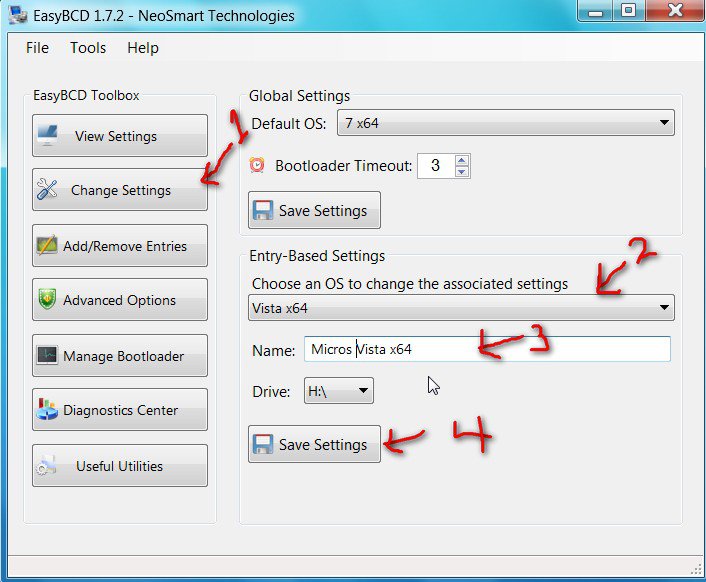
FIRST: Download and install the EasyBCD program, then run it.
easybcd2009-01-23_142941.jpg
1. Click on the Change Settings button.

2. Select the OS whose name you want to change in the drop down arrow menu.

3. To the left of the Name line, click in the line to put the cursor there and type any name you want for the OS.

4. Click on the Save Settings button.
That's is,
Shawn

Published by
Brink's Avatar
Administrator

Join Date: Apr 2007
Location: Texas, USA
Posts: 25,919
Rep Power: 150
Brink has a reputation beyond reputeBrink has a reputation beyond reputeBrink has a reputation beyond reputeBrink has a reputation beyond reputeBrink has a reputation beyond reputeBrink has a reputation beyond reputeBrink has a reputation beyond reputeBrink has a reputation beyond reputeBrink has a reputation beyond reputeBrink has a reputation beyond reputeBrink has a reputation beyond repute

Tutorial Tools

Applies to
All Vista Versions
64 Bit & 32 Bit

Old 03-11-2009  
nate42nd


Windows 7 x64 (7229)


Thumbs up Re: Dual Boot - Change OS Name in Windows Boot Manager

Thanks a lot for the tutorial Brink. I have been working on this for a few days. This is exactly what I needed.

On some systems, the boot manager will say "Earlier versions of windows" and we need to rename the OS.


Last edited by nate42nd; 03-11-2009 at 04:34 AM.. Reason: getting it right
My System SpecsSystem Spec
Old 03-11-2009  
Brink


Vista x64 Ultimate SP2, Windows 7 Ultimate x64


Re: Dual Boot - Change OS Name in Windows Boot Manager

You're welcome Nate. This is the easiest method that I could come up with using the bcdedit command.
My System SpecsSystem Spec
Old 03-11-2009  
nate42nd


Windows 7 x64 (7229)


Re: Dual Boot - Change OS Name in Windows Boot Manager

Brink, I am running XP, Vista, and Windows 7. To use this method, one needs to be running the OS they intend to change right? Will this method work in XP?
My System SpecsSystem Spec
Old 03-11-2009  
Brink


Vista x64 Ultimate SP2, Windows 7 Ultimate x64


Re: Dual Boot - Change OS Name in Windows Boot Manager

Yes, you need to be running the OS you want to change the name of. I have not tried it in XP, but I believe it should work without any problems.
My System SpecsSystem Spec
Old 04-14-2009  
sl2222


Vista Ultimate x64


Re: Dual Boot - Change OS Name in Windows Boot Manager

Quote  Quote: Originally Posted by Brink View Post
Yes, you need to be running the OS you want to change the name of. I have not tried it in XP, but I believe it should work without any problems.
Not with method 2. EasyBCD does it all from any OS and it's FREE and very easy to use!

sl2222
My System SpecsSystem Spec
Comment

Tutorial Tools


Similar Threads
Tutorial Category
Boot Manager issue: dual boot vista 64 ultimate / windows 7 ultimate Vista installation & setup
How change from dual boot to single boot Vista? Vista General
Change location of Windows Boot Manager Vista installation & setup
How to change Dual boot to Individual boot. Vista installation & setup
change dual boot to single boot Vista installation & setup


Vista Forums is an independent web site and has not been authorized,
sponsored, or otherwise approved by Microsoft Corporation.
"Windows Vista", the Start Orb, and related materials are trademarks of Microsoft Corp.
© Designer Media Ltd
Tutorial powered by GARS 2.1.8m ©2005-2006

1 2 3 4 5 6 7 8 9 10 11 12 13 14 15 16 17 18 19 20 21 22 23 24 25 26 27 28 29 30 31 32 33 34 35 36 37 38 39 40 41 42 43 44 45 46