
How to Open and Use Windows Mobility Center in Vista
 Information
This will show you how to open Windows Mobility Center to display the most commonly used laptop settings, such as display brightness, volume, battery status, wireless network status, external display, Sync Center, and Presentation settings in one location for quicker access in Vista.
 Tip
TipIf you wanted or needed to create a Windows Mobility Center shortcut, the exe file is located at C:\Windows\System32\mblctr.exe.
 Warning
By default, the Windows Mobility Center feature is only available on laptops, notebooks, and tablet PCs. It is not available on desktop computers unless enabled.
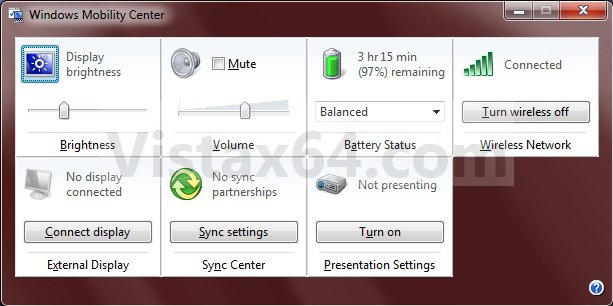
EXAMPLE: Windows Mobility Center
NOTE: Each available setting is displayed as a tile in Mobility Center. Different tiles are displayed depending on your system hardware and drivers. Some tiles are added by your laptop manufacturer. Not all settings are available on all laptops.
Here's How:
1. Press Windows Key + X.
A) Go to step 3.
OR
2. Open the Control Panel (Classc view), and click on the Windows Mobility Center icon.
3. You can now adjust the settings per tile to what you like. (See screenshot below)
NOTE: You can click on a tile icon at the upper left corner of the tile to quickly open options for that setting. Here are some of the most common settings you might find in Mobility Center listed below. Remember that not all settings are available on all laptops.
- Display Brightness - Move the slider to temporarily adjust the brightness of your display. To adjust the display brightness settings for your power plan, click the icon to open Power Options.
- Volume - Move the slider to adjust the speaker volume of your laptop, or select the Mute check box.
- Battery Status - View how much charge remains on your battery or select a power plan from the list.
- Wireless Network - View the status of your wireless network connection or turn your wireless network adapter on or off.
NOTE: If the Turn wireless on button is unavailable, you might need to use the hardware switch on your laptop computer to turn on the wireless network adapter. For more information about turning the adapter on and off, check the documentation that came with your computer. - Screen Rotation - Change the orientation of your Tablet PC screen from portrait to landscape, or vice versa.
- External Display - Connect an additional monitor to your laptop, or customize the display settings.
- Sync Center - View the status of an in-progress file sync, start a new sync, set up a sync partnership, or change your settings in Sync Center.
- Presentation Settings - Change the screen saver, adjust the speaker volume, and change your desktop background image to be applied when giving a presentation.
Shawn
Attachments
Last edited: