Windows Vista Forums
Vista Forums Home Join Vista Forums Windows 7 Forum Vista Tutorials Tags
Welcome to Windows Vista Forums. Our forum is dedicated to helping you find solutions with any problems, errors or issues you are experiencing with Windows Vista. The Vista forum also covers news and updates and has an extensive Windows Vista tutorial section that covers a wide range of tips and tricks.

Go Back   Vista Forums > Vista Forums > Tutorials

Vista Tutorial - Empty Recycle Bin - Add to Desktop Context Menu

Comment
 

Empty Recycle Bin - Add to Desktop Context Menu

How to Add Empty Recycle Bin to the Vista Desktop Context Menu
Published by Brink
04-15-2009

How to Add Empty Recycle Bin to the Vista Desktop Context Menu
Information
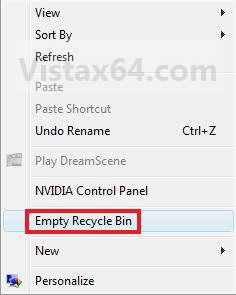
  This will show you how to add or remove the Empty Recycle Bin option from the desktop context menu in Vista. By default, Empty Recycle Bin is not in the desktop context menu.
RELATED LINKS:EXAMPLE: Desktop Context Menu without and with "Empty Recycle Bin" added
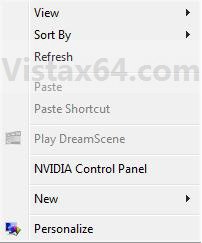
Name:  Default_Desktop_Menu.jpg
Views: 1348
Size:  19.9 KBName:  Added.jpg
Views: 1425
Size:  29.0 KB


Here's How:
1. To Add Empty Recycle Bin to Desktop Context Menu -
A) Click on the Download button below to download the
Add_Desktop_Empty_Recycle_Bin.zip file below.

B) Go to step 3.
2. To Remove Empty Recycle Bin to Desktop Context Menu -
A) Click on the Download button below to download the
Remove_Desktop_Empty_Recycle_Bin.zip file below.

3. Click on Save, and save the .zip file to the desktop.

4. Open the .zip file and extract the .reg file to the desktop.

5. Right click the .reg file (On Desktop) and click on Merge.

6. Click on Run, Continue, Yes, and OK when prompted.

7. When done, you can delete the downloaded .reg and .zip files on the desktop if you like.
That's it,
Shawn

Published by
Brink's Avatar
Administrator

Join Date: Apr 2007
Location: Texas, USA
Posts: 25,812
Rep Power: 150
Brink has a reputation beyond reputeBrink has a reputation beyond reputeBrink has a reputation beyond reputeBrink has a reputation beyond reputeBrink has a reputation beyond reputeBrink has a reputation beyond reputeBrink has a reputation beyond reputeBrink has a reputation beyond reputeBrink has a reputation beyond reputeBrink has a reputation beyond reputeBrink has a reputation beyond repute

Tutorial Tools

Applies to
All Vista Versions
64 Bit & 32 Bit

Old 04-15-2009  
nizaradil
Member


Join Date: Aug 2008
Vista Home Premium


Re: Empty Recycle Bin - Add to Desktop Context Menu

Oh, yes it's good

thank you Shawn.

My System SpecsSystem Spec
Old 04-15-2009  
Kernel
Vista User


Join Date: Feb 2009
Vista Ultimate 32bit, Windows 7 32bit.


Re: Empty Recycle Bin - Add to Desktop Context Menu

It is a very good idea to setup clean desktop. no need to place recycle bin icon on the desktop.
My System SpecsSystem Spec
Old 04-15-2009  
Brink
Administrator


Join Date: Apr 2007
Vista x64 Ultimate SP2, Windows 7 (7600) x64


Re: Empty Recycle Bin - Add to Desktop Context Menu

You're welcome guys. I always like a clean desktop as well.
My System SpecsSystem Spec
Old 2 Weeks Ago  
pcs800
Newbie


Join Date: Oct 2009
7 Ultimate


Re: Empty Recycle Bin - Add to Desktop Context Menu

Does anyone know of a way to get this to work on 64 bit OS's? Specifically Win 7 ultimate 64?
My System SpecsSystem Spec
Old 2 Weeks Ago  
Brink
Administrator


Join Date: Apr 2007
Vista x64 Ultimate SP2, Windows 7 (7600) x64


Re: Empty Recycle Bin - Add to Desktop Context Menu

Hello PCS, and welcome to Vista Forums.

This works perfectly fine on Vista 64-bit, but does not work on Windows 7. Windows 7 questions and issues need to be posted at our sister site Seven Forums instead though.

Sorry.
My System SpecsSystem Spec
Comment

Tutorial Tools


Similar Threads
Tutorial Category
Context Menu (Desktop) - Application Shortcuts Tutorials
context menu on desktop Vista General
Empty Folder and Subfolders - Add to Context Menu Tutorials
Set As Desktop Background Context Menu Vista General
Right Click context menu very slow on Desktop Vista hardware & devices


Vista Forums is an independent web site and has not been authorized,
sponsored, or otherwise approved by Microsoft Corporation.
"Windows Vista", the Start Orb, and related materials are trademarks of Microsoft Corp.
© Designer Media Ltd
Tutorial powered by GARS 2.1.8m ©2005-2006

1 2 3 4 5 6 7 8 9 10 11 12 13 14 15 16 17 18 19 20 21 22 23 24 25 26 27 28 29 30 31 32 33 34 35 36 37 38 39 40 41 42 43 44 45 46