Windows Vista Forums
Vista Forums Home Join Vista Forums Windows 7 Forum Vista Tutorials Tags
Welcome to Windows Vista Forums. Our forum is dedicated to helping you find solutions with any problems, errors or issues you are experiencing with Windows Vista. The Vista forum also covers news and updates and has an extensive Windows Vista tutorial section that covers a wide range of tips and tricks.

Go Back   Vista Forums > Vista Forums > Tutorials

Vista - Windows Update - Fix 80246005 Error

Comment
 

Windows Update - Fix 80246005 Error

How to Fix the Windows Update 80246005 Error in Vista
Published by kavita
04-28-2009

How to Fix the Windows Update 80246005 Error in Vista
Information
  If you receive Windows Update error 80246005 while checking for updates, it usually means either you cannot save files to the Catroot2 folder, or that the Cryptographic Service was not started or is not working properly. To allow files to be saved in the Catroot2 folder Windows Update might fail if Vista cannot copy files to the Catroot2 folder or replace files that are in that folder (for example, if the folder or its files are set to read-only). To change the folder so you can write files to it, follow the steps below.


Here's How:
1: Open a elevated command prompt.

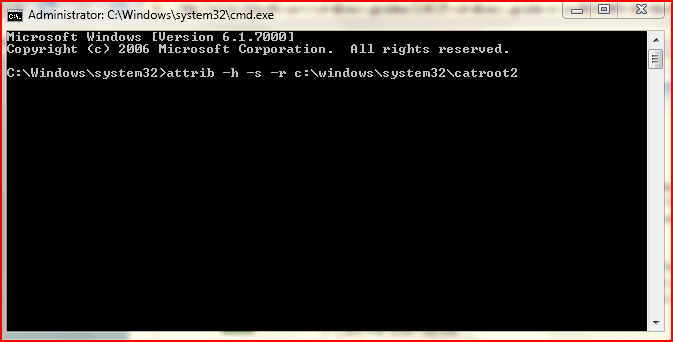
2: Type attrib -h -s -r c:\windows\system32\catroot2 and then press ENTER.
Name:  1.PNG
Views: 2961
Size:  53.5 KB
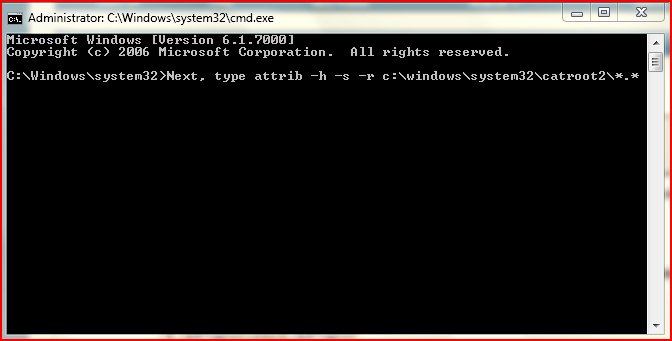
3: Next, type attrib -h -s -r c:\windows\system32\catroot2\*.* (where c:\ is the drive where Vista is installed), and then press ENTER.
Name:  Capture1.PNG
Views: 2945
Size:  39.3 KB
4: Type Exit, and then press ENTER to close the Command Prompt window.

5: Open Services.msc.

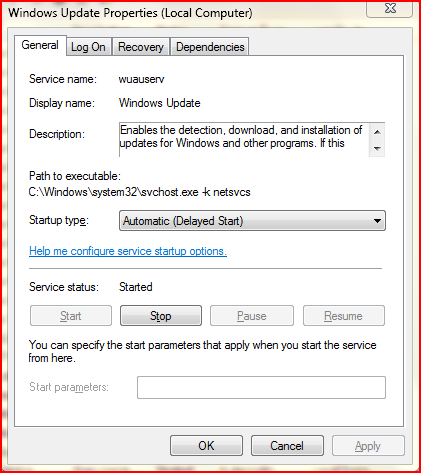
6: In the Services dialog box, double click on Windows Update.

7: Set the service as Automatic, and click on Apply.

8: Stop the service and Start or vice versa.
Name:  Capture3.PNG
Views: 2927
Size:  48.3 KB
9: Double click on the Cryptographic Services service.

10: Set the service to Automatic, and click on Apply.

11. Stop the service and Start.
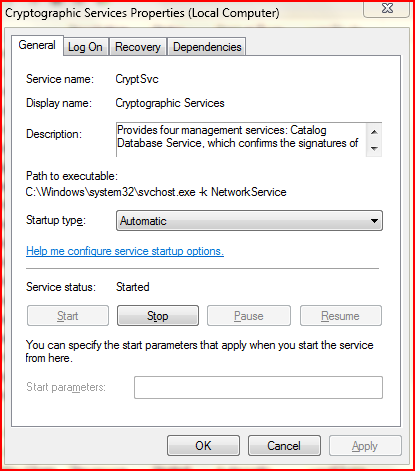
Name:  Capture2.PNG
Views: 2965
Size:  42.7 KB
12: Close the Services Dialog Box.

13: Restart your computer and update windows.
Published by
kavita's Avatar
CCNA
Join Date: Apr 2009
Location: India
Posts: 276
Rep Power: 15
kavita is a jewel in the roughkavita is a jewel in the roughkavita is a jewel in the rough

Tutorial Tools

Applies to
All Vista Versions
64 Bit & 32 Bit

Old 09-22-2009  
txt3rob


Vista Home Premium 64bit


Re: Windows Update - Fix 80246005 Error

Just a Quick one for you guys I've made a self extracting .exe that will do all this via command prompt.

http://www.xcellweb.co.uk/80246005.exe

My System SpecsSystem Spec
Old 3 Weeks Ago  
Flavius


Vista Bussiness x64 PL


Re: Windows Update - Fix 80246005 Error

KB971058 started in aggressive mode can fix this issue as well
My System SpecsSystem Spec
Comment

Tutorial Tools


Similar Threads
Tutorial Category
error code 80246005 General Discussion
Vista Windows Update error Code: 80070490 Windows Update encountered an unknown error Vista General
windows update fails to update to new version with error code 8007 Vista General
Windows Update KB936330 Windows Vista SP1 fails error code 8004131 Vista General
Windows update error 80070103 - Beta 2 Vista NVIDIA Driver Update Vista General


Vista Forums is an independent web site and has not been authorized,
sponsored, or otherwise approved by Microsoft Corporation.
"Windows Vista", the Start Orb, and related materials are trademarks of Microsoft Corp.
© Designer Media Ltd
Tutorial powered by GARS 2.1.8m ©2005-2006

1 2 3 4 5 6 7 8 9 10 11 12 13 14 15 16 17 18 19 20 21 22 23 24 25 26 27 28 29 30 31 32 33 34 35 36 37 38 39 40 41 42 43 44 45 46