
Turn On or Off IE8 and IE9 Display Accelerator Button on Selection
 Information
This will show you how to have the Accelerator button to display or not display when text is selected or highlighted in IE8 and IE9. By default this is set to display.
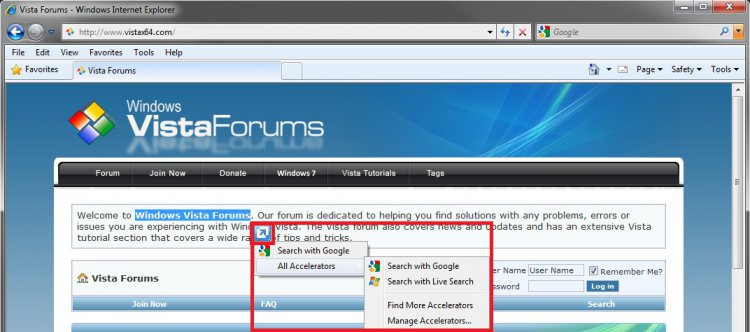
EXAMPLE: Display Accelerator button on selection ON
NOTE: When turned on, you can click on the accelerator blue arrow button displayed when selecting text in Internet Explorer to see and select from any enabled accelerator add-on.
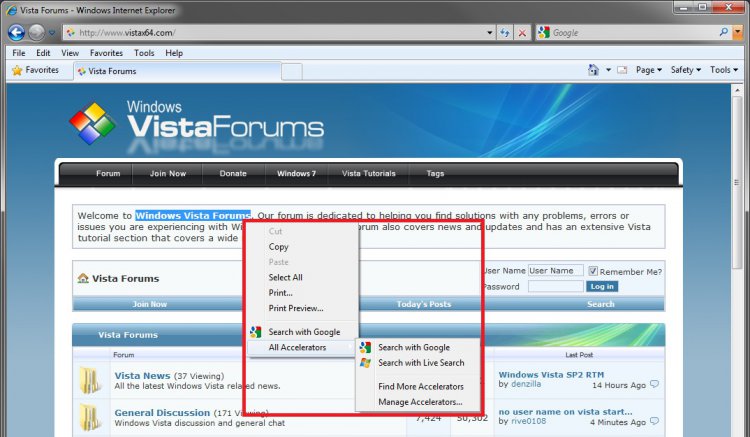
EXAMPLE: Display Accelerator button on selection OFFNOTE: When turned off, you can still right click on the selected text in Internet Explorer to see and select from any enabled accelerator add-on.
Here's How:
1. Open Internet Explorer.
A) Click on the Tools Command Bar icon button or Menu Bar item and click on Internet Options.
B) Go to step 3.
OR
2. Open the Control Panel (Classic view).
A) Click on the Internet Options icon.
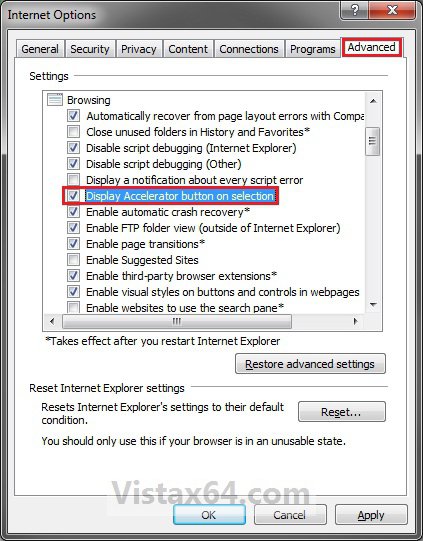
3. Click on the Advanced tab. (See screenshot below)
4. To Turn On Display Accelerator Button on Selection
A) Check the Display Accelerator button on selection box, then click on OK. (See screenshot above)
5. To Turn Off Display Accelerator Button on Selection
A) Uncheck the Display Accelerator button on selection box, then click on OK. (See screenshot below step 3)
That's it,
Shawn
Attachments

Last edited: