Windows Vista Forums

Startup Orb - Change

  1. #1
    <!-- google_ad_section_start -->Startup Orb - Change<!-- google_ad_section_end -->

    Startup Orb - Change
    How To Change the Vista Startup Orb
    Published by Macavity is offline
    31 Aug 2009
    Startup Orb - Change

    How To Change the Vista Startup Orb

    information   Information
    This tutorial shows you how to change the Windows orb seen at the conclusion of the Vista boot sequence. The method for doing so is quite straightforward. The orb is composed of four images in a DLL within System32. By altering these images it can be replaced with Tux for example.
    warning   Warning
    Altering a system file is never completely safe. Please see the section of this tutorial entitled Protection Measures before restarting.
    Note   Note
    This method has only been done on Windows Vista Home Premium 32bit, please post your results.


    Instructions
    1. Download Resource Tuner (the trial is sufficient), or an equivalent DLL editor.
    Note: Resource Tuner's uninstall seems clean. Nevertheless, use Revo Uninstaller to ensure complete removal.

    2. Install and start Resource Tuner.

    3. Open C:\Windows\System32\authui.dll with all file types visible.
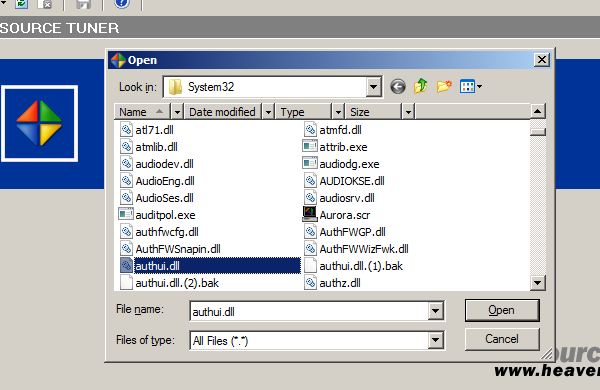
    restunefig1.png
    4. Navigate to the Image menu in the Resource Browser pane.

    5. Right click image files 17000 through 17003 and click Save Resource As. I suggest a temporary directory.
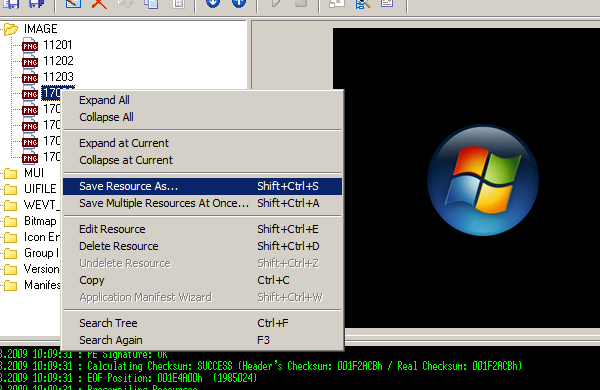
    restunefig3.png
    6. Edit them using anything from Photoshop to Microsoft Paint. Make sure to center the replacement. The images will appear in numerical order and finish with 17003 fading.
    Warning: Retain the original image dimensions, file type, and file name.

    7. In Resource Tuner, right click the original images and select Edit Resource.
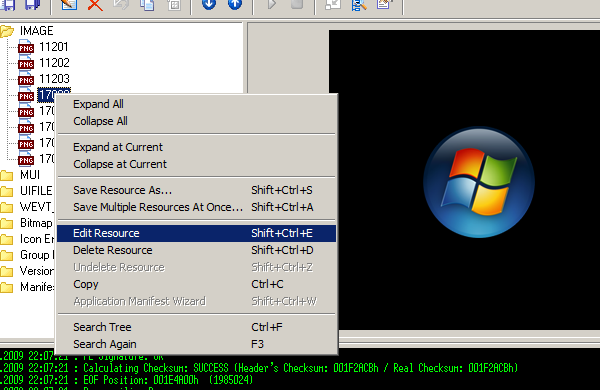
    restunefig2.png
    8. Replace each image with the corresponding altered one.
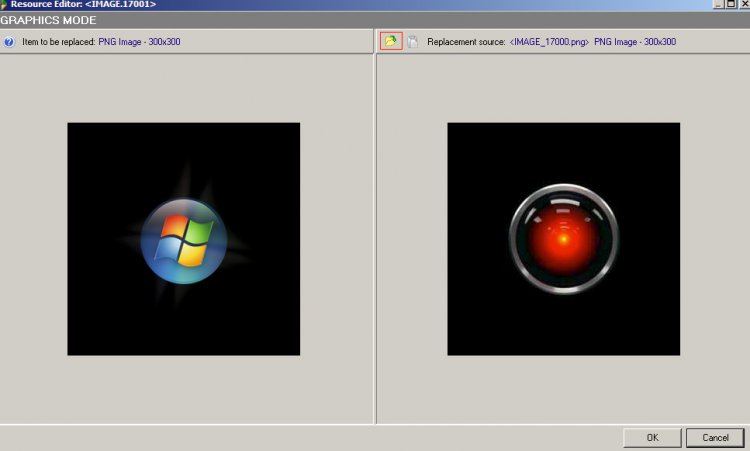
    restunefig4.jpg
    9. Save the library, check that everything is in place, then restart.
    Note: Expect a delay during the initial restart. Please see Protection Measures before restarting.
    Disable Startup Sound
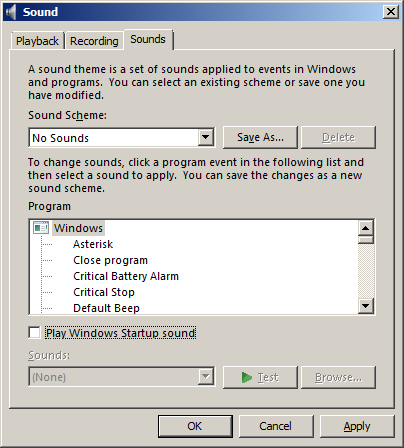
    1. Navigate to Control Panel > Hardware and Sound > Sound.
    soundfig1.png
    2. Click the Sounds tab and uncheck Play Windows Startup [S]ound.
    Protection Measures
    1. Backup the original authui.dll to root directory (C:\.)

    2. Note down the following command: copy /y C:\authui.dll C:\Windows\System32.


    3. If the computer will not boot after the restart, run a command prompt from the Windows System Recovery Options Menu accessed from the Windows Vista Installation CD and key in that command.
    Note: If you are using a computer from a manufacturer (such as Dell) the menu may be on your hard disk.

    information   Information
    If you did not backup the library use the sfc /fixnow command to restore its original state. For more information please see Brink's tutorial.

    This is my first tutorial, please tell me how I can improve.


    Published by


    Macavity's Avatar
    Nada y nada
    Join Date: Aug 2009
    Posts: 39
    Array

    Tutorial Tools


    Applies to

    All Vista Versions
    64 Bit & 32 Bit

  2. #1
    whosebrian's Avatar

    Newbie
    Join Date : Sep 2009
    Posts : 4
    Vista Home Premium 64bit
    Local Time: 05:37 AM

    Re: Startup Orb - Change

    Hello-

    I tried replacing authuii following your tutorial, but when saving the edited file there is an overwriting error. It is the type of message given when there is a permission issue(file in use) Ive tried with resource tuner and restorator 2007. I'm on Vistuh home premium 64 and I've taken ownership with full permit. I just finished replacing the start taskbar orb and I would like to try this one also.

    Thank You,

    Brian


      My System SpecsSystem Spec

  3. #2
    Macavity's Avatar

    Nada y nada
    Join Date : Aug 2009
    Posts : 39
    Vista Home Premium 32bit
    Local Time: 06:37 AM


      Thread Starter

    Re: Startup Orb - Change

    Try these solutions:

    1 Start Resource Tuner with administrative privileges by right clicking it and selecting Run as administrator.

    2 Try copying authui.dll to another location and editing it there. Then copy it back.

    To force copy, open a command prompt and type
    set copycmd=/y and hit enter. Then key in xcopy /h /r location of edited authui.dll c:\windows\system32 and press enter.

    3 The third option is to try TuneUp which I found provides an option to automate the process.


      My System SpecsSystem Spec

  4. #3
    whosebrian's Avatar

    Newbie
    Join Date : Sep 2009
    Posts : 4
    Vista Home Premium 64bit
    Local Time: 05:37 AM


    Re: Startup Orb - Change

    Relocating the file worked, thanks for your time.
    I also added a different wav to go with it; oddly enough, when I play the wav from imageres.dll in restorator it plays the windows sound, but when I restart I hear my sound effect. Works for me, thanks again.

    Brian.

      My System SpecsSystem Spec

  5. #4


    Newbie
    Join Date : Nov 2009
    Posts : 1
    Vista Enterprise x64
    Local Time: 02:37 PM


    Re: Startup Orb - Change

    Hello, I'm still having problems with copying the file in the system32 folder. First it was saying sharing violation, now it says access denied.

      My System SpecsSystem Spec

  6. #5
    Macavity's Avatar

    Nada y nada
    Join Date : Aug 2009
    Posts : 39
    Vista Home Premium 32bit
    Local Time: 06:37 AM


      Thread Starter

    Re: Startup Orb - Change

    This is another approach:

    1 Open a command prompt window (as an administrator).

    2 Type takeown
    /f c:\windows\system32\authui.dll and then enter cacls c:\windows\system32\authui.dll /g username:f to assume full control.

      My System SpecsSystem Spec

  7. #6
    Tobywan's Avatar

    Newbie
    Join Date : Dec 2009
    Perth, Australia
    Posts : 1
    Vista Home Premium 32bit
    Local Time: 09:37 PM
    australia au west australia


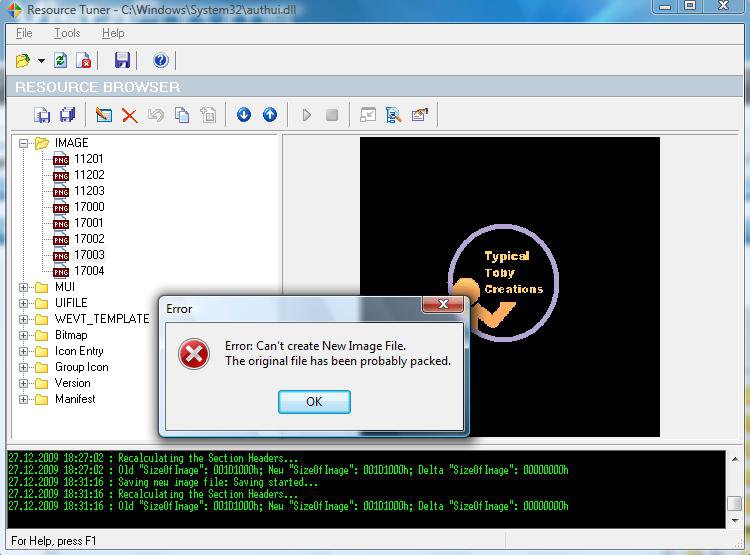
    Error trying to save the library! (the last step)

    Hey, all untill the last step has worked and I'm not quite sure what to do.

    "9. Save the library, check that everything is in place, then restart."

    So I tried to save the library but a message comes up saying:

    "Error: Can't create New Image File. The original file has been probably packed."


    Note: The folder I am saving the library into is C:\Windows\System32
    I am overwriting the file: authui.dll

    Thanks (:

    P.S Nice guide!

    Last edited by Tobywan; 27 Dec 2009 at 05:34 AM. Reason: typo
      My System SpecsSystem Spec

  8. #7
    Macavity's Avatar

    Nada y nada
    Join Date : Aug 2009
    Posts : 39
    Vista Home Premium 32bit
    Local Time: 06:37 AM


      Thread Starter

    Re: Startup Orb - Change

    This means that the library has been compressed by a utility for security reasons. There are ways to unpack but I have never tried. You could first use sfc /scannow in a command prompt to possibly fix this.

    The best approach would be to find out which utility (maybe an AV) did the packing and go from there.

    Also I have attached mine which you could try. Type regsvr32 c:\windows\system32\authui.dll in a prompt after replacing if the system will not acknowledge it. See above if you need permissions when replacing or editing.

    authui.zip


    As a side note
    Resource Hacker could work better for you. The images are in hex format though so use Resource Tuner for guidance.


      My System SpecsSystem Spec

  9. #8
    tick's Avatar

    Newbie
    Join Date : Jan 2010
    Posts : 1
    Vista home premium x64
    Local Time: 01:37 PM


    Re: Startup Orb - Change

    using vista home premium x64 with SP2 i did this exactly and it resulted in black screen before login (in fact at the moment of glowing orb, there was just a mouse cursor and black screen) and nothing happens (no HD work etc.). After some struggle with repair dvd and it's cmd (there were problems about admin rights, so i was unable to replace authui.dll) and sfc /fixnow nor chdsk worked, i had to reinstall vista...

    now i am about to do this again, but with just one adjustment "restoration point".

    I was just wondering, there are two authui.dll files in x64 systems, one in system32 and another in sysWOW64 folder. Will it work correctly if i change both according to the directions?
    thanks Ian.

      My System SpecsSystem Spec

Startup Orb - Change

Similar Threads
Tutorial Tutorial Starter Category Comments Last Post
Startup-script to change hostname and IP if not OK IUnderstandSomething VB Script 3 10 Aug 2009
Any way to change window startup position? Bob Vista General 1 31 Jul 2008
Change startup programs Mary Vista General 4 12 Jul 2008
Change startup programs - Error 0x80070002 Scott Kuhn Vista General 6 14 Jul 2007
How to change Vista Premium Startup sound goingforward Vista General 11 09 Jun 2007