
Windows Vista Forums
Vista Forums Home Join Vista Forums Windows 7 Forum Vista Tutorials Tags
Welcome to Windows Vista Forums. Our forum is dedicated to helping you find solutions with any problems, errors or issues you are experiencing with Windows Vista. The Vista forum also covers news and updates and has an extensive Windows Vista tutorial section that covers a wide range of tips and tricks.

Go Back   Vista Forums > Vista Forums > Tutorials

Vista - Background Inteligence Transfer Service - Fix

Comment
 

Background Inteligence Transfer Service - Fix

How To Fix the Background Inteligence Transfer Service in Vista
Published by Flavius
2 Weeks Ago

How to Fix the Background Inteligence Transfer Service in Vista


Any issue with this service cause problems with Windows Update

Due to this you may get following Windows Update error codes:

80246008
80070424
800706BA


SOLUTION

Check service settings:

Go to:

Start>>search>>services.msc

and make sure Background Intelligent Transfer Service (BITS) service is started and set to Automatic (Delayed Start)
if you have another settings you have to correct it,if you don't change setting or service don't exist follow to below to fix it:


METHOD I

Use BITS Repair Tool

//This tool remove all qmgr*.dat files from C:\Programdata\Microsoft\Network\Downloader folder,of course you can do also manually (details in the link)


METHOD II

Reset the whole WU components in aggresive mode KB971058

//addresed to issue with BITS it reset also qmgr*.dat like BITS Repair Tool and more thing (details in the link)


METHOD III

Import this fix: BITS.zip.Because to some BITS subkeys Administrators group don't have full control to workaround this problem,import this fix from SYSTEM account

1.Download PsTools,extract from this psexec.exe
file and place it in C:\Windows\System32

2.Run cmd.exe with administrative previlliges (right click on cmd.exe as admin) and type:

psexec -s -i -d regedit


This command run regedit from System account.Go to File>>Import choose location where you stored BITS.reg file,choose it and apply.

3.Restart Computer

METHOD IV

Uninstall all 3p security software -firewall,antivirus,antispyware

METHOD V

//apply only if you don't use 3p firewall

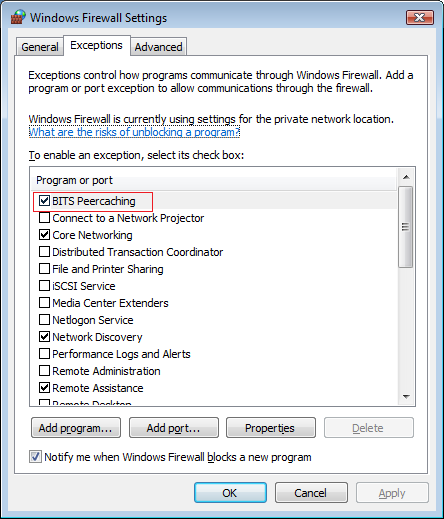
Open system firewal (Control Panel>>Windows Firewall) go to Eception tab and check "BITS Peercaching" to allow as an exception (image below)
Name:  BITSPeer.png
Views: 195
Size:  25.5 KB
Published by
Flavius's Avatar
Master

Join Date: Apr 2008
Posts: 1,543
Rep Power: 63
Flavius has much to be proud ofFlavius has much to be proud ofFlavius has much to be proud ofFlavius has much to be proud ofFlavius has much to be proud ofFlavius has much to be proud ofFlavius has much to be proud ofFlavius has much to be proud of

Tutorial Tools

Applies to
All Vista Versions
64 Bit & 32 Bit

Comment

Tutorial Tools


Similar Threads
Tutorial Category
VISTA 64 - Background Intelligent Transfer Service Vista installation & setup
Background Intelligence Transfer Service (BITS) Vista General
Background Intelligent Transfer Service (BITS) Vista performance & maintenance
Background Intelligent Transfer Service and MS Update Vista installation & setup
Background Intelligent Transfer Service. Vista General


Vista Forums is an independent web site and has not been authorized,
sponsored, or otherwise approved by Microsoft Corporation.
"Windows Vista", the Start Orb, and related materials are trademarks of Microsoft Corp.
© Designer Media Ltd
Tutorial powered by GARS 2.1.8m ©2005-2006

1 2 3 4 5 6 7 8 9 10 11 12 13 14 15 16 17 18 19 20 21 22 23 24 25 26 27 28 29 30 31 32 33 34 35 36 37 38 39 40 41 42 43 44 45 46