

Flavius
Expelled
Windows Modules Installer Error 126 - Fix
 Information
Symptoms
When you try run Windows Modules Installer service the following error is returned
Windows could not start the Windows Modules Installer service on Local Computer.Error 126:The specified module could not be found
additionally above error cause also other following errors
-Windows Update Error 80080005
-When you run any SFC command the following error is returned:Windows Resource Protection could not start the repair service
Cause
This problem can occur if you have corrupted HKLM\Software\Microsoft\Windows\CurrentVersion\Component Based Servicing\Version or subfolder in WinSxS described by this key-the exact form of the folder depends on the system architecture (x32 ,x64) and update status.Sometimes this error is correlated with other damages in WinSxS or CBS
1.Make sure you have following key:
HKLM\Software\Microsoft\Windows\CurrentVersion\Component Based Servicing\Version.
key should look similar though not necessarily the same as in the example below.
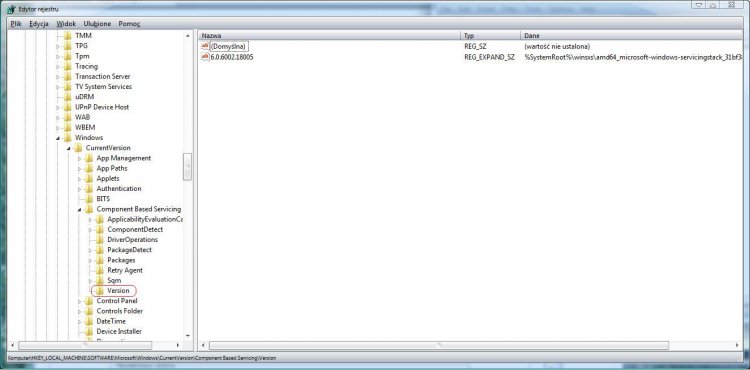
2.Run Readiness Tool.Although TrustedInstaller not working this tool does not require this service.This help to diagnose damages in subfolder described by above Version key and other damages in WinSxS and CBS.This tool generate CheckSur.log file in C:\Windows\Logs\CBS folder -you have to analyze this file too.
 Note
NoteReadiness Tool can't detect issues with HKLM\Software\Microsoft\Windows\CurrentVersion\Component Based Servicing\Version,thus you have to do that manually.
STEP I -If you have corrupted Version key....
 Tip
TipFor analysis and retrieval system files is best to use good professional file manager -built-in explorer is not good tool for such things
IDENTEFICATION CORRUPTED KEY
First you have to figure to which folder this key should correspond.General form of string in this key is following:
{TrustedInstaller ID} REG_EXPAND_SZ
%SystemRoot%\WinSxS\x86_microsoft-windows-servicingstack_31bf3856ad364e35_{TrustedInstaller ID}_none_{16 additional digits} -for 32bit system
and
{TrustedInstaller ID} REG_EXPAND_SZ
%SystemRoot%\WinSxS\amd64_microsoft-windows-servicingstack_31bf3856ad364e35_{TrustedInstaller ID}_none_{16 additional digits} -for 64bit system
where REG_EXPAND_SZ -expandable string value
In practice may be a number of folders such as above.They relate with difference older TrustedInstaller version.You have to figure which one version is currently used.
Fortunatelly subfolder in C:\Windows\Servicing\Version always have the same name as currently used TrustedInstaller version (I assigned it in this tutorial as TrustedInstaller ID)
EXAMPLES
You have following folder
C:\Windows\Servicing\Version\6.0.6001.18000
so relate string is following:
6.0.6001.18000 REG_EXPAND_SZ
%SystemRoot%\WinSxS\amd64_microsoft-windows-servicingstack_31bf3856ad364e35_6.0.6001.18000_none_657dfccc7fa7eb9a
and {TrustedInstaller ID}=6.0.6001.18000
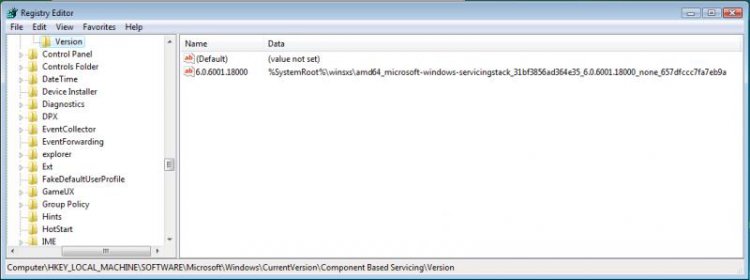
in another axample
C:\Windows\Servicing\Version\6.1.7600.16385
relate string is following
6.1.7600.16385 REG_EXPAND_SZ
%SystemRoot%\WinSxS\amd64_microsoft-windows-servicingstack_31bf3856ad364e35_6.1.7600.16385_none_655452efe0fb810b
and and {TrustedInstaller ID}=6.1.7600.16385
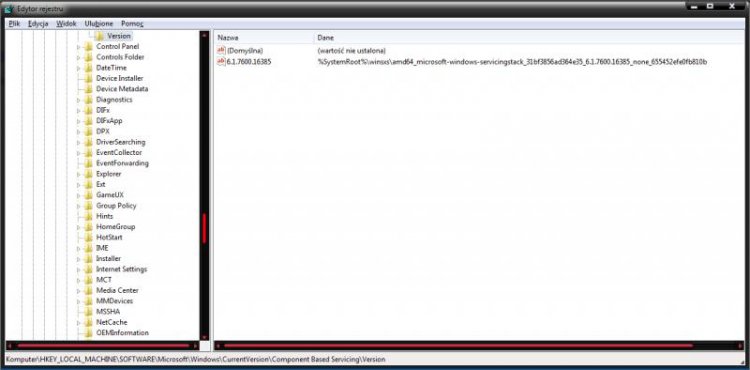
and so on
FIXING KEY
1.Navigate to C:\Windows\Servicing\Version read the name of a subfolder (now you have TrustedInstaller ID)
2.Use any good file manager to find in C:\Windows\WinSxS subfolder which name starts with:
x86_microsoft-windows-servicingstack_31bf3856ad364e35_{TrustedInstaller ID} (if you have system 32bit)
amd64_microsoft-windows-servicingstack_31bf3856ad364e35_{TrustedInstaller ID} (if you have system 64bit)
write it name somwhere
3.Go to HKLM\Software\Microsoft\Windows\CurrentVersion\Component Based Servicing (CBS),takeownership of this key and add your account to have full control.
4.In CBS key create Version subkey.
5.In Version subkey create expandable string with the same name as {TrustedInstaller ID},in Data field type: %SystemRoot%\WinSxS\{indentified folder in point 2}
6.Remove your account from permissions to CBS key and next restore ownership back to "NT Service\TrustedInstaller"
 Warning
Useful lectures relate to point 3 and 6 -plase read them
Take ownership of file
Trusted Installer - Restore as Owner
Folder permissions
STEP II - FIXING REMAINS DAMAGES
Code:
=================================
Checking System Update Readiness.
Binary Version 6.0.6002.22441
Package Version 9.0
2010-09-12 12:29

Checking Windows Servicing Packages

Checking Package Manifests and Catalogs

Checking Package Watchlist

Checking Component Watchlist

Checking Packages

Checking Component Store
(f) CSI Payload File Corrupt 0x00000000 wrpint.dll amd64_microsoft-windows-servicingstack_31bf3856ad364e35_6.0.6001.18000_none_657dfccc7fa7eb9a

Summary:
Seconds executed: 1667
Found 1 errors
CSI Payload File Corrupt Total count: 1Remains damages you have to diagnose and fix in the same way as for other errors relate to corruptions in WinSxS,CBS
How to Analyze the System Update Readiness Tool CheckSur.log File